Details
-
Type:
Bug
-
Status: Open (View Workflow)
-
Priority:
 Major
Major
-
Resolution: Unresolved
-
Labels:
-
Epic Link:
Description
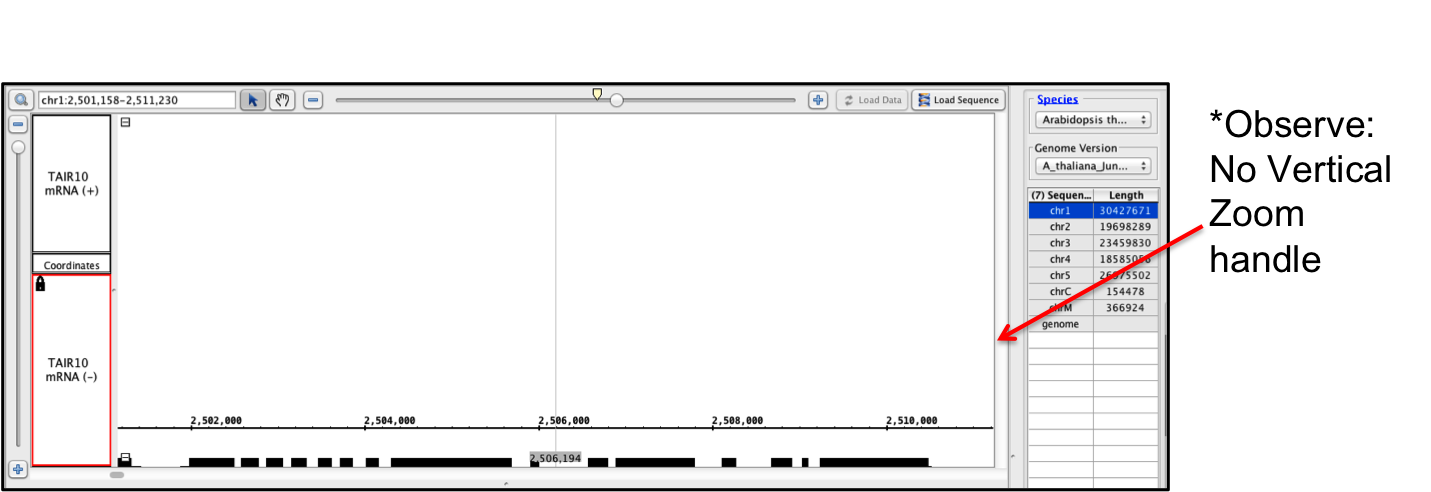
It seems that IGB can get into a situation where the main screen can be zoomed way in with no vertical scroll handle appearing (see screenshot).
To reproduce:
1) Set the IGB screen so that it does not cover your whole desktop (maybe covering about 50% of your desktop only).
2) Select a track and set track height to something like 500 and then lock the track height using the check box.
Observe:
When you hit "Go" you may notice that the main IGB viewport gets zoomed way in and the vertical scroll handle that is normally on the right side of the main window has disappeared. Altering the vertical window size may bring it back.
Attachments
Activity
| Field | Original Value | New Value |
|---|---|---|
| Epic Link | IGBF-439 [ 15497 ] |
| Attachment | NoVerticalZoomHandle.png [ 13152 ] |
| Rank | Ranked higher |
| Sprint | Backlog Grooming Meeting [ 32 ] | Sprint 25 [ 34 ] |
| Assignee | Tarun Mall [ tmall ] |
| Sprint | Backlog Grooming Meeting [ 34 ] | Sprint 25 [ 32 ] |
| Rank | Ranked lower |
| Description |
It seems that IGB can get into a situation where the main screen can be zoomed way in with no vertical scroll handle appearing (see screenshot).
To reproduce: 1) Set the IGB screen so that it does not cover your whole desktop (maybe covering about 50% of your desktop only). 2) Select a track and set stack height to something like 500 and then lock the track height using the check box. Observe: When you hit "Go" you may notice that the main IGB viewport gets zoomed way in and the vertical scroll handle that is normally on the right side of the main window has disappeared. Altering the vertical window size may bring it back. |
It seems that IGB can get into a situation where the main screen can be zoomed way in with no vertical scroll handle appearing (see screenshot).
To reproduce: 1) Set the IGB screen so that it does not cover your whole desktop (maybe covering about 50% of your desktop only). 2) Select a track and set track height to something like 500 and then lock the track height using the check box. Observe: When you hit "Go" you may notice that the main IGB viewport gets zoomed way in and the vertical scroll handle that is normally on the right side of the main window has disappeared. Altering the vertical window size may bring it back. |
| Status | Open [ 1 ] | In Progress [ 3 ] |
| Status | In Progress [ 3 ] | Open [ 1 ] |
| Sprint | Sprint 25 [ 32 ] |
| Sprint | Sprint 26 [ 34 ] |
| Rank | Ranked higher |
| Status | Open [ 1 ] | In Progress [ 3 ] |
| Status | In Progress [ 3 ] | Open [ 1 ] |
| Labels | Track_View |
| Sprint | Sprint 26 [ 34 ] |
| Sprint | Sprint 27 [ 35 ] |
| Rank | Ranked higher |
| Sprint | Sprint 27 [ 35 ] |