Details

      Description

      Dear support team,
      Since today i am having trouble when saving an image from IGB as .svg file. The program saves the file but I cannot open it with any problem (illustrator says I need to validate first the .svg file). This issue has never happened to me before. In fact, yesterday I could save images as .svg files without any problem.
      Thanks for the help and all the best,
      Zaida.

      Reporter: Zaida Vergara
      E-mail: zvergara@cbm.csic.es

        Attachments
          Activity

          support Support (Inactive) created issue -
          Hide
          mason Mason Meyer (Inactive) added a comment -

          From: Mason Meyer <mmeyer20@uncc.edu>
          To: Zaida Vergara <zvergara@cbm.csic.es>
          CC: Ann Loraine <Ann.Loraine@uncc.edu>
          Date: Thu, Jul 13, 2017 at 12:16 PM
          Subject: Re: Save image as .svg

          Hello Zaida,

          My name is Mason Meyer, IGB Support Specialist. Thank you for taking the time to contact our team with your question. I understand you are experiencing some issues when opening your .svg file exported from IGB. In your report, you said that your .svg files worked as expected for you the day before. This is interesting to me because we have made no changes on our end that should affect the SVG export ability within IGB. I am wondering if there is a setting in the Save Image window that could be causing the problems.

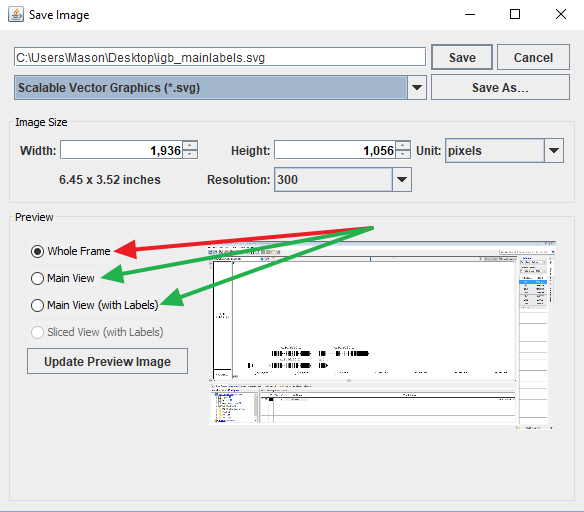
          In the past, we have seen some problems occur when users try to save an .svg file when using the Whole Frame option (see attached screenshot). Do you think this could have to do with the problem you are currently experiencing? If so, I recommend trying to use the Main View or Main View (with Labels) settings to see if you notice improved behavior.

          I have also seen an issue in the past with an incompatibility between Adobe Illustrator and exported .svg files. Users reported a better experience when using exported .svg files with Inkscape, which is available for free if you would like to give that a try. I understand that this may be an inconvenience for you at the moment, but our team is keeping our eyes open for solutions to these .svg issues you are currently experiencing.

          Please let me know if the Whole Frame setting is what is causing the problems for you. Also, if you are able to try Inkscape and have a better experience using that, I would love to know about it. If you have any additional questions or feedback for me, please don't hesitate to contact me.

          Thanks again,

          Mason Meyer
          IGB Support Specialist

          Show
          mason Mason Meyer (Inactive) added a comment - From: Mason Meyer <mmeyer20@uncc.edu> To: Zaida Vergara <zvergara@cbm.csic.es> CC: Ann Loraine <Ann.Loraine@uncc.edu> Date: Thu, Jul 13, 2017 at 12:16 PM Subject: Re: Save image as .svg Hello Zaida, My name is Mason Meyer, IGB Support Specialist. Thank you for taking the time to contact our team with your question. I understand you are experiencing some issues when opening your .svg file exported from IGB. In your report, you said that your .svg files worked as expected for you the day before. This is interesting to me because we have made no changes on our end that should affect the SVG export ability within IGB. I am wondering if there is a setting in the Save Image window that could be causing the problems. In the past, we have seen some problems occur when users try to save an .svg file when using the Whole Frame option (see attached screenshot). Do you think this could have to do with the problem you are currently experiencing? If so, I recommend trying to use the Main View or Main View (with Labels) settings to see if you notice improved behavior. I have also seen an issue in the past with an incompatibility between Adobe Illustrator and exported .svg files. Users reported a better experience when using exported .svg files with Inkscape, which is available for free if you would like to give that a try. I understand that this may be an inconvenience for you at the moment, but our team is keeping our eyes open for solutions to these .svg issues you are currently experiencing. Please let me know if the Whole Frame setting is what is causing the problems for you. Also, if you are able to try Inkscape and have a better experience using that, I would love to know about it. If you have any additional questions or feedback for me, please don't hesitate to contact me. Thanks again, Mason Meyer IGB Support Specialist
          mason Mason Meyer (Inactive) made changes -
          Field Original Value New Value
          Priority Blocker [ 1 ]
          Attachment SaveSVGSettings.png [ 14001 ]
          Hide
          mason Mason Meyer (Inactive) added a comment -

          From: Mason Meyer <mmeyer20@uncc.edu>
          To: Zaida Vergara <zvergara@cbm.csic.es>
          CC: Ann Loraine <Ann.Loraine@uncc.edu>
          Date: Mon, Jul 31, 2017 at 10:49 AM
          Subject: Re: Save image as .svg

          Hello again Zaida,

          This is Mason Meyer, User Support Specialist for IGB. You recently contacted our team about an IGB issue in which you were having trouble opening SVG images that were exported from IGB. I wanted to reach out to you to see if the issue has been resolved. If so, was it the Whole Frame setting that was causing you problems? I would love to know more about your current experience with this issue if you have time, but I understand you may be busy. If you have anymore questions or comments for our team, please feel free to contact me.

          Sincerely,

          Mason Meyer
          IGB Support Specialist

          Show
          mason Mason Meyer (Inactive) added a comment - From: Mason Meyer <mmeyer20@uncc.edu> To: Zaida Vergara <zvergara@cbm.csic.es> CC: Ann Loraine <Ann.Loraine@uncc.edu> Date: Mon, Jul 31, 2017 at 10:49 AM Subject: Re: Save image as .svg Hello again Zaida, This is Mason Meyer, User Support Specialist for IGB. You recently contacted our team about an IGB issue in which you were having trouble opening SVG images that were exported from IGB. I wanted to reach out to you to see if the issue has been resolved. If so, was it the Whole Frame setting that was causing you problems? I would love to know more about your current experience with this issue if you have time, but I understand you may be busy. If you have anymore questions or comments for our team, please feel free to contact me. Sincerely, Mason Meyer IGB Support Specialist
          Hide
          mason Mason Meyer (Inactive) added a comment -

          From: Zaida Vergara <zvergara@cbm.csic.es>
          To: Mason Meyer <mmeyer20@uncc.edu>
          Date: Mon, Jul 31, 2017 at 11:14 AM
          Subject: Re: Save image as .svg

          Hello Mason,

          I am very sorry for the late answer.

          First, I was using a windows PC without inkspace, only with Illustrator. When saving images I was using the Main View (with labels) option. The .svg generated could not be open in Illustrator. I downloaded inkspace but the file was missing some code and could not be open. After that, I move to my personal computer (macOS). I prefer to use IGB on the windows we have in the lab because it has more RAM memory. I could manage to load all the tracks on my computer and save images as .svg using the Main View (with labels) option. Surprising, those .svg could open without major problems.

          I think for some reason the windows needs to be updated or something. Also, I need to manage too many tracks (43), and I think that was at least another problem.
          Anyway, I managed to save the images on my mac, so it worked for me.
          Do you think the windows PC needs to be updated? Could it be another issue?
          Thanks for your help and best regards,

          Zaida.

          Zaida Vergara

          Show
          mason Mason Meyer (Inactive) added a comment - From: Zaida Vergara <zvergara@cbm.csic.es> To: Mason Meyer <mmeyer20@uncc.edu> Date: Mon, Jul 31, 2017 at 11:14 AM Subject: Re: Save image as .svg Hello Mason, I am very sorry for the late answer. First, I was using a windows PC without inkspace, only with Illustrator. When saving images I was using the Main View (with labels) option. The .svg generated could not be open in Illustrator. I downloaded inkspace but the file was missing some code and could not be open. After that, I move to my personal computer (macOS). I prefer to use IGB on the windows we have in the lab because it has more RAM memory. I could manage to load all the tracks on my computer and save images as .svg using the Main View (with labels) option. Surprising, those .svg could open without major problems. I think for some reason the windows needs to be updated or something. Also, I need to manage too many tracks (43), and I think that was at least another problem. Anyway, I managed to save the images on my mac, so it worked for me. Do you think the windows PC needs to be updated? Could it be another issue? Thanks for your help and best regards, Zaida. Zaida Vergara
          Hide
          mason Mason Meyer (Inactive) added a comment -

          From: Mason Meyer <mmeyer20@uncc.edu>
          To: Zaida Vergara <zvergara@cbm.csic.es>
          CC: Ann Loraine <Ann.Loraine@uncc.edu>
          Date: Mon, Jul 31, 2017 at 4:01 PM
          Subject: Re: Save image as .svg

          Hello Zaida,

          Thanks for your reply. I am glad that the SVG issues seem to be resolved when working on your Mac. It is possible that there could be a difference in how Windows and Mac handle the SVG files, resulting in the problem on Windows. It is also possible that the large number of tracks you had loaded had to do with the problem, but for some reason, it seemed like this was alright on Mac. I will continue looking into the issue on Windows by attempting to export SVG files of many tracks, as you did, and will let you know if I find out anything that may be useful to you. In the meantime, please feel free to contact me if you have anymore questions or comments for our team.

          Thanks again,

          Mason Meyer
          IGB Support Specialist

          Show
          mason Mason Meyer (Inactive) added a comment - From: Mason Meyer <mmeyer20@uncc.edu> To: Zaida Vergara <zvergara@cbm.csic.es> CC: Ann Loraine <Ann.Loraine@uncc.edu> Date: Mon, Jul 31, 2017 at 4:01 PM Subject: Re: Save image as .svg Hello Zaida, Thanks for your reply. I am glad that the SVG issues seem to be resolved when working on your Mac. It is possible that there could be a difference in how Windows and Mac handle the SVG files, resulting in the problem on Windows. It is also possible that the large number of tracks you had loaded had to do with the problem, but for some reason, it seemed like this was alright on Mac. I will continue looking into the issue on Windows by attempting to export SVG files of many tracks, as you did, and will let you know if I find out anything that may be useful to you. In the meantime, please feel free to contact me if you have anymore questions or comments for our team. Thanks again, Mason Meyer IGB Support Specialist
          Hide
          mason Mason Meyer (Inactive) added a comment -

          From: Zaida Vergara <zvergara@cbm.csic.es>
          To: Mason Meyer <mmeyer20@uncc.edu>
          CC: Ann Loraine <Ann.Loraine@uncc.edu>
          Date: Tue, Aug 1, 2017 at 5:16 AM
          Subject: Re: Save image as .svg

          Hello Mason,

          Thanks again. It would be great if you could find the issue between SVG files and windows, as that is the common computer in my lab. Let me know if you need further details.

          All the best,

          Zaida.

          Show
          mason Mason Meyer (Inactive) added a comment - From: Zaida Vergara <zvergara@cbm.csic.es> To: Mason Meyer <mmeyer20@uncc.edu> CC: Ann Loraine <Ann.Loraine@uncc.edu> Date: Tue, Aug 1, 2017 at 5:16 AM Subject: Re: Save image as .svg Hello Mason, Thanks again. It would be great if you could find the issue between SVG files and windows, as that is the common computer in my lab. Let me know if you need further details. All the best, Zaida.
          ann.loraine Ann Loraine made changes -
          Workflow Loraine Lab Workflow [ 17823 ] Fall 2019 Workflow Update [ 20463 ]
          ann.loraine Ann Loraine made changes -
          Workflow Fall 2019 Workflow Update [ 20463 ] Revised Fall 2019 Workflow Update [ 22655 ]
          Status Open [ 1 ] To-Do [ 10305 ]

            People

            • Assignee:
              ann.loraine Ann Loraine
              Reporter:
              support Support (Inactive)
            • Votes:
              0 Vote for this issue
              Watchers:
              2 Start watching this issue

              Dates

              • Created:
                Updated: