Uploaded image for project: 'IGB'
  1. IGB
  2. IGBF-1935

Create Mock UI for quickload automation site

    Details

    • Type: Task
    • Status: Closed (View Workflow)
    • Priority: Major
    • Resolution: Done
    • Affects Version/s: None
    • Fix Version/s: None
    • Labels:
      None

      Description

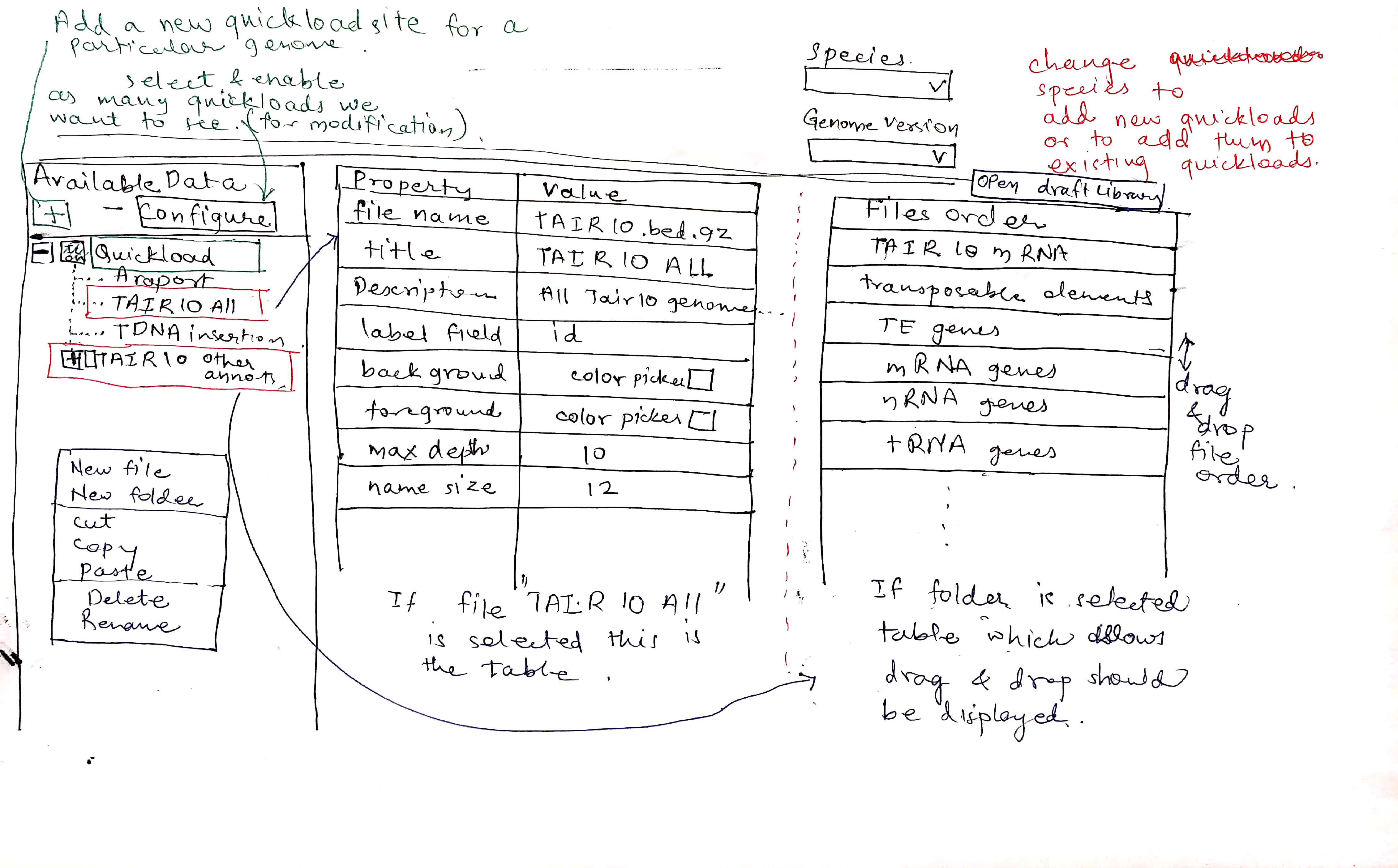
      Create a mock UI for testing the Quickload Builder site. Use pen and paper testing on as many individuals as possible to test the UI, updating the UI as necessary. Attach feedback from testers as comments, or link to their feedback.

      Google Drive link: https://drive.google.com/drive/folders/1TddsRu_-qstbnlAjMww2W2eKA-oUaqIs?usp=sharing

        Attachments
          Activity

          Hide
          stiwari8 Srishti Tiwari (Inactive) added a comment -

          Dr. Nowlan Freese,
          I have uploaded the mock UI in Shared folder. Please review the same.

          Show
          stiwari8 Srishti Tiwari (Inactive) added a comment - Dr. Nowlan Freese , I have uploaded the mock UI in Shared folder. Please review the same.
          Hide
          stiwari8 Srishti Tiwari (Inactive) added a comment -

          Adding mock ui version 2 as per Dr. Loraine's suggestions.

          Show
          stiwari8 Srishti Tiwari (Inactive) added a comment - Adding mock ui version 2 as per Dr. Loraine's suggestions.
          Hide
          nfreese Nowlan Freese added a comment -

          After discussing further edge cases, I think the easiest/best way to move forward with implementing the UI to look like the IGB Available Data would be to limit each Quickload to a single genome.

          Show
          nfreese Nowlan Freese added a comment - After discussing further edge cases, I think the easiest/best way to move forward with implementing the UI to look like the IGB Available Data would be to limit each Quickload to a single genome.
          Hide
          nfreese Nowlan Freese added a comment -

          Some notes after meeting with Dr. Loraine:

          May be worth having an example Quickload in the left panel for a new user to see/explore. This way they can see how a Quickload can be structured, what kinds of data/urls/names go in each field, etc.

          Do not need to show that changes have been saved. Instead, give user a warning if they are disconnected from server. The default assumption should be that everything they change is automatically saved.

          The publish/cancel buttons have been removed. In terms of implementation, everything should be in the database, and the various files needed (contents.txt, annots.xml) would be generated on demand by the server. So as soon as a change is made in the Quickload Builder it is saved and available to IGB.

          Do not provide/allow default folder/file names. Users have to enter something.

          Consider allowing users a way to bulk upload information. A scenario would be a user with a file containing a column of file names and a column of their respective URLs. We would parse the file and create files containing that information. That way a user with hundreds of files could quickly generate all of them. Another example would be to allow users to upload a quickload. They may have already made a quickload manually, or someone provided them with one. They would upload it, we would parse it, and display the quickload in the quickload builder. We could then provide "example" quickload structures for users to try out.

          For file properties, we will need to change the attribute names to be more clear. For example, the name attribute is the url to the file, whereas the title is whatever name the user wants the file to show up as in the quickload. Name should be changed to URL/link, and title to name. All of the attributes will need to have tooltip descriptions.

          Show
          nfreese Nowlan Freese added a comment - Some notes after meeting with Dr. Loraine: May be worth having an example Quickload in the left panel for a new user to see/explore. This way they can see how a Quickload can be structured, what kinds of data/urls/names go in each field, etc. Do not need to show that changes have been saved. Instead, give user a warning if they are disconnected from server. The default assumption should be that everything they change is automatically saved. The publish/cancel buttons have been removed. In terms of implementation, everything should be in the database, and the various files needed (contents.txt, annots.xml) would be generated on demand by the server. So as soon as a change is made in the Quickload Builder it is saved and available to IGB. Do not provide/allow default folder/file names. Users have to enter something. Consider allowing users a way to bulk upload information. A scenario would be a user with a file containing a column of file names and a column of their respective URLs. We would parse the file and create files containing that information. That way a user with hundreds of files could quickly generate all of them. Another example would be to allow users to upload a quickload. They may have already made a quickload manually, or someone provided them with one. They would upload it, we would parse it, and display the quickload in the quickload builder. We could then provide "example" quickload structures for users to try out. For file properties, we will need to change the attribute names to be more clear. For example, the name attribute is the url to the file, whereas the title is whatever name the user wants the file to show up as in the quickload. Name should be changed to URL/link, and title to name. All of the attributes will need to have tooltip descriptions.
          Hide
          nfreese Nowlan Freese added a comment - - edited

          Made changes to mock UI following discussion with Dr. Loraine.

          Tested on additional user (BK). In general, they found it to be intuitive and easy to use. Primary comment was to have mouse-over tooltips for buttons and attributes. Some confusion in New menu regarding the upload quickload option - wasn't sure if needed to upload a quickload to make a new quickload. Did not know what to expect in terms of downloading a quickload (such as what would be included). Unclear what the undo/redo buttons would do. The +New button worked well and was intuitive.

          Closing issue.

          Show
          nfreese Nowlan Freese added a comment - - edited Made changes to mock UI following discussion with Dr. Loraine. Tested on additional user (BK). In general, they found it to be intuitive and easy to use. Primary comment was to have mouse-over tooltips for buttons and attributes. Some confusion in New menu regarding the upload quickload option - wasn't sure if needed to upload a quickload to make a new quickload. Did not know what to expect in terms of downloading a quickload (such as what would be included). Unclear what the undo/redo buttons would do. The +New button worked well and was intuitive. Closing issue.

            People

            • Assignee:
              stiwari8 Srishti Tiwari (Inactive)
              Reporter:
              stiwari8 Srishti Tiwari (Inactive)
            • Votes:
              0 Vote for this issue
              Watchers:
              2 Start watching this issue

              Dates

              • Created:
                Updated:
                Resolved: