Details
-
Type:
New Feature
-
Status: Closed (View Workflow)
-
Priority:
 Major
Major
-
Resolution: Done
-
Affects Version/s: None
-
Fix Version/s: None
-
Labels:None
-
Story Points:4
-
Sprint:Summer 2019 Sprint 12, Fall 2019 Sprint 1, Fall 2019 Sprint 2, Fall 2019 Sprint 3
Description
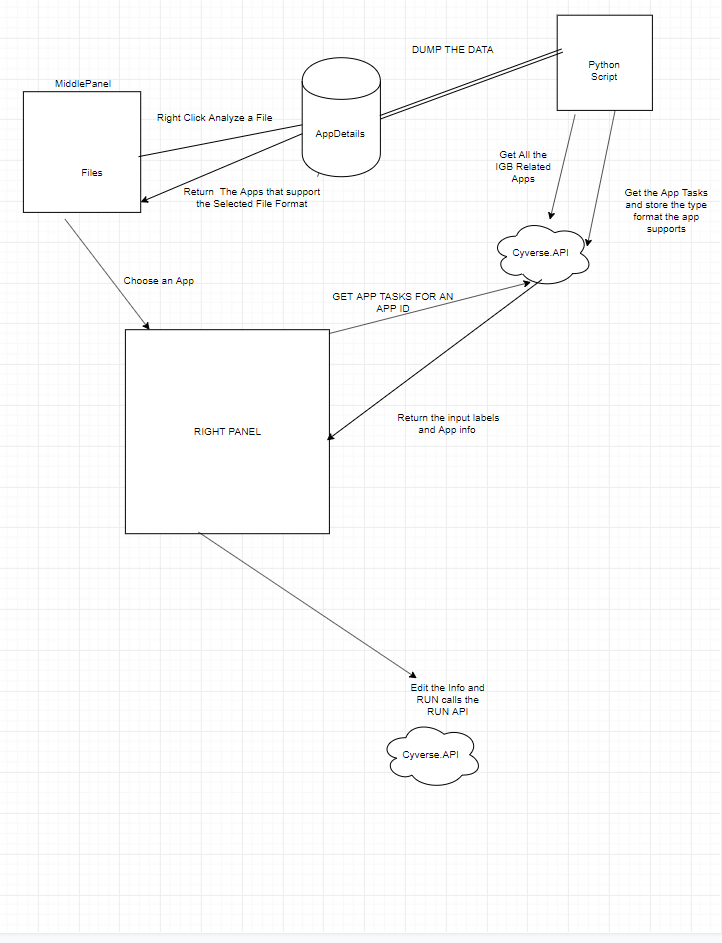
Design Analysis Feature for BioViz-CyVerse.
1) Setup a MySQL Database on a LocalMachine
2) Create the Database and Table Scheme for AppDetails
3) Create the Python Script to populate the AppDetails table.
4) Implement Analysis functionality.
- When User Right-clicks and selects analyse button, he is only shown
the list of apps that are supported by the chosen file. The data is
fetched from the MySQL Database. - The input UI Data fields are fetched from the API, and the default file
name is set randomly depending upon the file type. - The RUN action calls the corresponding API endpoint with the input
data.
Attachments
Issue Links
- relates to
-
IGBF-1995 Implement Script to Copy Data onto BioVizCyverse DatabaseTables
-
- Closed
-
-
-
- Closed
-
-
-
- Closed
-
-
-
- Closed
-
Activity
| Field | Original Value | New Value |
|---|---|---|
| Sprint | Summer 2019 Sprint 12 [ 71 ] |
| Epic Link |
|
| Summary | Implement Analysis in Bioviz Cyverse | Design Analysis in Bioviz Cyverse Backend |
| Description |
Implement Analysis Feature to the current system.
1) Setup a MySQL Database on an RDS 2) Create the Database and Table Scheme for AppDetails 3) Create the Python Script to populate the AppDetails table. 4) Implement Analysis functionality. * When User Right-clicks and selects analyse button, he is only shown the list of apps that are supported by the chosen file. The data is fetched from the MySQL Database. * The input UI Data fields are fetched from the API, and the default file name is set randomly depending upon the file type. * The RUN action calls the corresponding API endpoint with the input data. |
Design Analysis Feature for BioViz-CyVerse.
1) Setup a MySQL Database on an RDS 2) Create the Database and Table Scheme for AppDetails 3) Create the Python Script to populate the AppDetails table. 4) Implement Analysis functionality. * When User Right-clicks and selects analyse button, he is only shown the list of apps that are supported by the chosen file. The data is fetched from the MySQL Database. * The input UI Data fields are fetched from the API, and the default file name is set randomly depending upon the file type. * The RUN action calls the corresponding API endpoint with the input data. |
| Story Points | 4 |
| Description |
Design Analysis Feature for BioViz-CyVerse.
1) Setup a MySQL Database on an RDS 2) Create the Database and Table Scheme for AppDetails 3) Create the Python Script to populate the AppDetails table. 4) Implement Analysis functionality. * When User Right-clicks and selects analyse button, he is only shown the list of apps that are supported by the chosen file. The data is fetched from the MySQL Database. * The input UI Data fields are fetched from the API, and the default file name is set randomly depending upon the file type. * The RUN action calls the corresponding API endpoint with the input data. |
Design Analysis Feature for BioViz-CyVerse.
1) Setup a MySQL Database on a LocalMachine 2) Create the Database and Table Scheme for AppDetails 3) Create the Python Script to populate the AppDetails table. 4) Implement Analysis functionality. * When User Right-clicks and selects analyse button, he is only shown the list of apps that are supported by the chosen file. The data is fetched from the MySQL Database. * The input UI Data fields are fetched from the API, and the default file name is set randomly depending upon the file type. * The RUN action calls the corresponding API endpoint with the input data. |
| Sprint | Summer 2019 Sprint 12 [ 71 ] | Summer 2019 Sprint 12, Fall 2019 Sprint 1 [ 71, 72 ] |
| Rank | Ranked higher |
| Status | Open [ 1 ] | In Progress [ 3 ] |
| Workflow | Loraine Lab Workflow [ 18696 ] | Fall 2019 Workflow Update [ 19081 ] |
| Sprint | Summer 2019 Sprint 12, Fall 2019 Sprint 1 [ 71, 72 ] | Summer 2019 Sprint 12, Fall 2019 Sprint 1, Fall 2019 Sprint 2 [ 71, 72, 73 ] |
| Rank | Ranked higher |
| Sprint | Summer 2019 Sprint 12, Fall 2019 Sprint 1, Fall 2019 Sprint 2 [ 71, 72, 73 ] | Summer 2019 Sprint 12, Fall 2019 Sprint 1, Fall 2019 Sprint 2, Fall 2019 Sprint 4 [ 71, 72, 73, 74 ] |
| Rank | Ranked higher |
| Status | In Progress [ 3 ] | Needs 1st Level Review [ 10005 ] |
| Status | Needs 1st Level Review [ 10005 ] | First Level Review in Progress [ 10301 ] |
| Status | First Level Review in Progress [ 10301 ] | Ready for Pull Request [ 10304 ] |
| Status | Ready for Pull Request [ 10304 ] | Pull Request Submitted [ 10101 ] |
| Status | Pull Request Submitted [ 10101 ] | Reviewing Pull Request [ 10303 ] |
| Status | Reviewing Pull Request [ 10303 ] | Merged Needs Testing [ 10002 ] |
| Status | Merged Needs Testing [ 10002 ] | Post-merge Testing In Progress [ 10003 ] |
| Resolution | Done [ 10000 ] | |
| Status | Post-merge Testing In Progress [ 10003 ] | Closed [ 6 ] |
| Workflow | Fall 2019 Workflow Update [ 19081 ] | Revised Fall 2019 Workflow Update [ 22483 ] |