Details
-
Type:
Bug
-
Status: Closed (View Workflow)
-
Priority:
 Major
Major
-
Resolution: Done
-
Affects Version/s: None
-
Fix Version/s: None
-
Labels:
-
Story Points:1
-
Epic Link:
-
Sprint:Fall 2019 Sprint 3
Description
When a user uploads an image to use as an App logo, the App Store code appears to be changing the resolution of the image.
For example, I recently uploaded an image file to use as the logo for "Super Simple IGB App." The image file I uploaded was 71 Kb and 71 DPI.
However, the file that got stored in S3 bucket after the upload was only 4.3 kb.
Also, when the image is shown in my browser, it looks very low resolution and blurry.
This would be very disappointing for App developers. Images when displayed on an App's page should be high resolution and should look at least as good as the original image uploaded from the user's desktop.
Attachments
Activity
| Field | Original Value | New Value |
|---|---|---|
| Epic Link | IGBF-1388 [ 17463 ] |
| Rank | Ranked higher |
| Assignee | Ann Loraine [ aloraine ] |
| Description |
When a user uploads an image to use as an App logo, the App Store code appears to be changing the resolution of the image.
For example, I recently uploaded an image file to use as the logo for "Super Simple IGB App." The image file I uploaded was 71 Kb and 71 DPI. However, the file that got stored in S3 bucket after the upload is only 4.3 kb. Also, when the image is shown in my browser, it looks very low resolution and blurry. This needs to be fixed. Images when displayed on an App's page should be high resolution and should look at least as good as how they look on the user's desktop. |
When a user uploads an image to use as an App logo, the App Store code appears to be changing the resolution of the image.
For example, I recently uploaded an image file to use as the logo for "Super Simple IGB App." The image file I uploaded was 71 Kb and 71 DPI. However, the file that got stored in S3 bucket after the upload was only 4.3 kb. Also, when the image is shown in my browser, it looks very low resolution and blurry. This needs to be fixed. Images when displayed on an App's page should be high resolution and should look at least as good as how they look on the user's desktop. |
| Description |
When a user uploads an image to use as an App logo, the App Store code appears to be changing the resolution of the image.
For example, I recently uploaded an image file to use as the logo for "Super Simple IGB App." The image file I uploaded was 71 Kb and 71 DPI. However, the file that got stored in S3 bucket after the upload was only 4.3 kb. Also, when the image is shown in my browser, it looks very low resolution and blurry. This needs to be fixed. Images when displayed on an App's page should be high resolution and should look at least as good as how they look on the user's desktop. |
When a user uploads an image to use as an App logo, the App Store code appears to be changing the resolution of the image.
For example, I recently uploaded an image file to use as the logo for "Super Simple IGB App." The image file I uploaded was 71 Kb and 71 DPI. However, the file that got stored in S3 bucket after the upload was only 4.3 kb. Also, when the image is shown in my browser, it looks very low resolution and blurry. This would be very disappointing for App developers. Images when displayed on an App's page should be high resolution and should look at least as good as how they look on the user's desktop. |
| Description |
When a user uploads an image to use as an App logo, the App Store code appears to be changing the resolution of the image.
For example, I recently uploaded an image file to use as the logo for "Super Simple IGB App." The image file I uploaded was 71 Kb and 71 DPI. However, the file that got stored in S3 bucket after the upload was only 4.3 kb. Also, when the image is shown in my browser, it looks very low resolution and blurry. This would be very disappointing for App developers. Images when displayed on an App's page should be high resolution and should look at least as good as how they look on the user's desktop. |
When a user uploads an image to use as an App logo, the App Store code appears to be changing the resolution of the image.
For example, I recently uploaded an image file to use as the logo for "Super Simple IGB App." The image file I uploaded was 71 Kb and 71 DPI. However, the file that got stored in S3 bucket after the upload was only 4.3 kb. Also, when the image is shown in my browser, it looks very low resolution and blurry. This would be very disappointing for App developers. Images when displayed on an App's page should be high resolution and should look at least as good as the original image uploaded from the user's desktop. |
| Assignee | Noor Zahara [ noor91zahara ] |
| Status | Open [ 1 ] | To-Do [ 10305 ] |
| Status | To-Do [ 10305 ] | In Progress [ 3 ] |
Code changes can be found - https://bitbucket.org/nzahara/appstore-local/branch/IGBF-2022#diff
| Status | In Progress [ 3 ] | Needs 1st Level Review [ 10005 ] |
| Assignee | Noor Zahara [ noor91zahara ] |
| Status | Needs 1st Level Review [ 10005 ] | First Level Review in Progress [ 10301 ] |
| Status | First Level Review in Progress [ 10301 ] | Ready for Pull Request [ 10304 ] |
| Assignee | Riddhi Jagdish Patil [ rpatil14 ] |
| Assignee | Riddhi Jagdish Patil [ rpatil14 ] | Noor Zahara [ noor91zahara ] |
Apologies to Noor Zahara - I mistakenly re-assigned to another developer.
Please submit PR at your earliest convenience. Code appears fine but I have not tested functionality.
| Status | Ready for Pull Request [ 10304 ] | Pull Request Submitted [ 10101 ] |
| Assignee | Noor Zahara [ noor91zahara ] |
| Status | Pull Request Submitted [ 10101 ] | Reviewing Pull Request [ 10303 ] |
| Status | Reviewing Pull Request [ 10303 ] | Merged Needs Testing [ 10002 ] |
| Assignee | Sameer Shanbhag [ sameer ] |
| Status | Merged Needs Testing [ 10002 ] | Post-merge Testing In Progress [ 10003 ] |
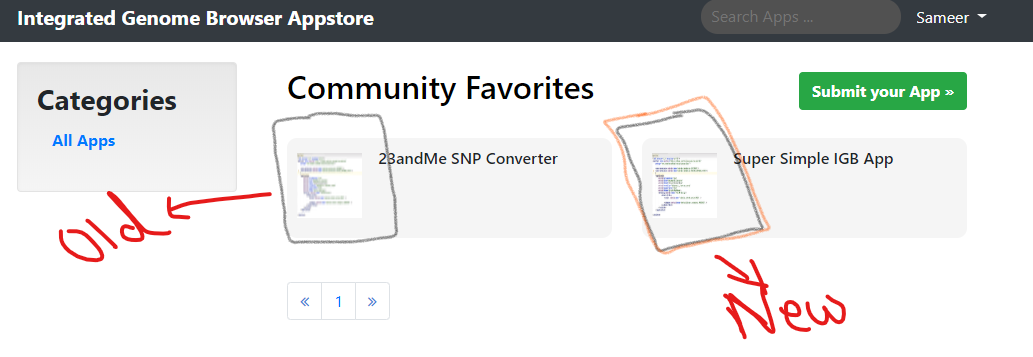
Scale Image Removed. Now the image is having its real resolution.
Testing Successful. The functionality works as expected. Test Results attached with the ticket.
Moving to Done.
| Resolution | Fixed [ 1 ] | |
| Attachment | ScaleImage.png [ 14418 ] |
| Resolution | Fixed [ 1 ] | Done [ 10000 ] |
| Status | Post-merge Testing In Progress [ 10003 ] | Closed [ 6 ] |
| Assignee | Sameer Shanbhag [ sameer ] | Noor Zahara [ noor91zahara ] |
| Workflow | Fall 2019 Workflow Update [ 20779 ] | Revised Fall 2019 Workflow Update [ 22519 ] |
Removed image scaling functionality from code since it has been handled via CSS.