Details
-
Type:
New Feature
-
Status: Closed (View Workflow)
-
Priority:
 Major
Major
-
Resolution: Done
-
Affects Version/s: None
-
Fix Version/s: None
-
Labels:None
-
Story Points:1
-
Epic Link:
-
Sprint:Spring 8 : 24 Apr to 8 May
Description
IGB contains multiple Quickload sites, but the Genome Dashboard is only showing shortcuts for one Quickload site - the main one.
This is fine, but it would be even cooler if the Genome Dashboard could collect and merge information from all Quickload sites viewed in IGB.
To find out which Quickload sites are available by default, the Genome Dashboard could query the master branch in bitbucket and retrieve the IGB preferences file, which is in JSON format.
Attachments
Activity
| Field | Original Value | New Value |
|---|---|---|
| Epic Link | IGBF-1765 [ 17855 ] |
| Rank | Ranked higher |
| Status | To-Do [ 10305 ] | In Progress [ 3 ] |
Integrated all the Quickload websites to be used by Genome Dashboard
https://bitbucket.org/sshanbh1/genome-dashboard/commits/6fea92c8a08500a25cf9eaf8cb289b2c42f791c4
Changelog:
- contents.txt from all the quickload sites will be used to generate data to be displayed on quickload website.
- Added exception handling to the Get request in case any of the servers go down
- Fixed the logic to check if IGB is running or not by moving the logic to the Express controller.
P.S. Prof. Ann Loraine It would be great if the changes are used to test.bioviz.org so that Shamika Gajanan Kulkarni can continue testing
Thanks for the head's up. Doing this now!
A quick follow-up:
Will be spinning up an entirely new site with latest master but before I do that, I want to add some logic that will transfer the existing site's elastic IP to the new one.
This will take a couple of hours to complete.
However, if you happen to be working right now would like me to get the new testing site ready sooner than that, please let me know.
Where I am concerned, I can wait till you finish it Prof. Ann Loraine. No hurries. 
I have updated the code deployed on test.bioviz.org and restarted pm2, but I can't tell if the latest genome dashboard code is actually being run.
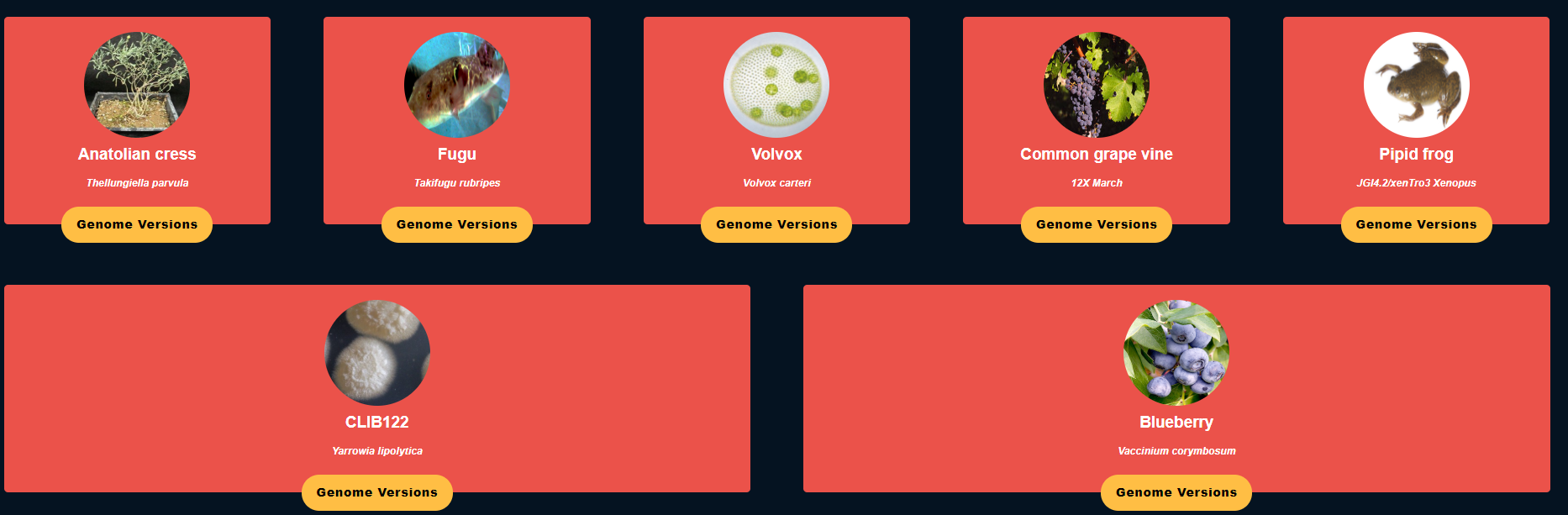
I checked this by looking for the blueberry genome, which is served from http://igbquickload.org/blueberry/. With the new changes, a "square" with the default DNA image should appear unless Sameer Shanbhag you have added a blueberry photo.
Sameer Shanbhag - maybe you can take a look?
FYI - here is an image with blueberry:
- V_corymbosum.png
From:
Here are the latest commits for the genome-dashboard code currently deployed on test.bioviz.org:
TestBioviz ec2-user $ git ls
4b05ebc (HEAD -> master, origin/master, origin/HEAD) Merged sshanbh1/genome-dashboard into master
6fea92c IGBF-2359 Fix IGB Connection Issue and Integrate all the quickload sites
8145e77 IGBF-2274 - Dynaimcally assign image when available regardless of extension
1871339 IGBF-2274 : Update Links to Species Content and Synonyms file.
a3c4f2d Merged sshanbh1/presentation-ui into master
4954a26 Merged in lorainelab/genome-dashboard/IGBF-2350-images (pull request #2)
I restarted node by running:
pm2 delete genome-dashboard
pm2 start --name genome-dashboard /var/www/genome-dashboard/bin/www
Hi Prof. Ann Loraine
There was some issue with the merging logic, with the implementation I pushed the data was not getting merged due to a small bug and it was using the old implementation. I have updated the codebase with the required changes. Blueberries are now visible on the dashboard and data has been merged properly.
Change Log:
- Fix logic to merge all the quickload `content.txt` file
- Add Blueberry image to the repository
Commit:
P.S. Please refer to the screenshot regarding the changes.
| Attachment | blueberries.png [ 14709 ] |
| Status | In Progress [ 3 ] | Needs 1st Level Review [ 10005 ] |
OK. I will deploy the new code.
New code deployed:
824e7d2 (HEAD -> master, origin/master, origin/HEAD) Merged sshanbh1/genome-dashboard into master
83a93e3 IGBF-2359 : Fix Merge Quicload sites logic
4b05ebc Merged sshanbh1/genome-dashboard into master
6fea92c IGBF-2359 Fix IGB Connection Issue and Integrate all the quickload sites
8145e77 IGBF-2274 - Dynaimcally assign image when available regardless of extension
1871339 IGBF-2274 : Update Links to Species Content and Synonyms file.
a3c4f2d Merged sshanbh1/presentation-ui into master
4954a26 Merged in lorainelab/genome-dashboard/IGBF-2350-images (pull request #2)
Blueberry image visible on test.bioviz.org
Latest changes have been pushed to the repository:
Change Log:
- Added "Start IGB. Then click a species open its genome" to the header
- Fixed Duplication of Genome versions due to merging of Quick Load websites
- Fixed IGB Status Check code as that cannot be handled from backend as it was done in my last iteration.
Commit:
P.S. : Prof. Ann Loraine IT would be great if this iteration was pushed on to test bioviz site for Shamika Gajanan Kulkarni to test.
I am able to view Blueberry Genome on the dashboard and load it in IGB.
Prof. Ann Loraine please review this ticket to be sure everything is as expected.
It's all good.
Shamika Gajanan Kulkarni - please close at your convenience.
Closing this ticket. Thank you Prof. Ann Loraine and Sameer Shanbhag.
| Status | Needs 1st Level Review [ 10005 ] | First Level Review in Progress [ 10301 ] |
| Status | First Level Review in Progress [ 10301 ] | Needs 1st Level Review [ 10005 ] |
| Status | Needs 1st Level Review [ 10005 ] | First Level Review in Progress [ 10301 ] |
| Status | First Level Review in Progress [ 10301 ] | Needs 1st Level Review [ 10005 ] |
| Status | Needs 1st Level Review [ 10005 ] | First Level Review in Progress [ 10301 ] |
| Status | First Level Review in Progress [ 10301 ] | Ready for Pull Request [ 10304 ] |
| Status | Ready for Pull Request [ 10304 ] | Pull Request Submitted [ 10101 ] |
| Status | Pull Request Submitted [ 10101 ] | Reviewing Pull Request [ 10303 ] |
| Status | Reviewing Pull Request [ 10303 ] | Merged Needs Testing [ 10002 ] |
| Status | Merged Needs Testing [ 10002 ] | Post-merge Testing In Progress [ 10003 ] |
| Resolution | Done [ 10000 ] | |
| Status | Post-merge Testing In Progress [ 10003 ] | Closed [ 6 ] |
Quickload Sites can be found at https://bitbucket.org/lorainelab/integrated-genome-browser/src/master/core/igb-preferences/src/main/resources/igbDefaultPrefs.json