Details
-
Type:
Task
-
Status: Closed (View Workflow)
-
Priority:
 Major
Major
-
Resolution: Done
-
Affects Version/s: None
-
Fix Version/s: None
-
Labels:None
-
Story Points:0.5
-
Epic Link:
-
Sprint:Summer 2: 22 Jun - 3 Jul, Summer 3: 6 Jul - 17 Jul, Summer 4: 14 Jul - 28 Jul
Description
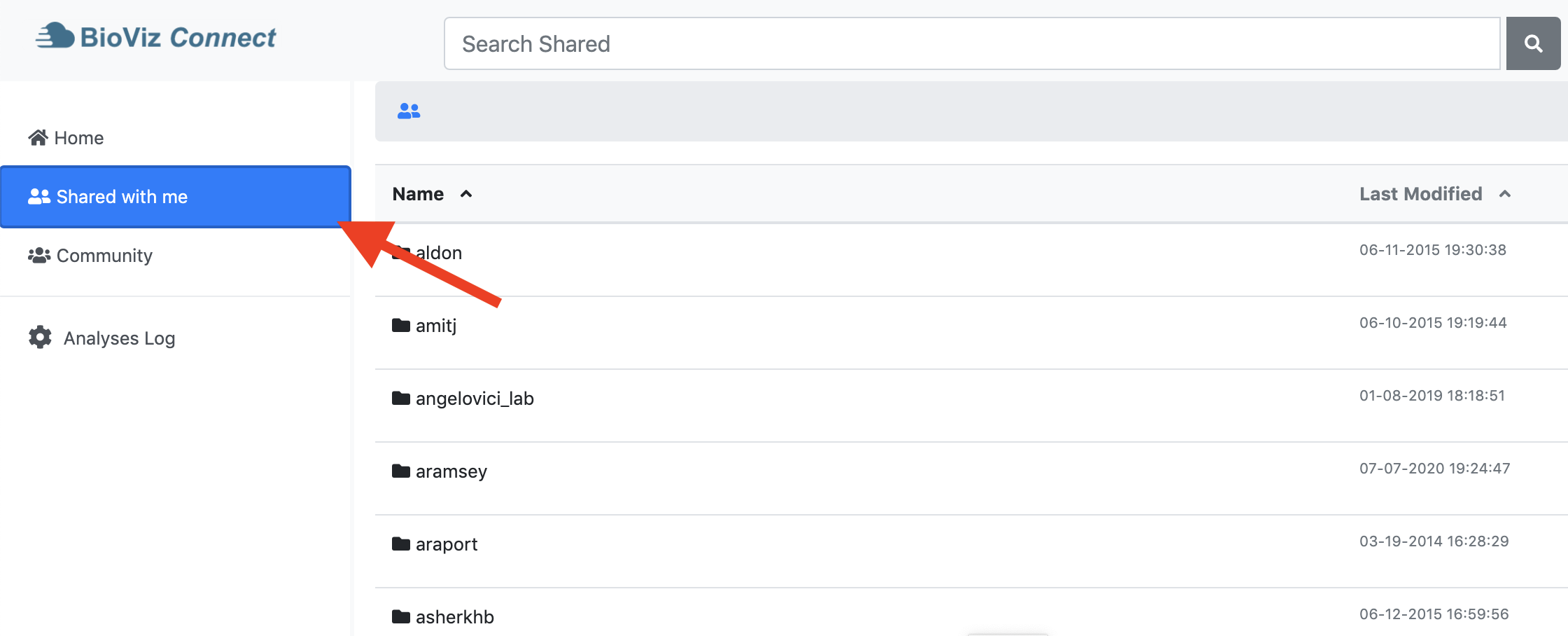
Situation: BioViz Connect users can navigate between three primary folders: Home, Shared with me, and Community. As the user navigates between these three primary folders they are highlighted in the left panel (see attached image sharedFolder.png). Users can search using the search bar at the top of the BioViz Connect page. When a user searches for something, the search will look at all folders and files within either Home, Shared with me, or Community depending on which of these primary folders the user is currently in. For example, if the user is currently within the Shared with me folder, and they search for "bam", the search results will contain all "bam" results from within the Shared with me folder. The search results will not contain bam files or folders from the Home or Community folders.
Problem: Currently, when a user searches from within Home, Shared with me, or Community the left panel is no longer highlighted (see attached image searchingSharedFolder.png). This may be confusing to the user as it may give the impression that the search will return results from all three primary folders, instead of the primary folder they are currently in.
Task: Implement highlighting on the left panel primary folders (Home, Shared with me, Community) during searching based on the user's current location (Home, Shared with me, Community). Effectively we want the highlighting during search to match the highlighting during navigation.
Note: Look at how the current highlighting of the left panel is being done during navigation, and apply that to when a search is being carried out.
Attachments

Activity
| Field | Original Value | New Value |
|---|---|---|
| Epic Link | IGBF-2376 [ 18533 ] |
| Rank | Ranked higher |
| Rank | Ranked higher |
| Assignee | Nowlan Freese [ nfreese ] |
| Sprint | Summer 2: 22 Jun - 3 Jul [ 97 ] |
| Sprint | Summer 3: 3 Jul - 14 Jul [ 98 ] |
| Summary | Highlight location while searching | Improve BioViz Connect search usability |
| Story Points | 2 | 0.5 |
| Description |
Situation: Searching occurs in either Home, Shared, or Community depending on the user's current location. However, when searching the location (Home, Shared, Community) is not highlighted.
Task: Highlight the user's current location (Home, Shared, Community) when searching. |
Situation: Searching occurs in either Home, Shared, or Community depending on the user's current location. However, when searching the location (Home, Shared, Community) is not highlighted.
Task: Develop a solution to make it more obvious to the user which location is is being searched, possibly by highlighting the user's current location (Home, Shared, Community) when searching. |
| Sprint | Summer 3: 3 Jul - 14 Jul [ 98 ] | Summer 2: 22 Jun - 3 Jul [ 97 ] |
| Assignee | Nowlan Freese [ nfreese ] | Chaitanya Kintali [ chaitanya ] |
| Description |
Situation: Searching occurs in either Home, Shared, or Community depending on the user's current location. However, when searching the location (Home, Shared, Community) is not highlighted.
Task: Develop a solution to make it more obvious to the user which location is is being searched, possibly by highlighting the user's current location (Home, Shared, Community) when searching. |
Situation: Searching occurs in either Home, Shared, or Community depending on the user's current location. However, when searching the location (Home, Shared, Community) is not highlighted.
Task: Highlight the user's current location (Home, Shared, Community) when searching. |
| Sprint | Summer 2: 22 Jun - 3 Jul [ 97 ] | Summer 2: 22 Jun - 3 Jul, Summer 3: 3 Jul - 14 Jul [ 97, 98 ] |
| Rank | Ranked higher |
| Assignee | Chaitanya Kintali [ chaitanya ] | Ann Loraine [ aloraine ] |
| Assignee | Ann Loraine [ aloraine ] | Nowlan Freese [ nfreese ] |
| Attachment | searchingSharedFolder.png [ 14779 ] | |
| Attachment | sharedFolder.png [ 14780 ] |
| Description |
Situation: Searching occurs in either Home, Shared, or Community depending on the user's current location. However, when searching the location (Home, Shared, Community) is not highlighted.
Task: Highlight the user's current location (Home, Shared, Community) when searching. |
Situation: BioViz Connect users can navigate between three primary folders: Home, Shared with me, and Community. As the user navigates between these three primary folders they are highlighted in the left panel (see attached image sharedFolder.png). Users can search using the search bar at the top of the BioViz Connect page. When a user searches for something, the search will look at all folders and files within either Home, Shared with me, or Community depending on which of these primary folders the user is currently in. For example, if the user is currently within the Shared with me folder, and they search for "bam", the search results will contain all "bam" results from within the Shared with me folder. The search results will not contain bam files or folders from the Home or Community folders.
Problem: Currently, when a user searches from within Home, Shared with me, or Community the left panel is no longer highlighted (see attached image searchingSharedFolder.png). This may be confusing to the user as it may give the impression that the search will return results from all three primary folders, instead of the primary folder they are currently in. Task: Implement highlighting on the left panel primary folders (Home, Shared with me, Community) during searching based on the user's current location (Home, Shared with me, Community). Effectively we want the highlighting during search to match the highlighting during navigation. |
I have added additional details to the description as well as images illustrating the problem.
| Description |
Situation: BioViz Connect users can navigate between three primary folders: Home, Shared with me, and Community. As the user navigates between these three primary folders they are highlighted in the left panel (see attached image sharedFolder.png). Users can search using the search bar at the top of the BioViz Connect page. When a user searches for something, the search will look at all folders and files within either Home, Shared with me, or Community depending on which of these primary folders the user is currently in. For example, if the user is currently within the Shared with me folder, and they search for "bam", the search results will contain all "bam" results from within the Shared with me folder. The search results will not contain bam files or folders from the Home or Community folders.
Problem: Currently, when a user searches from within Home, Shared with me, or Community the left panel is no longer highlighted (see attached image searchingSharedFolder.png). This may be confusing to the user as it may give the impression that the search will return results from all three primary folders, instead of the primary folder they are currently in. Task: Implement highlighting on the left panel primary folders (Home, Shared with me, Community) during searching based on the user's current location (Home, Shared with me, Community). Effectively we want the highlighting during search to match the highlighting during navigation. |
Situation: BioViz Connect users can navigate between three primary folders: Home, Shared with me, and Community. As the user navigates between these three primary folders they are highlighted in the left panel (see attached image sharedFolder.png). Users can search using the search bar at the top of the BioViz Connect page. When a user searches for something, the search will look at all folders and files within either Home, Shared with me, or Community depending on which of these primary folders the user is currently in. For example, if the user is currently within the Shared with me folder, and they search for "bam", the search results will contain all "bam" results from within the Shared with me folder. The search results will not contain bam files or folders from the Home or Community folders.
Problem: Currently, when a user searches from within Home, Shared with me, or Community the left panel is no longer highlighted (see attached image searchingSharedFolder.png). This may be confusing to the user as it may give the impression that the search will return results from all three primary folders, instead of the primary folder they are currently in. Task: Implement highlighting on the left panel primary folders (Home, Shared with me, Community) during searching based on the user's current location (Home, Shared with me, Community). Effectively we want the highlighting during search to match the highlighting during navigation. Note: Look at how the current highlighting of the left panel is being done during navigation, and apply that to when a search is being carried out. |
| Assignee | Nowlan Freese [ nfreese ] |
| Status | To-Do [ 10305 ] | In Progress [ 3 ] |
| Assignee | Karthik Raveendran [ karthik ] |
| Status | In Progress [ 3 ] | Needs 1st Level Review [ 10005 ] |
| Sprint | Summer 2: 22 Jun - 3 Jul, Summer 3: 6 Jul - 17 Jul [ 97, 98 ] | Summer 2: 22 Jun - 3 Jul, Summer 3: 6 Jul - 17 Jul, Summer 4: 14 Jul - 28 Jul [ 97, 98, 99 ] |
| Rank | Ranked higher |
| Status | Needs 1st Level Review [ 10005 ] | First Level Review in Progress [ 10301 ] |
| Status | First Level Review in Progress [ 10301 ] | Ready for Pull Request [ 10304 ] |
| Status | Ready for Pull Request [ 10304 ] | Pull Request Submitted [ 10101 ] |
| Status | Pull Request Submitted [ 10101 ] | Reviewing Pull Request [ 10303 ] |
| Status | Reviewing Pull Request [ 10303 ] | Merged Needs Testing [ 10002 ] |
| Status | Merged Needs Testing [ 10002 ] | Post-merge Testing In Progress [ 10003 ] |
Working correctly, closing issue.
| Resolution | Done [ 10000 ] | |
| Status | Post-merge Testing In Progress [ 10003 ] | Closed [ 6 ] |
For the next step, we need a user story that explains a little more about what the problem is. Based on that, we can come up with some possible improvements.