Uploaded image for project: 'IGB'
  1. IGB
  2. IGBF-3022

Remove View in IGB button color change function

    Details

    • Type: Improvement
    • Status: Closed (View Workflow)
    • Priority: Major
    • Resolution: Done
    • Affects Version/s: None
    • Fix Version/s: None
    • Labels:
      None

      Description

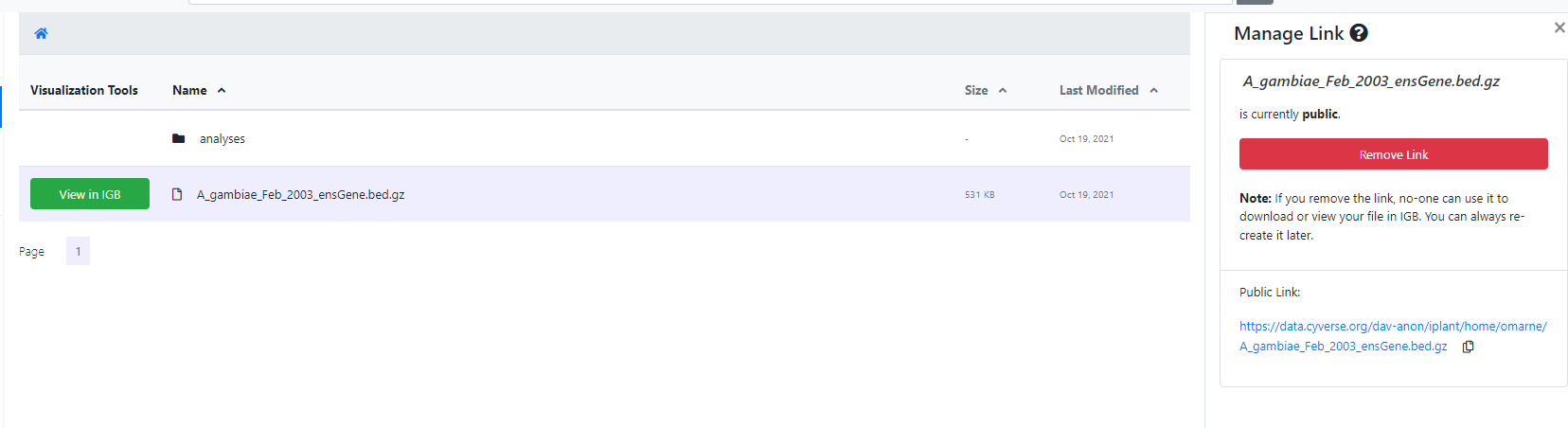
      When the files and folders are populated, the files that can be viewed in IGB will have View in IGB button which is by default green in color. After the user changes the public link status the button's color changes to orange if the public link is private and green if its public. This change in color functionality needs to be removed.

        Attachments

        1. Green.jpg
          Green.jpg
          40 kB
        2. green .png
          green .png
          35 kB
        3. Yellow.jpg
          Yellow.jpg
          36 kB
        4. yellow.png
          yellow.png
          49 kB

          Activity

          Hide
          karthik Karthik Raveendran added a comment -

          Removed the View in IGB background color change code when public link status is changed. Commit

          Show
          karthik Karthik Raveendran added a comment - Removed the View in IGB background color change code when public link status is changed. Commit
          Show
          nfreese Nowlan Freese added a comment - Merged: https://bitbucket.org/nfreese/bioviz-connect/pull-requests/267/igbf-3022-remove-view-in-igb-color-change?link_source=email
          Hide
          nfreese Nowlan Freese added a comment -

          Make sure we test this thoroughly. We previously had logic built around the button color and I would want to make sure we don't miss something.

          Show
          nfreese Nowlan Freese added a comment - Make sure we test this thoroughly. We previously had logic built around the button color and I would want to make sure we don't miss something.
          Hide
          karthik Karthik Raveendran added a comment - - edited

          Testing Protocol:
          Please check if the code changes are deployed. If not, run this issue in local environment.
          a) Go to BioViz Connect.
          b) Right-click on a file with View in IGB button
          c) Select "Manage Link" and the right panel will pop-up
          d) Click on the "Create Manage Link"/ "Remove Manage Link" button and check to see if the View in IGB button is changing colors or not (see images attached)

          Note: The color change should not happen.
          Note: If there is an error in the changes, the color change may happen after a few toggles on the button so please try multiple clicks.

          Show
          karthik Karthik Raveendran added a comment - - edited Testing Protocol: Please check if the code changes are deployed. If not, run this issue in local environment. a) Go to BioViz Connect. b) Right-click on a file with View in IGB button c) Select "Manage Link" and the right panel will pop-up d) Click on the "Create Manage Link"/ "Remove Manage Link" button and check to see if the View in IGB button is changing colors or not (see images attached) Note: The color change should not happen. Note: If there is an error in the changes, the color change may happen after a few toggles on the button so please try multiple clicks.
          Hide
          karthik Karthik Raveendran added a comment - - edited

          They are not supposed to change colors. Sorry I forgot to add specify that part clearly. Please check if you have pulled the changes from the commit provided above in your local environment.

          Show
          karthik Karthik Raveendran added a comment - - edited They are not supposed to change colors. Sorry I forgot to add specify that part clearly. Please check if you have pulled the changes from the commit provided above in your local environment.
          Hide
          omarne Omkar Marne (Inactive) added a comment - - edited

          Dr. [~aloraine] Please pull the changes from the master to the test server. https://bvctest6.bioviz.org. once the 'no space left on the device' error has been resolved.

          I can test once the changes are pulled.

          Show
          omarne Omkar Marne (Inactive) added a comment - - edited Dr. [~aloraine] Please pull the changes from the master to the test server. https://bvctest6.bioviz.org . once the 'no space left on the device' error has been resolved. I can test once the changes are pulled.
          Hide
          ann.loraine Ann Loraine added a comment -

          Can't figure out what the problem is with the bvctest6 host. Attempting to deploy on another host.

          Show
          ann.loraine Ann Loraine added a comment - Can't figure out what the problem is with the bvctest6 host. Attempting to deploy on another host.
          Hide
          ann.loraine Ann Loraine added a comment - - edited

          Attempting to deploy onto bvctest7.bioviz.org. Observing this error when running the 'install' role:

          TASK [install : Update currently installed software to latest versions.] ****************************************
          fatal: [bvctest7]: FAILED! => changed=false 
            msg: |-
              '/usr/bin/apt-get upgrade --with-new-pkgs ' failed: E: Could not get lock /var/lib/dpkg/lock-frontend - open (11: Resource temporarily unavailable)
              E: Unable to acquire the dpkg frontend lock (/var/lib/dpkg/lock-frontend), is another process using it?
            rc: 100
            stdout: ''
            stdout_lines: <omitted>
          

          Googled the error and learned that this is probably due to automatic updates that occur when ubuntu systems start up. See: https://itsfoss.com/could-not-get-lock-error/

          Show
          ann.loraine Ann Loraine added a comment - - edited Attempting to deploy onto bvctest7.bioviz.org. Observing this error when running the 'install' role: TASK [install : Update currently installed software to latest versions.] **************************************** fatal: [bvctest7]: FAILED! => changed= false msg: |- '/usr/bin/apt-get upgrade --with- new -pkgs ' failed: E: Could not get lock / var /lib/dpkg/lock-frontend - open (11: Resource temporarily unavailable) E: Unable to acquire the dpkg frontend lock (/ var /lib/dpkg/lock-frontend), is another process using it? rc: 100 stdout: '' stdout_lines: <omitted> Googled the error and learned that this is probably due to automatic updates that occur when ubuntu systems start up. See: https://itsfoss.com/could-not-get-lock-error/
          Hide
          ann.loraine Ann Loraine added a comment - - edited

          The above error resolved after a bit. The lock was due to automatic system updates that occur when an ubuntu host starts up.

          However, now there is another error, which looks like a failure to install "rest_framework" into the virtual environment.

          Here is the error observed when I try to run the playbook:

          TASK [migrate : Make migrations] ********************************************************************************
          fatal: [bvctest7]: FAILED! => changed=false 
            cmd: ./manage.py makemigrations bioviz_connect
            msg: |2-
            
              :stderr: Traceback (most recent call last):
                File "./manage.py", line 21, in <module>
                  main()
                File "./manage.py", line 17, in main
                  execute_from_command_line(sys.argv)
                File "/var/www/vhosts/bioviz-connect/venv/lib/python3.6/site-packages/django/core/management/__init__.py", line 401, in execute_from_command_line
                  utility.execute()
                File "/var/www/vhosts/bioviz-connect/venv/lib/python3.6/site-packages/django/core/management/__init__.py", line 395, in execute
                  self.fetch_command(subcommand).run_from_argv(self.argv)
                File "/var/www/vhosts/bioviz-connect/venv/lib/python3.6/site-packages/django/core/management/base.py", line 330, in run_from_argv
                  self.execute(*args, **cmd_options)
                File "/var/www/vhosts/bioviz-connect/venv/lib/python3.6/site-packages/django/core/management/base.py", line 368, in execute
                  self.check()
                File "/var/www/vhosts/bioviz-connect/venv/lib/python3.6/site-packages/django/core/management/base.py", line 396, in check
                  databases=databases,
                File "/var/www/vhosts/bioviz-connect/venv/lib/python3.6/site-packages/django/core/checks/registry.py", line 70, in run_checks
                  new_errors = check(app_configs=app_configs, databases=databases)
                File "/var/www/vhosts/bioviz-connect/venv/lib/python3.6/site-packages/django/core/checks/urls.py", line 40, in check_url_namespaces_unique
                  all_namespaces = _load_all_namespaces(resolver)
                File "/var/www/vhosts/bioviz-connect/venv/lib/python3.6/site-packages/django/core/checks/urls.py", line 57, in _load_all_namespaces
                  url_patterns = getattr(resolver, 'url_patterns', [])
                File "/var/www/vhosts/bioviz-connect/venv/lib/python3.6/site-packages/django/utils/functional.py", line 48, in __get__
                  res = instance.__dict__[self.name] = self.func(instance)
                File "/var/www/vhosts/bioviz-connect/venv/lib/python3.6/site-packages/django/urls/resolvers.py", line 589, in url_patterns
                  patterns = getattr(self.urlconf_module, "urlpatterns", self.urlconf_module)
                File "/var/www/vhosts/bioviz-connect/venv/lib/python3.6/site-packages/django/utils/functional.py", line 48, in __get__
                  res = instance.__dict__[self.name] = self.func(instance)
                File "/var/www/vhosts/bioviz-connect/venv/lib/python3.6/site-packages/django/urls/resolvers.py", line 582, in urlconf_module
                  return import_module(self.urlconf_name)
                File "/usr/lib/python3.6/importlib/__init__.py", line 126, in import_module
                  return _bootstrap._gcd_import(name[level:], package, level)
                File "<frozen importlib._bootstrap>", line 994, in _gcd_import
                File "<frozen importlib._bootstrap>", line 971, in _find_and_load
                File "<frozen importlib._bootstrap>", line 955, in _find_and_load_unlocked
                File "<frozen importlib._bootstrap>", line 665, in _load_unlocked
                File "<frozen importlib._bootstrap_external>", line 678, in exec_module
                File "<frozen importlib._bootstrap>", line 219, in _call_with_frames_removed
                File "/var/www/vhosts/bioviz-connect/bioviz_connect/urls.py", line 20, in <module>
                  from . import views
                File "/var/www/vhosts/bioviz-connect/bioviz_connect/views.py", line 3, in <module>
                  from bioviz_connect.error_handling.Custom_503_Exception_Handler import ServiceUnavailable
                File "/var/www/vhosts/bioviz-connect/bioviz_connect/error_handling/Custom_503_Exception_Handler.py", line 1, in <module>
                  from rest_framework.exceptions import APIException
              ModuleNotFoundError: No module named 'rest_framework'
            path: /var/www/vhosts/bioviz-connect/venv/bin:/usr/local/sbin:/usr/local/bin:/usr/sbin:/usr/bin:/sbin:/bin:/snap/bin
            syspath:
            - /tmp/ansible_django_manage_payload_dr8susbj/ansible_django_manage_payload.zip
            - /usr/lib/python36.zip
            - /usr/lib/python3.6
            - /usr/lib/python3.6/lib-dynload
            - /usr/local/lib/python3.6/dist-packages
            - /usr/lib/python3/dist-packages
          

          Karthik Raveendran - please take a look at the playbook role that configures the virtual environment. The file you need to update (probably) is:

          • bioviz-connect-playbooks/roles/venv/tasks/main.yml
          Show
          ann.loraine Ann Loraine added a comment - - edited The above error resolved after a bit. The lock was due to automatic system updates that occur when an ubuntu host starts up. However, now there is another error, which looks like a failure to install "rest_framework" into the virtual environment. Here is the error observed when I try to run the playbook: TASK [migrate : Make migrations] ******************************************************************************** fatal: [bvctest7]: FAILED! => changed= false cmd: ./manage.py makemigrations bioviz_connect msg: |2- :stderr: Traceback (most recent call last): File "./manage.py" , line 21, in <module> main() File "./manage.py" , line 17, in main execute_from_command_line(sys.argv) File "/ var /www/vhosts/bioviz-connect/venv/lib/python3.6/site-packages/django/core/management/__init__.py" , line 401, in execute_from_command_line utility.execute() File "/ var /www/vhosts/bioviz-connect/venv/lib/python3.6/site-packages/django/core/management/__init__.py" , line 395, in execute self.fetch_command(subcommand).run_from_argv(self.argv) File "/ var /www/vhosts/bioviz-connect/venv/lib/python3.6/site-packages/django/core/management/base.py" , line 330, in run_from_argv self.execute(*args, **cmd_options) File "/ var /www/vhosts/bioviz-connect/venv/lib/python3.6/site-packages/django/core/management/base.py" , line 368, in execute self.check() File "/ var /www/vhosts/bioviz-connect/venv/lib/python3.6/site-packages/django/core/management/base.py" , line 396, in check databases=databases, File "/ var /www/vhosts/bioviz-connect/venv/lib/python3.6/site-packages/django/core/checks/registry.py" , line 70, in run_checks new_errors = check(app_configs=app_configs, databases=databases) File "/ var /www/vhosts/bioviz-connect/venv/lib/python3.6/site-packages/django/core/checks/urls.py" , line 40, in check_url_namespaces_unique all_namespaces = _load_all_namespaces(resolver) File "/ var /www/vhosts/bioviz-connect/venv/lib/python3.6/site-packages/django/core/checks/urls.py" , line 57, in _load_all_namespaces url_patterns = getattr(resolver, 'url_patterns', []) File "/ var /www/vhosts/bioviz-connect/venv/lib/python3.6/site-packages/django/utils/functional.py" , line 48, in __get__ res = instance.__dict__[self.name] = self.func(instance) File "/ var /www/vhosts/bioviz-connect/venv/lib/python3.6/site-packages/django/urls/resolvers.py" , line 589, in url_patterns patterns = getattr(self.urlconf_module, "urlpatterns" , self.urlconf_module) File "/ var /www/vhosts/bioviz-connect/venv/lib/python3.6/site-packages/django/utils/functional.py" , line 48, in __get__ res = instance.__dict__[self.name] = self.func(instance) File "/ var /www/vhosts/bioviz-connect/venv/lib/python3.6/site-packages/django/urls/resolvers.py" , line 582, in urlconf_module return import_module(self.urlconf_name) File "/usr/lib/python3.6/importlib/__init__.py" , line 126, in import_module return _bootstrap._gcd_import(name[level:], package , level) File "<frozen importlib._bootstrap>" , line 994, in _gcd_import File "<frozen importlib._bootstrap>" , line 971, in _find_and_load File "<frozen importlib._bootstrap>" , line 955, in _find_and_load_unlocked File "<frozen importlib._bootstrap>" , line 665, in _load_unlocked File "<frozen importlib._bootstrap_external>" , line 678, in exec_module File "<frozen importlib._bootstrap>" , line 219, in _call_with_frames_removed File "/ var /www/vhosts/bioviz-connect/bioviz_connect/urls.py" , line 20, in <module> from . import views File "/ var /www/vhosts/bioviz-connect/bioviz_connect/views.py" , line 3, in <module> from bioviz_connect.error_handling.Custom_503_Exception_Handler import ServiceUnavailable File "/ var /www/vhosts/bioviz-connect/bioviz_connect/error_handling/Custom_503_Exception_Handler.py" , line 1, in <module> from rest_framework.exceptions import APIException ModuleNotFoundError: No module named 'rest_framework' path: / var /www/vhosts/bioviz-connect/venv/bin:/usr/local/sbin:/usr/local/bin:/usr/sbin:/usr/bin:/sbin:/bin:/snap/bin syspath: - /tmp/ansible_django_manage_payload_dr8susbj/ansible_django_manage_payload.zip - /usr/lib/python36.zip - /usr/lib/python3.6 - /usr/lib/python3.6/lib-dynload - /usr/local/lib/python3.6/dist-packages - /usr/lib/python3/dist-packages Karthik Raveendran - please take a look at the playbook role that configures the virtual environment. The file you need to update (probably) is: bioviz-connect-playbooks/roles/venv/tasks/main.yml
          Hide
          karthik Karthik Raveendran added a comment - - edited

          To install rest_framework library I used 'pip3 install djangorestframework'. I am not sure if this is what you wanted, Dr. Loraine. Please let me know.

          Django REST Framework

          Show
          karthik Karthik Raveendran added a comment - - edited To install rest_framework library I used 'pip3 install djangorestframework'. I am not sure if this is what you wanted, Dr. Loraine. Please let me know. Django REST Framework
          Hide
          ann.loraine Ann Loraine added a comment -

          Request for Karthik Raveendran: What version of rest django framework should be installed?

          For your reference, here is the code used to install software on ubuntu host. To avoid version mismatch problems, we specify the versions.

          - name: Install django-related modules in virtual env
            become: yes
            pip:
              name:
                - requests==2.24.0
                - python-decouple==3.3
                - redis==3.5.3
                - django-redis-cache==2.1.1
                - django-redis-sessions==0.6.1
                - mysqlclient==2.0.1
          
          Show
          ann.loraine Ann Loraine added a comment - Request for Karthik Raveendran : What version of rest django framework should be installed? For your reference, here is the code used to install software on ubuntu host. To avoid version mismatch problems, we specify the versions. - name: Install django-related modules in virtual env become: yes pip: name: - requests==2.24.0 - python-decouple==3.3 - redis==3.5.3 - django-redis-cache==2.1.1 - django-redis-sessions==0.6.1 - mysqlclient==2.0.1
          Hide
          ann.loraine Ann Loraine added a comment - - edited

          The new code is deployed to https://bvctest7.bioviz.org. Please test using bvctest7, not bvctest6.

          Please note that I'm no longer able to update bvctest6.bioviz.org because of an error I can't fix.

          Karthik Raveendran: I would like to delete the bvctest6 EC2. Can I do that now?

          Moving to "ready for testing".

          attn: Omkar Marne

          Show
          ann.loraine Ann Loraine added a comment - - edited The new code is deployed to https://bvctest7.bioviz.org . Please test using bvctest7, not bvctest6. Please note that I'm no longer able to update bvctest6.bioviz.org because of an error I can't fix. Karthik Raveendran : I would like to delete the bvctest6 EC2. Can I do that now? Moving to "ready for testing". attn: Omkar Marne
          Hide
          omarne Omkar Marne (Inactive) added a comment - - edited

          Test results on https://bvctest7.bioviz.org:

          After logging into the testing site and selecting 'Create Manage lInk/ Remove Manage Link' the 'View in IGB' button doesn't change its colors and works fine.

          Dr. [~aloraine] Please deploy the code to the production site.

          Closing the ticket.

          Show
          omarne Omkar Marne (Inactive) added a comment - - edited Test results on https://bvctest7.bioviz.org: After logging into the testing site and selecting 'Create Manage lInk/ Remove Manage Link' the 'View in IGB' button doesn't change its colors and works fine. Dr. [~aloraine] Please deploy the code to the production site. Closing the ticket.

            People

            • Assignee:
              karthik Karthik Raveendran
              Reporter:
              karthik Karthik Raveendran
            • Votes:
              0 Vote for this issue
              Watchers:
              4 Start watching this issue

              Dates

              • Created:
                Updated:
                Resolved: