Details
-
Type:
Task
-
Status: To-Do (View Workflow)
-
Priority:
 Major
Major
-
Resolution: Unresolved
-
Affects Version/s: None
-
Fix Version/s: None
-
Labels:None
-
Story Points:2
-
Epic Link:
-
Sprint:Fall 6
Description
After removing Jidesoft in IGBF-3486, a new ColorComboBox needs to be created for IGB.
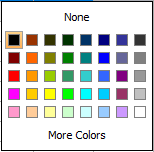
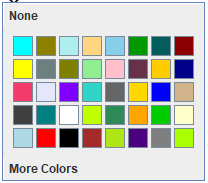
More info: IGB currently uses Jidesoft ColorCombobox and ColorExComboBox which has the features shown in the images.
About the images:
- See Dropdown.png: ColorCombobox dropdown has two buttons at the top and bottom, None and More Colors respectively and a basic color palette.
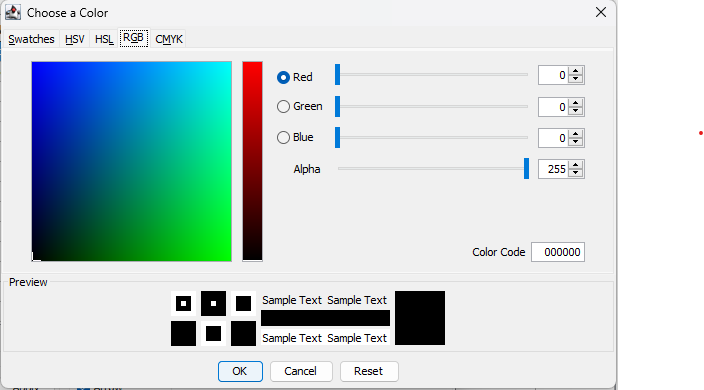
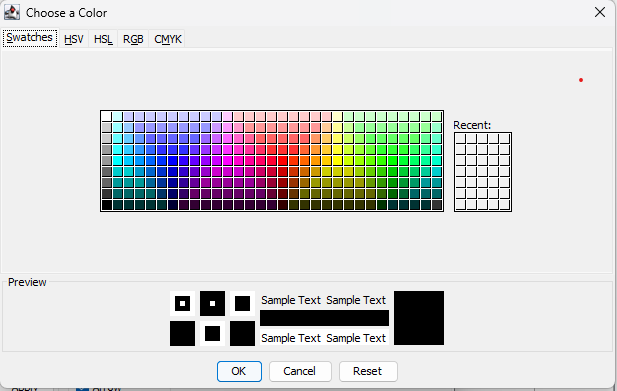
- See Tab images: On clicking More Colors, a JColoreChooser panel opens up with 5 tabs: Swatches, RGB, HSV, HSL, CMYK
- See Selected Dropdown.png: After selecting the color, the ColorCombobox component indicates the color
- See Cell images: If the ColorComboBox is in a table cell, it behaves differently when that cell is selected and unselected as an indication I think.
Attachments





Issue Links
- relates to
-
-
- Closed
-
Activity
| Field | Original Value | New Value |
|---|---|---|
| Epic Link |
|
| Description |
After removing Jidesoft in |
After removing Jidesoft in More info: IGB currently uses Jidesoft ColorCombobox and ColorExComboBox which has the features shown in the images. About the images: # See Dropdown.png: ColorCombobox dropdown has two buttons at the top and bottom, None and More Colors respectively and a basic color palette. # See Tab images: On clicking More Colors, a window opens up with 5 tabs: Swatches, RGB, HSV, HSL, CMYK # See Selected Dropdown.png: After selecting the color, the ColorCombobox component indicates the color # See Cell images: If the ColorComboBox is in a table cell, it behaves differently when that cell is selected and unselected as an indication I think. |
| Attachment | Tab Swatches.png [ 18084 ] | |
| Attachment | Tab RGB.png [ 18085 ] | |
| Attachment | Tab HSV.png [ 18086 ] | |
| Attachment | Tab HSL.png [ 18087 ] | |
| Attachment | Tab CMYK.png [ 18088 ] | |
| Attachment | Selected Dropdown.png [ 18089 ] | |
| Attachment | Dropdown.png [ 18090 ] | |
| Attachment | Cell Unselected.png [ 18091 ] | |
| Attachment | Cell Selected.png [ 18092 ] |


| Description |
After removing Jidesoft in More info: IGB currently uses Jidesoft ColorCombobox and ColorExComboBox which has the features shown in the images. About the images: # See Dropdown.png: ColorCombobox dropdown has two buttons at the top and bottom, None and More Colors respectively and a basic color palette. # See Tab images: On clicking More Colors, a window opens up with 5 tabs: Swatches, RGB, HSV, HSL, CMYK # See Selected Dropdown.png: After selecting the color, the ColorCombobox component indicates the color # See Cell images: If the ColorComboBox is in a table cell, it behaves differently when that cell is selected and unselected as an indication I think. |
After removing Jidesoft in More info: IGB currently uses Jidesoft ColorCombobox and ColorExComboBox which has the features shown in the images. About the images: # See Dropdown.png: ColorCombobox dropdown has two buttons at the top and bottom, None and More Colors respectively and a basic color palette. # See Tab images: On clicking More Colors, a JColoreChooser panel opens up with 5 tabs: Swatches, RGB, HSV, HSL, CMYK # See Selected Dropdown.png: After selecting the color, the ColorCombobox component indicates the color # See Cell images: If the ColorComboBox is in a table cell, it behaves differently when that cell is selected and unselected as an indication I think. |
| Status | To-Do [ 10305 ] | In Progress [ 3 ] |
| Attachment | New Dropdown.png [ 18150 ] |

| Sprint | Fall 6 [ 182 ] | Fall 6, Fall 7 [ 182, 183 ] |
| Rank | Ranked higher |
| Status | In Progress [ 3 ] | To-Do [ 10305 ] |
| Assignee | Karthik Raveendran [ karthik ] |
| Assignee | Karthik Raveendran [ karthik ] |
| Sprint | Fall 6, Fall 7 [ 182, 183 ] | Fall 6, Spring 1 [ 182, 185 ] |
| Sprint | Fall 6, Spring 1 [ 182, 185 ] | Fall 6 [ 182 ] |