Uploaded image for project: 'IGB'
  1. IGB
  2. IGBF-376

"Disabled" Data Sources do not appear under the Data Sources tab within Preferences

    Details

    • Type: Bug
    • Status: Closed (View Workflow)
    • Priority: Major
    • Resolution: Done
    • Affects Version/s: None
    • Fix Version/s: None
    • Labels:
      None

      Description

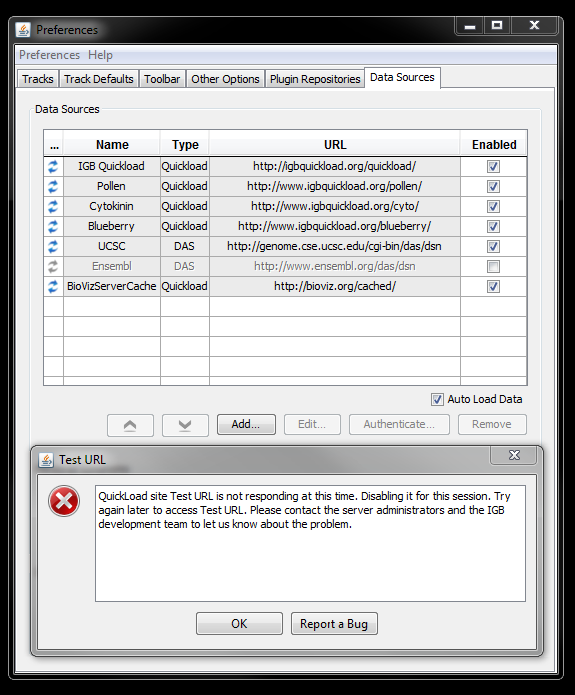
      While testing issues relating to adding a data source I noticed that IGB sometimes generates a pop-up when there is a problem with the data source that is being added (see attachment). This pop-up explains that IGB is "Disabling the Data Source for the session".

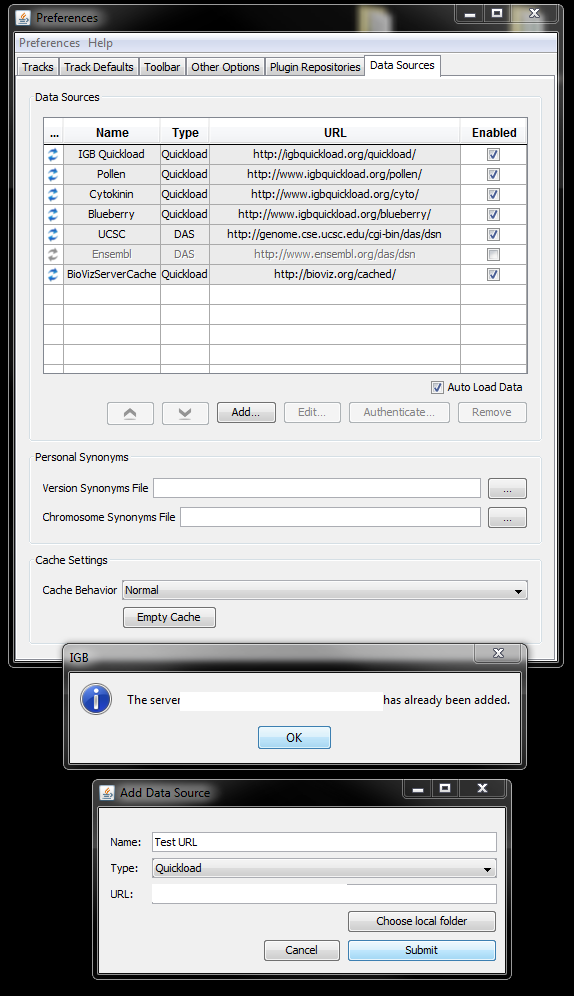
      However, under the Data Sources tab within the Preferences widget I noticed that there are a list of Data Sources that have been added. If they are enabled, there is a checked box under the "Enabled column". If they are DISABLED then the checkbox is not checked.

      The problem is that when IGB generates the popup "Disabling for the session", this disabled data source does not get added to the data source list in Preferences. It should get added but the "Enabled checkbox" should just not be checked since the source is disabled, but this does not happen.

      Since it is not added to the list, there is no way to edit, remove, or add the disabled data source. Trying to re-add the data source generates a popup stating "This data source has already been added" (see other attachment;exact URL has been hidden). The only way to add the data source again is to Reset IGB Preferences, unfortunately.
        Attachments

          Activity

          Hide
          mason Mason Meyer (Inactive) added a comment -

          My testing verifies that all changes to this story have been made as expected and disabled data sources are now being handles as expected. Since this story is resolved it will now be closed.

          Show
          mason Mason Meyer (Inactive) added a comment - My testing verifies that all changes to this story have been made as expected and disabled data sources are now being handles as expected. Since this story is resolved it will now be closed.
          Hide
          mason Mason Meyer (Inactive) added a comment -

          This issue was reopened because it seems that added data sources are not persisting in the "Data Sources" table within Preferences after closing an IGB session (when closing and reopening IGB).

          They added sources are still visible under "Available Data" on the Main Screen, however, they do not show up in the Data Sources table within preferences after closing an IGB session.

          Reassigning to Tarun so that necessary changes can be made.

          Show
          mason Mason Meyer (Inactive) added a comment - This issue was reopened because it seems that added data sources are not persisting in the "Data Sources" table within Preferences after closing an IGB session (when closing and reopening IGB). They added sources are still visible under "Available Data" on the Main Screen, however, they do not show up in the Data Sources table within preferences after closing an IGB session. Reassigning to Tarun so that necessary changes can be made.
          Hide
          mason Mason Meyer (Inactive) added a comment -

          My testing verifies that this story has been resolved. Disabled data sources now populate to the Data Sources list in Preferences and there is no "enabled" check mark for disabled sources. Sources can be edited, deleted, and authenticated.

          Since this story is resolved it will now be closed.

          Show
          mason Mason Meyer (Inactive) added a comment - My testing verifies that this story has been resolved. Disabled data sources now populate to the Data Sources list in Preferences and there is no "enabled" check mark for disabled sources. Sources can be edited, deleted, and authenticated. Since this story is resolved it will now be closed.
          Hide
          mason Mason Meyer (Inactive) added a comment -

          It seems that the change that was made to the code was to actually close the authentication window when canceled or clicking on the "X" in the upper-right corner of the widget. I do like this change to the code but the issue explained in this story requires a different fix.

          If you enter an incorrect username or password at the authentication window then you will see the pop-up saying that the Quickload server is not responding and it is being disabled for the session. The disabled data source should still populate to the list of data sources but it does not---that is the real issue of this story. The data source gets added in the background but not to the list of data sources, because trying to add the source again causes a pop-up to arise saying that the data source has already been added. You can't remove this data source though or edit it because it is not selectable since it is not on the data sources list.

          Therefore, if a user accidentally enters the wrong username or password then they won't be able to go back and correct this unless they clear IGB preferences which causes IGB to close.

          But to clarify, the story doesn't actually relate to the authentication window at all; using the authentication window is just an easy way to force a data source to become "disabled". The real problem lies in the fact that an added data source does not get populated to the data sources list if it is disabled, even though it should be (just with no checkmark in the "enabled" checkbox).

          Before continuing with any further resolution you should discuss the story with David to see if this story is even worth working on because the whole data sources list may be refactored soon anyways.

          Show
          mason Mason Meyer (Inactive) added a comment - It seems that the change that was made to the code was to actually close the authentication window when canceled or clicking on the "X" in the upper-right corner of the widget. I do like this change to the code but the issue explained in this story requires a different fix. If you enter an incorrect username or password at the authentication window then you will see the pop-up saying that the Quickload server is not responding and it is being disabled for the session. The disabled data source should still populate to the list of data sources but it does not---that is the real issue of this story. The data source gets added in the background but not to the list of data sources, because trying to add the source again causes a pop-up to arise saying that the data source has already been added. You can't remove this data source though or edit it because it is not selectable since it is not on the data sources list. Therefore, if a user accidentally enters the wrong username or password then they won't be able to go back and correct this unless they clear IGB preferences which causes IGB to close. But to clarify, the story doesn't actually relate to the authentication window at all; using the authentication window is just an easy way to force a data source to become "disabled". The real problem lies in the fact that an added data source does not get populated to the data sources list if it is disabled, even though it should be (just with no checkmark in the "enabled" checkbox). Before continuing with any further resolution you should discuss the story with David to see if this story is even worth working on because the whole data sources list may be refactored soon anyways.
          Hide
          mason Mason Meyer (Inactive) added a comment - - edited

          To reproduce the "Disabling for the Session" popup, it may be helpful to add a data source that requires authentication and then just "Cancel" the Authentication window. (this usually produces the pop-up).

          An example of a data source that requires authentication can be found by asking Mason.

          Show
          mason Mason Meyer (Inactive) added a comment - - edited To reproduce the "Disabling for the Session" popup, it may be helpful to add a data source that requires authentication and then just "Cancel" the Authentication window. (this usually produces the pop-up). An example of a data source that requires authentication can be found by asking Mason.

            People

            • Assignee:
              mason Mason Meyer (Inactive)
              Reporter:
              mason Mason Meyer (Inactive)
            • Votes:
              0 Vote for this issue
              Watchers:
              1 Start watching this issue

              Dates

              • Created:
                Updated:
                Resolved: