Details
-
Type:
Bug
-
Status: Closed (View Workflow)
-
Priority:
 Major
Major
-
Resolution: Done
-
Affects Version/s: None
-
Fix Version/s: None
-
Labels:None
-
Story Points:0.25
-
Epic Link:
-
Sprint:Sprint 15, Sprint 19
Description
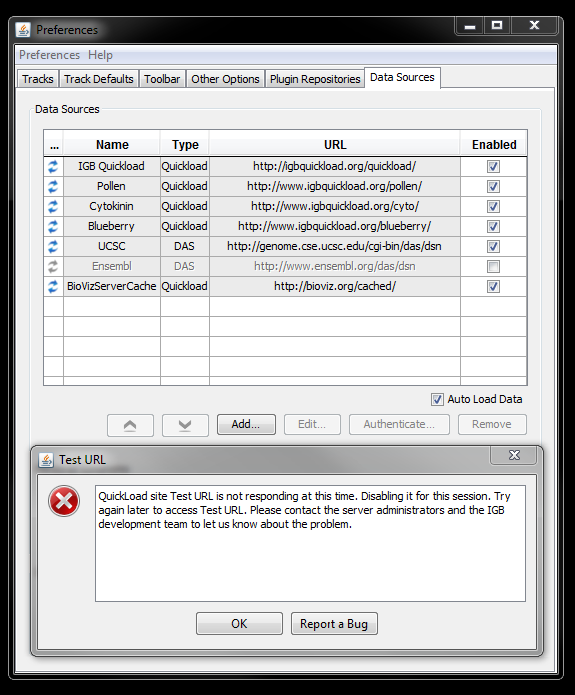
While testing issues relating to adding a data source I noticed that IGB sometimes generates a pop-up when there is a problem with the data source that is being added (see attachment). This pop-up explains that IGB is "Disabling the Data Source for the session".
However, under the Data Sources tab within the Preferences widget I noticed that there are a list of Data Sources that have been added. If they are enabled, there is a checked box under the "Enabled column". If they are DISABLED then the checkbox is not checked.
The problem is that when IGB generates the popup "Disabling for the session", this disabled data source does not get added to the data source list in Preferences. It should get added but the "Enabled checkbox" should just not be checked since the source is disabled, but this does not happen.
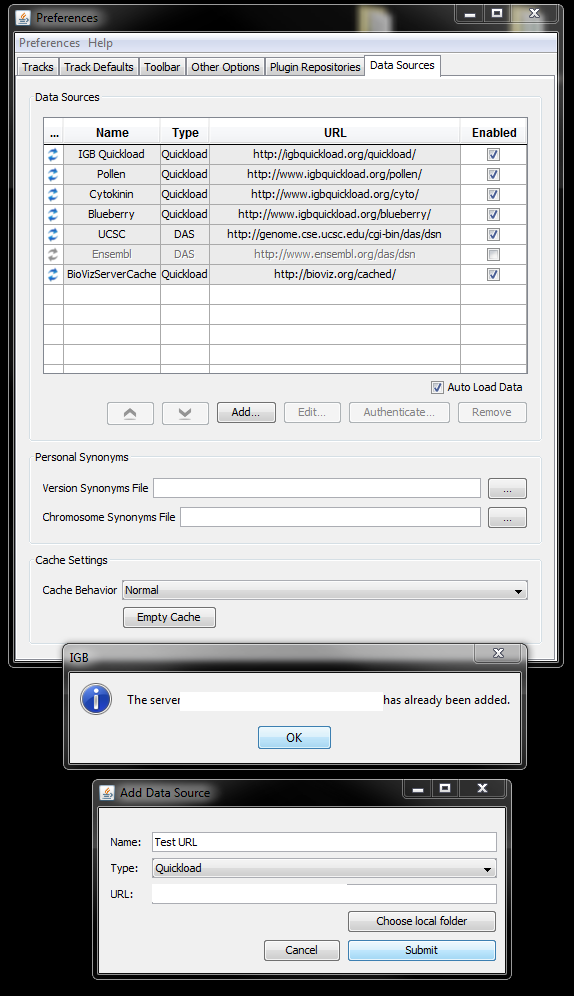
Since it is not added to the list, there is no way to edit, remove, or add the disabled data source. Trying to re-add the data source generates a popup stating "This data source has already been added" (see other attachment;exact URL has been hidden). The only way to add the data source again is to Reset IGB Preferences, unfortunately.