Uploaded image for project: 'IGB'
  1. IGB
  2. IGBF-4132

Add searchable Species dropdown in IGB

    Details

    • Type: Task
    • Status: Closed (View Workflow)
    • Priority: Major
    • Resolution: Done
    • Affects Version/s: None
    • Fix Version/s: None
    • Labels:
      None
    • Story Points:
      3
    • Sprint:
      Spring 4, Spring 5, Spring 6, Spring 7, Fall 5, Fall 6, Fall 7, Fall 8, Fall 9

      Description

      Situation: As additional genomes are added to IGB, the Species dropdown has gotten larger and more difficult to navigate.

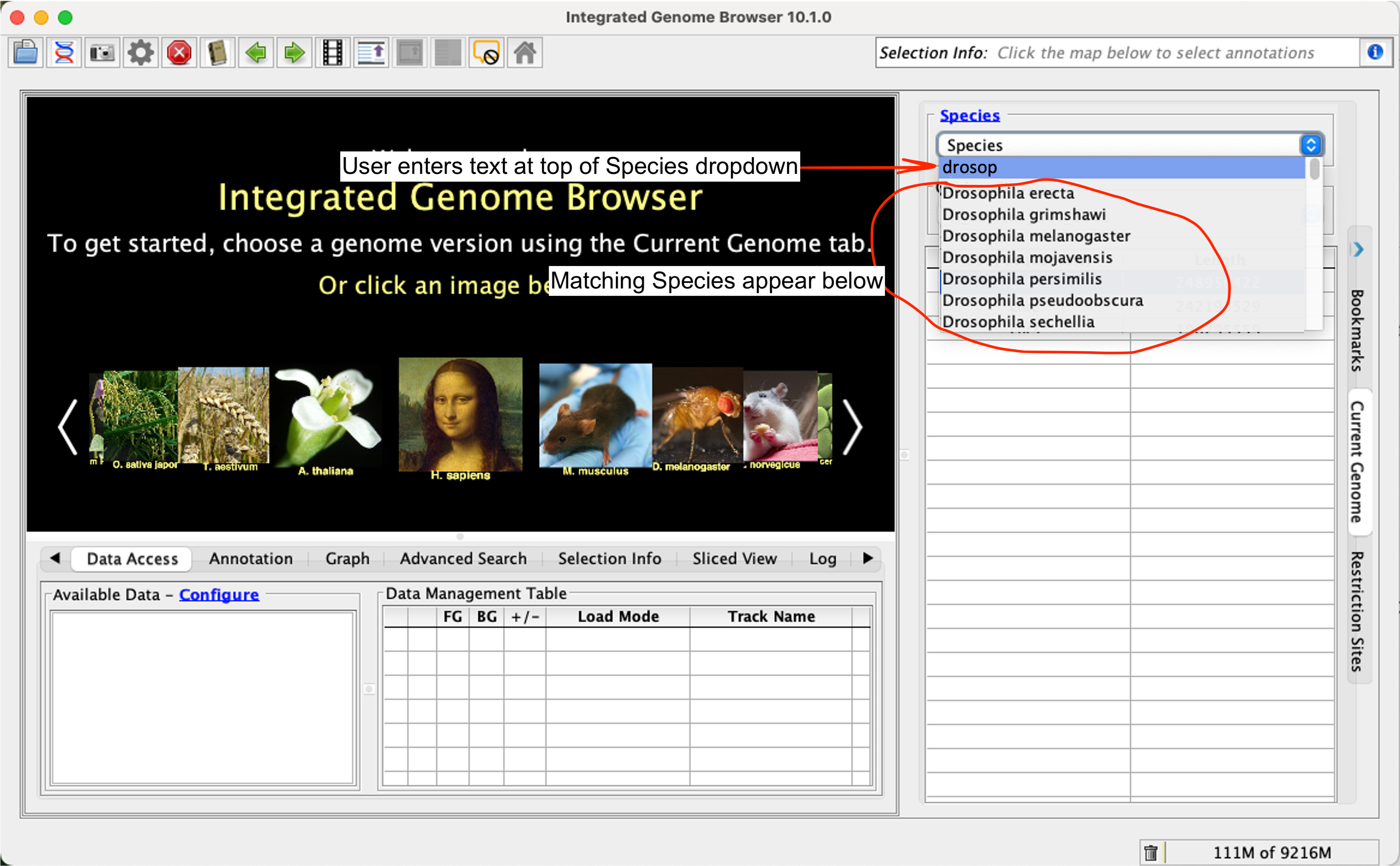
      Task: Add the ability for an IGB user to search for a genome within the Species dropdown. Ideally a user would click on the Species dropdown, then start typing their search string and the list of genomes would be subset to show matches. The search string would be visible to the user at the top of the list of available Species.

        Attachments
          Issue Links

            Activity

            Show
            nfreese Nowlan Freese added a comment - Pranav's code changes: https://bitbucket.org/pranavbhatia1999/integrated-genome-browser/branch/IGBF-4132
            Hide
            ann.loraine Ann Loraine added a comment -

            The changes look good. Should we proceed to a pull request Nowlan Freese ?

            Show
            ann.loraine Ann Loraine added a comment - The changes look good. Should we proceed to a pull request Nowlan Freese ?
            Hide
            nfreese Nowlan Freese added a comment -

            Ann Loraine - This is preliminary work that Pranav had from the spring. I asked him to push his changes so that we wouldn't lose them. I think saideepthi jagarapu was considering picking up this ticket and completing the work.

            Show
            nfreese Nowlan Freese added a comment - Ann Loraine - This is preliminary work that Pranav had from the spring. I asked him to push his changes so that we wouldn't lose them. I think saideepthi jagarapu was considering picking up this ticket and completing the work.
            Hide
            ann.loraine Ann Loraine added a comment -

            I asked saideepthi jagarapu to pick up updating the hub-facade playbooks. If she gets stuck on that or when she finishes, we could ask her to pick this up. It depends on how high a priority it would be and whether we want to get this included in the new release.

            Show
            ann.loraine Ann Loraine added a comment - I asked saideepthi jagarapu to pick up updating the hub-facade playbooks. If she gets stuck on that or when she finishes, we could ask her to pick this up. It depends on how high a priority it would be and whether we want to get this included in the new release.
            Hide
            nfreese Nowlan Freese added a comment - - edited

            Recommendations based on talking with Deepthi and comparing to https://bioviz.org/genome-dashboard:

            • Users should be able to search for scientific species name as well as any tooltip names. For example, a user searching for "human" would pull up the "Homo sapiens" species.
            • The "Species" dropdown should have the word Species in it as usual. When clicked, the text should change to "Search" and the text should be in the background greyed out and not selectable. When the user starts typing their text immediately replaces the "Search" text.
            • Mockup: https://docs.google.com/presentation/d/1tsej7ZgRwZb-NE5WszDHxbWHpjRMq7RLTfPFHj5lr7A/edit?usp=sharing
            Show
            nfreese Nowlan Freese added a comment - - edited Recommendations based on talking with Deepthi and comparing to https://bioviz.org/genome-dashboard: Users should be able to search for scientific species name as well as any tooltip names. For example, a user searching for "human" would pull up the "Homo sapiens" species. The "Species" dropdown should have the word Species in it as usual. When clicked, the text should change to "Search" and the text should be in the background greyed out and not selectable. When the user starts typing their text immediately replaces the "Search" text. Mockup: https://docs.google.com/presentation/d/1tsej7ZgRwZb-NE5WszDHxbWHpjRMq7RLTfPFHj5lr7A/edit?usp=sharing
            Hide
            nfreese Nowlan Freese added a comment - - edited

            Testing branch: https://bitbucket.org/lorainelab-deepthi/integrated-genome-browser/branch/IGBF-4132

            • If I search for something in the Species dropdown, but then click on an image in the carousel it takes me to the selected genome version, but the options in the species dropdown are for what I had previously searched for.
            • If I click in the textbox after I have selected a genome version, I should be able to click outside of the text box and the textbox should no longer be selected.
            • When I click on the Species text box I am seeing the word Species and I have to delete the word before I can type something. I would expect to click on it and see Search Species and as soon as I type it would replace the text with my text.
            • If I choose a genome version. Delete the value in the Species text box. Then click the Species button/link. It should go to the carousel, but if click several times it is going to a blank screen.
            Show
            nfreese Nowlan Freese added a comment - - edited Testing branch: https://bitbucket.org/lorainelab-deepthi/integrated-genome-browser/branch/IGBF-4132 If I search for something in the Species dropdown, but then click on an image in the carousel it takes me to the selected genome version, but the options in the species dropdown are for what I had previously searched for. If I click in the textbox after I have selected a genome version, I should be able to click outside of the text box and the textbox should no longer be selected. When I click on the Species text box I am seeing the word Species and I have to delete the word before I can type something. I would expect to click on it and see Search Species and as soon as I type it would replace the text with my text. If I choose a genome version. Delete the value in the Species text box. Then click the Species button/link. It should go to the carousel, but if click several times it is going to a blank screen.
            Show
            sjagarap saideepthi jagarapu added a comment - - edited Branch Changes https://bitbucket.org/lorainelab-deepthi/integrated-genome-browser/branch/IGBF-4132_1
            Hide
            nfreese Nowlan Freese added a comment -

            Testing the new branch changes

            • If I select Triticum aestivum, then the genome version, the genome loads as expected. If I then click the Species dropdown (do not make any changes) and then click on the Genome Version dropdown, the screen goes to the black "Select genome version" even though the Genome Version is still selected. The only way to get out of it is to change the Genome Version back to "Genome Version" and then select the correct genome version.
            Show
            nfreese Nowlan Freese added a comment - Testing the new branch changes If I select Triticum aestivum, then the genome version, the genome loads as expected. If I then click the Species dropdown (do not make any changes) and then click on the Genome Version dropdown, the screen goes to the black "Select genome version" even though the Genome Version is still selected. The only way to get out of it is to change the Genome Version back to "Genome Version" and then select the correct genome version.
            Hide
            pkulzer Paige Kulzer (Inactive) added a comment -

            Fetched Deepthi's new branch for testing, here's some things I noticed that were finicky from a naive user's perspective:

            • I'm unable to use the keyboard shortcut to highlight all text in the search box (command+a on Mac)
            • I'm unable to use the left/right arrow keys to step through the text in the search box. This would be nice for editing a typo earlier in the search, for example.
            • Same issue with the up/down arrow keys for flipping through search results.
            Show
            pkulzer Paige Kulzer (Inactive) added a comment - Fetched Deepthi's new branch for testing, here's some things I noticed that were finicky from a naive user's perspective: I'm unable to use the keyboard shortcut to highlight all text in the search box (command+a on Mac) I'm unable to use the left/right arrow keys to step through the text in the search box. This would be nice for editing a typo earlier in the search, for example. Same issue with the up/down arrow keys for flipping through search results.
            Hide
            sjagarap saideepthi jagarapu added a comment -

            I have pushed changes to handle keyboard shortcuts, like command+a, cut, paste, navigating left, right, up, down keys.

            Show
            sjagarap saideepthi jagarapu added a comment - I have pushed changes to handle keyboard shortcuts, like command+a, cut, paste, navigating left, right, up, down keys.
            Hide
            nfreese Nowlan Freese added a comment -

            Some of the keyboard shortcuts like command+a still are not working as expected. We are going to try to get rid of some of the override code and the placeholder text and see if that fixes things.

            Show
            nfreese Nowlan Freese added a comment - Some of the keyboard shortcuts like command+a still are not working as expected. We are going to try to get rid of some of the override code and the placeholder text and see if that fixes things.
            Hide
            nfreese Nowlan Freese added a comment -

            saideepthi jagarapu - which branch should I test? I tried IGBF-4132_1 but it wasn't working.

            Show
            nfreese Nowlan Freese added a comment - saideepthi jagarapu - which branch should I test? I tried IGBF-4132 _1 but it wasn't working.
            Hide
            nfreese Nowlan Freese added a comment -

            Code for this ticket showed a working prototype, but unfortunately we were not able to get it working as well as we wanted to include in a release. I am creating two PRs for the two branches of this ticket to the Loraine Lab repository so that we do not lose the code.

            PR 1: https://bitbucket.org/lorainelab/integrated-genome-browser/pull-requests/1092
            PR 2: https://bitbucket.org/lorainelab/integrated-genome-browser/pull-requests/1093

            Once these branches have been added to the Loraine Lab repository this ticket can be closed.

            Show
            nfreese Nowlan Freese added a comment - Code for this ticket showed a working prototype, but unfortunately we were not able to get it working as well as we wanted to include in a release. I am creating two PRs for the two branches of this ticket to the Loraine Lab repository so that we do not lose the code. PR 1: https://bitbucket.org/lorainelab/integrated-genome-browser/pull-requests/1092 PR 2: https://bitbucket.org/lorainelab/integrated-genome-browser/pull-requests/1093 Once these branches have been added to the Loraine Lab repository this ticket can be closed.

              People

              • Assignee:
                sjagarap saideepthi jagarapu
                Reporter:
                nfreese Nowlan Freese
              • Votes:
                0 Vote for this issue
                Watchers:
                4 Start watching this issue

                Dates

                • Created:
                  Updated:
                  Resolved: