Details
-
Type:
Task
-
Status: In Progress (View Workflow)
-
Priority:
 Major
Major
-
Resolution: Unresolved
-
Affects Version/s: None
-
Fix Version/s: None
-
Labels:None
Description
Trying to modify the shortcuts in the Preferences / Toolbar panel ...
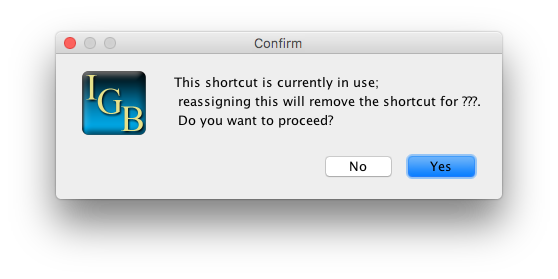
When I enter a shortcut that already exists in the table, the error message says "???" where it should say the name of the function that already has that shortcut.
After I enter a keyboard shortcut, it does not always become visible in the table. I entered "ctrl+E" for Save Image; but after I hit enter, the space looked blank. But if I click on it, it shows that shortcut. Using ctrl+E does not start the image.
I restarted IGB.
Now the ctrl+E shows up in the table, and when I press ctrl+E, it opens the save image window.
Attachments
Issue Links
- relates to
-
IGBF-519 Keyboard Shortcut text is not being updated in the table
-
- Closed
-
Activity
I have been able to reproduce each of these symptoms in v 9.0.0,
except for the "???" in the error message. ---which is also inconsistent in v9.0.1.
I don't remember which specific features I did see it for; so it is very hard to say if that issue is absent / different / same between versions.
This was inconsistent.
Sometimes, I was just able to add a shortcut and it all worked perfectly.
One time, I changed a shortcut, and it was updated in the table immediately. But it didn't actually work... the shortcut still did its old thing. Then I restarted IGB, and tried the shortcut, it did the new thing it was supposed to do.
These changes are not consistently being integrated into preferences; and restarting the program prompts the update that is not being triggered when it should be.
At this point, I do not think this issue warrants a delay in the release of v 9.0.1.