Details
-
Type:
Task
-
Status: In Progress (View Workflow)
-
Priority:
 Major
Major
-
Resolution: Unresolved
-
Affects Version/s: None
-
Fix Version/s: None
-
Labels:None
Description
Trying to modify the shortcuts in the Preferences / Toolbar panel ...
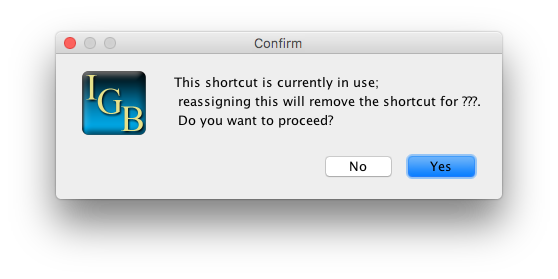
When I enter a shortcut that already exists in the table, the error message says "???" where it should say the name of the function that already has that shortcut.
After I enter a keyboard shortcut, it does not always become visible in the table. I entered "ctrl+E" for Save Image; but after I hit enter, the space looked blank. But if I click on it, it shows that shortcut. Using ctrl+E does not start the image.
I restarted IGB.
Now the ctrl+E shows up in the table, and when I press ctrl+E, it opens the save image window.
Attachments
Issue Links
- relates to
-
IGBF-519 Keyboard Shortcut text is not being updated in the table
-
- Closed
-
Activity
| Description |
When I enter a shortcut that already exists in the table, the error message says "???" where it should say the name of the function that already has that shortcut.
After I enter a keyboard shortcut, it does not always become visible in the table. I entered "ctrl+E" for Save Image; but after I hit enter, the space looked blank. But if I click on it, it shows that shortcut. Using ctrl+E does not start the image. |
Trying to modify the shortcuts in the Preferences / Toolbar panel ...
When I enter a shortcut that already exists in the table, the error message says "???" where it should say the name of the function that already has that shortcut. After I enter a keyboard shortcut, it does not always become visible in the table. I entered "ctrl+E" for Save Image; but after I hit enter, the space looked blank. But if I click on it, it shows that shortcut. Using ctrl+E does not start the image. I restarted IGB. Now the ctrl+E shows up in the table, and when I press ctrl+E, it opens the save image window. |
| Workflow | Loraine Lab Workflow [ 18020 ] | Fall 2019 Workflow Update [ 18875 ] |
| Workflow | Fall 2019 Workflow Update [ 18875 ] | Revised Fall 2019 Workflow Update [ 21000 ] |
| Status | Open [ 1 ] | In Progress [ 3 ] |