Details
-
Type:
Task
-
Status: Closed (View Workflow)
-
Priority:
 Major
Major
-
Resolution: Done
-
Affects Version/s: None
-
Fix Version/s: 9.1.6 Major Release
-
Labels:None
-
Story Points:1
-
Epic Link:
-
Sprint:Fall 1: 14 Sep - 25 Sep, Fall 2: 28 Sep - 9 Oct, Fall 3: Oct 12 - Oct 23
Description
Situation: A user commented on the lack of variants for the Androgen Receptor (AR) gene in humans. This paper discusses several variants, while the current human annotation for hg19 and hg38 has only two variants. We would like to add an additional annotation to mirror what is in NCBI .
Task: Add the RefSeq annotation for hg19 and hg38 for humans. Need to find additional gene name information for field 13 and 14.
Attachments
Issue Links
- relates to
-
-
- Closed
-
Activity
| Workflow | Loraine Lab Workflow [ 18338 ] | Fall 2019 Workflow Update [ 18958 ] |
| Workflow | Fall 2019 Workflow Update [ 18958 ] | Revised Fall 2019 Workflow Update [ 21083 ] |
| Status | Open [ 1 ] | In Progress [ 3 ] |
| Status | In Progress [ 3 ] | To-Do [ 10305 ] |
| Epic Link | IGBF-1765 [ 17855 ] |
| Sprint | Summer 4: 14 Jul - 28 Jul [ 99 ] |
| Rank | Ranked lower |
| Sprint | Summer 4: 14 Jul - 28 Jul [ 99 ] |
| Rank | Ranked higher |
| Rank | Ranked higher |
| Sprint | Fall 1: 14 Sep - 25 Sep [ 103 ] |
| Rank | Ranked lower |
| Rank | Ranked higher |
| Rank | Ranked higher |
| Status | To-Do [ 10305 ] | In Progress [ 3 ] |
| Assignee | Nowlan Freese [ nfreese ] |
| Status | In Progress [ 3 ] | To-Do [ 10305 ] |
| Sprint | Fall 1: 14 Sep - 25 Sep [ 103 ] | Fall 1: 14 Sep - 25 Sep, Fall 2: 28 Sep - 9 Oct [ 103, 104 ] |
| Rank | Ranked higher |
| Rank | Ranked higher |
| Status | To-Do [ 10305 ] | In Progress [ 3 ] |
I ran into an issue when trying to run the ucscToBedDetail.py file. UCSC table browser output is now including the accession and version (previously only included the accession). There are two ways to fix the issue in ucscToBedDetail.py:
1) If I remove the version when reading in the bed file as well as the gene2accession file the output has no gene id for 2,976 out of 166,923 accessions.
2) If I keep the version when reading in the bed file as well as the gene2accession file there is no matching gene id for 19,381 out of 166,923 accessions.
It may be more accurate to match only the exact versions for each accession, however this leads to more NA values in the output bed file than if we simply match based on accession and ignore the version.
Ann Loraine if you could please comment on the approach you would like me to take.
I think the best approach would be to match using accession only (no version suffix).
Pull request with fix for ucscToBedDetail.py to handle removing of version from accession when reading in ucsc table browser bed data: https://bitbucket.org/lorainelab/genomesource/pull-requests/17
Have completed committing updates for the following files:
H_sapiens_Dec_2013_snp153Common.bed.gz.tbi
H_sapiens_Dec_2013_refGene.bed.gz.tbi
H_sapiens_Dec_2013_snp153Common.bed.gz
H_sapiens_Dec_2013_refGene.bed.gz
H_sapiens_Dec_2013_ncbiRefSeqCurated.bed.gz.tbi
H_sapiens_Dec_2013_ncbiRefSeqCurated.bed.gz
H_sapiens_Dec_2013_ncbiRefSeq.bed.gz.tbi
H_sapiens_Dec_2013_ncbiRefSeq.bed.gz
H_sapiens_Dec_2013_all_mrna.psl.gz.tbi
H_sapiens_Dec_2013_all_mrna.psl.gz
H_sapiens_Dec_2013_all_est.psl.gz.tbi
H_sapiens_Dec_2013_all_est.psl.gz
annots.xml
Notes on updating the human genome:
Most of the annotation files come from the UCSC Table Browser: https://genome-euro.ucsc.edu/cgi-bin/hgTables
group > All Tracks; track: NCBI RefSeq
Output format for bed files should be set to "BED - browser extensible data".
Output format for psl files should be set to "all fields from selected table".
Many of the bed files need to be converted to bed detail and tabix indexed following instructions in the Google Drive under the name: "How we add new genomes to IGB Quickload using UCSC Genome Informatics as a data source".
*Updated gene2accession and gene_info files can be found here: ftp://ftp.ncbi.nlm.nih.gov/gene/DATA/
*genomeSource repo: https://bitbucket.org/lorainelab/genomesource/src/master/
The psl files need to be tabix indexed using the following instructions: https://wiki.bioviz.org/confluence/display/igbdevelopers/Adding+a+new+genome+-+X.+tropicalis+Nov+2009
psl example:
To process the EST data set, I used the following command to strip off the first column
$ gunzip -c X_tropicalis_Nov_2009_all_est.gz | grep -v bin | cut -f2- > X_tropicalis_Nov_2009_all_est.psl
Next, I sorted and created an index using bgzip and tabix:
$ sort -k14,14 -k16,16n X_tropicalis_Nov_2009_all_est.psl > sorted.psl
$ mv sorted.psl X_tropicalis_Nov_2009_all_est.psl
$ bgzip X_tropicalis_Nov_2009_all_est.psl
$ tabix -s 14 -b 16 -0 X_tropicalis_Nov_2009_all_est.psl.gz
Once files are ready to be submitted, need access to subversion repository. Instructions for submitting to the subversion repository can be found in Google Drive under name "Setting up the Quickload subversion repository on EC2 with EBS".
Subversion repository can be found here: https://svn.bioviz.org/viewvc/genomes/quickload/H_sapiens_Dec_2013/
Ann Loraine - I have created a pull request for the changes to ucscToBedDetail.py and have committed the updated human annotation files to the subversion repository following testing on my local machine.
| Assignee | Nowlan Freese [ nfreese ] | Ann Loraine [ aloraine ] |
| Status | In Progress [ 3 ] | Needs 1st Level Review [ 10005 ] |
| Status | Needs 1st Level Review [ 10005 ] | First Level Review in Progress [ 10301 ] |
| Status | First Level Review in Progress [ 10301 ] | Needs 1st Level Review [ 10005 ] |
| Status | Needs 1st Level Review [ 10005 ] | First Level Review in Progress [ 10301 ] |
| Status | First Level Review in Progress [ 10301 ] | Ready for Pull Request [ 10304 ] |
| Status | Ready for Pull Request [ 10304 ] | Pull Request Submitted [ 10101 ] |
| Sprint | Fall 1: 14 Sep - 25 Sep, Fall 2: 28 Sep - 9 Oct [ 103, 104 ] | Fall 1: 14 Sep - 25 Sep, Fall 2: 28 Sep - 9 Oct, Fall 3: Oct 12 - Oct 23 [ 103, 104, 106 ] |
| Rank | Ranked higher |
Merged.
Deployed new annotations on scidas quickload site: http://lorainelab-quickload.scidas.org/quickload/
Main Quickload site is not yet updated: http://quickload.org/quickload
To test the new annotations, open each updated data set (sci-das) and also open its older, non-updated version from main igbquickload.
- Select items in both to compare metadata. To see the metadata, open the "Selection Info" tab
- Compare the number of annotations in old versus new data sets. They should be about the same number, or more in the newer version.
- Put extra effort into making sure the reference gene models look correct. These are the gene models that load automatically from the server. (annots.xml specifies this using "load_hint" tag)
| Assignee | Ann Loraine [ aloraine ] |
| Status | Pull Request Submitted [ 10101 ] | Reviewing Pull Request [ 10303 ] |
| Status | Reviewing Pull Request [ 10303 ] | Merged Needs Testing [ 10002 ] |
| Status | Merged Needs Testing [ 10002 ] | Post-merge Testing In Progress [ 10003 ] |
| Assignee | Ann Loraine [ aloraine ] |
| Status | Post-merge Testing In Progress [ 10003 ] | Merged Needs Testing [ 10002 ] |
| Assignee | Ann Loraine [ aloraine ] |
| Assignee | Sai Supreeth Segu [ ssegu ] |
| Status | Merged Needs Testing [ 10002 ] | Post-merge Testing In Progress [ 10003 ] |
I'm unable to open the Main Quickload site http://quickload.org/quickload and I can access http://quickload.bioviz.org/quickload/
May I know if I can use http://quickload.bioviz.org/quickload/ instead of http://quickload.org/quickload
cc: Ann Loraine
- For comparing metadata, Do I need to run igb master branch code and igb 9.1.6 and then compare both metadata in the Datasouces tab?
- The number of annotations are the same in both old versus new data sets.
- I'm not sure how to make sure the reference gene models look correct?
URL should be igbquickload.org instead of quickload.org. Sorry for the incorrect information.
- For comparing metadata, Do I need to run igb master branch code and igb 9.1.6 and then compare both metadata in the Datasouces tab?
Correct me if I am wrong?
cc: Ann Loraine
No, you should run the released version of IGB - 9.1.4.
To determine which quickload sites are being used to deliver data to a given release of IGB, look up the file "igbDefaultPrefs.json" on that branch. Dr. Freese has updated the "main" quickload site, which is version-controlled here: https://svn.bioviz.org/viewvc/genomes/quickload/H_sapiens_Dec_2013/
There are two checked-out copies of same:
- http://igbquickload.org/quickload/H_sapiens_Dec_2013/ (not yet updated with Dr. Freese's changes)
- http://lorainelab-quickload.scidas.org/quickload/H_sapiens_Dec_2013/ (updated with Dr. Freese's changes)
Check the json preferences file to find out which one is being used as the primary site and which one is being used as a mirror, backup site. The one that is being used as a backup site has been updated - I logged onto the server and ran the command
svn up
to deploy all the latest changes made by Dr. Freese.
The primary site has not yet been updated.
What you would need to do is add the updated, backup site as a new data source using IGB 9.1.4's Data Management Table. (See https://wiki.transvar.org/display/igbman/Data+Access - you click "configure" to add the new quickload site for testing)
When you do that, then you will be able to compare the older and newer data sets by opening then one-by-one.
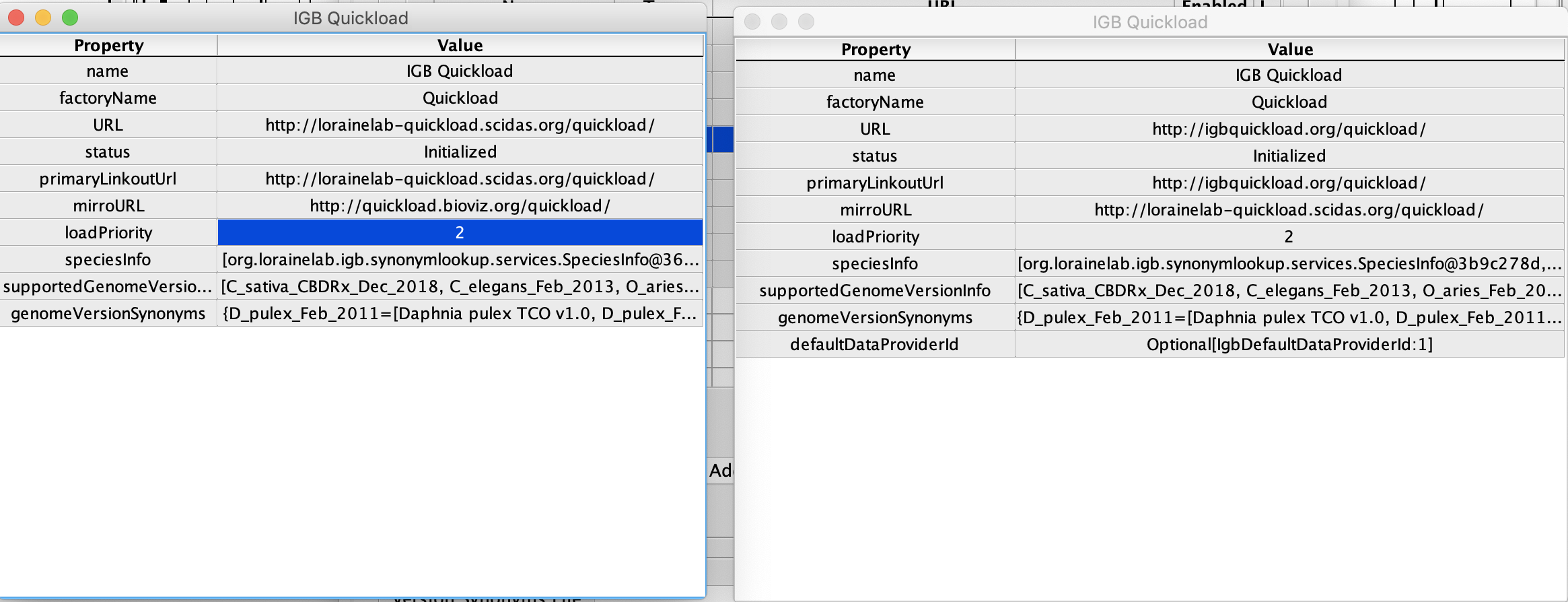
- When I am comparing metadata, default Data Provide Id was not loaded for
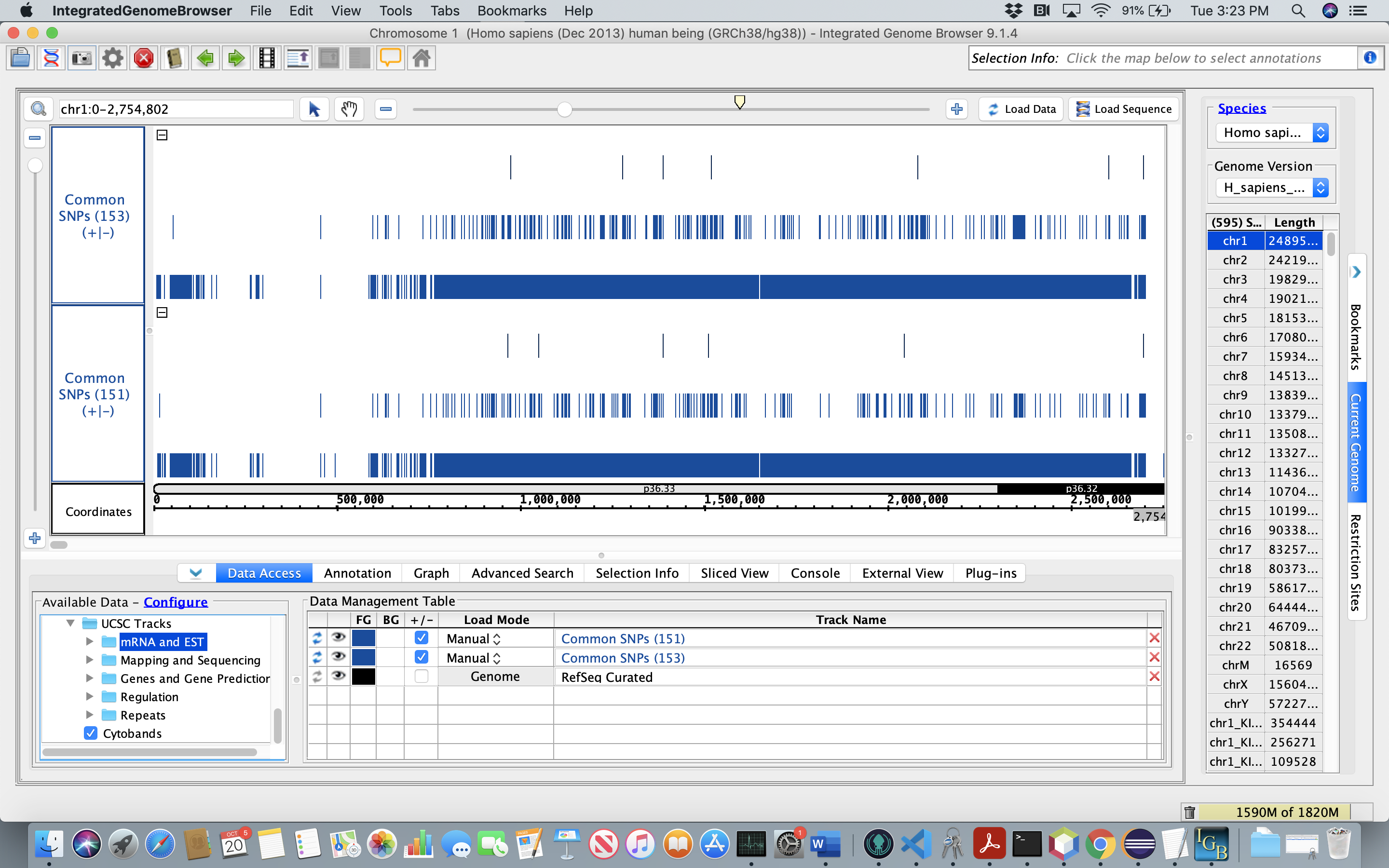
- The number of annotations are the same in both old versus new data sets.
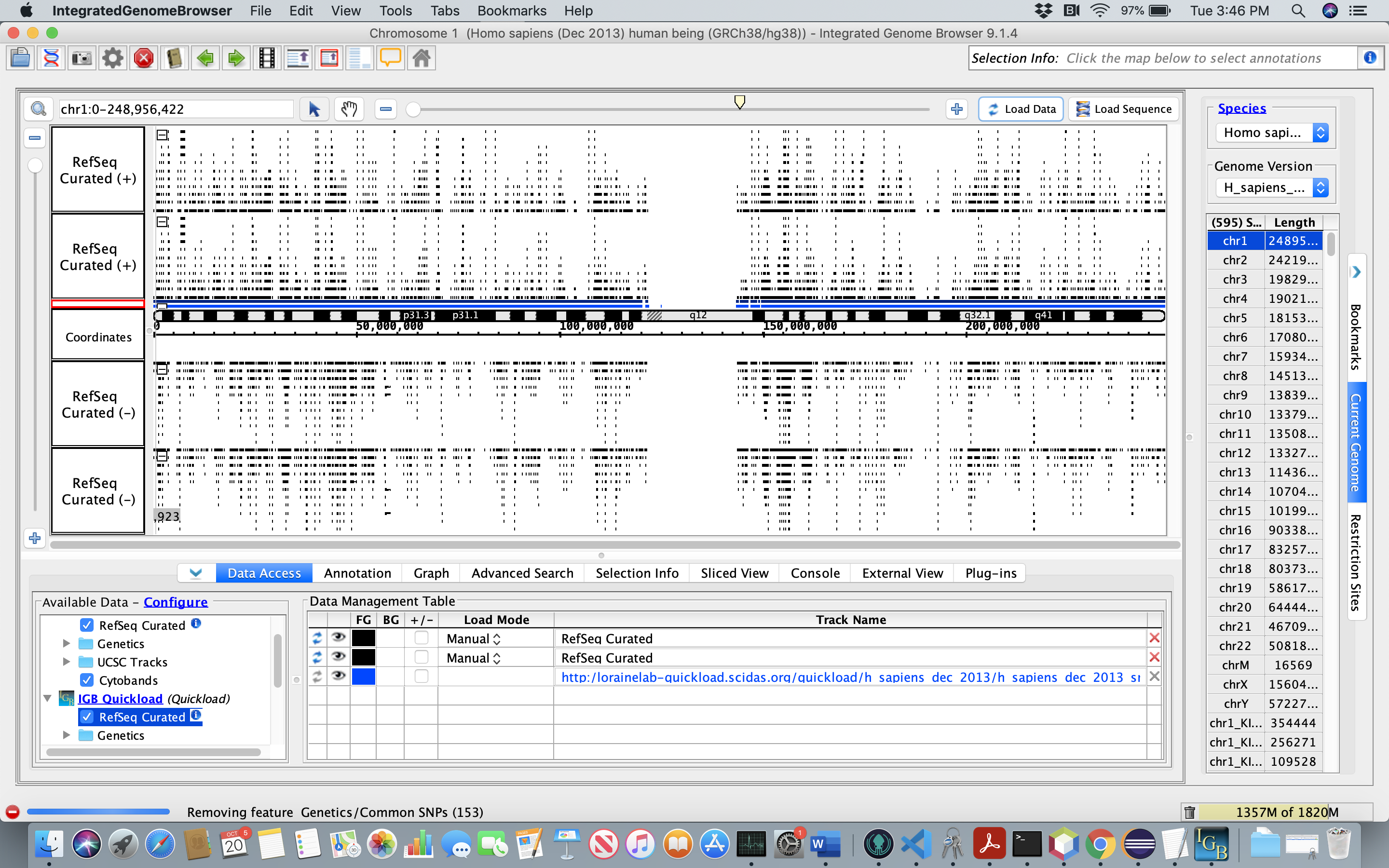
- Reference gene models look good to me.
cc: Ann Loraine
Screenshots for the above comments attached
| Attachment | MetadataCompare.png [ 14905 ] | |
| Attachment | SNP(old vs new).png [ 14906 ] | |
| Attachment | RefSeq_Compare.png [ 14907 ] |
.png)
| Assignee | Sai Supreeth Segu [ ssegu ] |
| Resolution | Done [ 10000 ] | |
| Status | Post-merge Testing In Progress [ 10003 ] | Closed [ 6 ] |
| Assignee | Nowlan Freese [ nfreese ] |
| Fix Version/s | 9.1.6 Major Release [ 10604 ] |
We updated dbSNP and genome annotations 15 months ago - see https://svn.bioviz.org/viewvc/genomes/quickload/H_sapiens_Dec_2013/ for history.
We should re-update these now. Moving to next sprint.