Details
-
Type:
Task
-
Status: Closed (View Workflow)
-
Priority:
 Major
Major
-
Resolution: Done
-
Affects Version/s: None
-
Fix Version/s: None
-
Labels:None
-
Story Points:0.25
-
Epic Link:
-
Sprint:Fall 8 : 25 Nov to 6 Dec
Description
See https://jira.transvar.org/browse/REL-40
"1) Sometimes, after installing the app from Appstore, the download count does not change. It reacts a bit slowly to fast installations and misses a count of downloads."
Attachments
Issue Links
- relates to
-
REL-40 End-to-end testing with App for Testing App Workflow
-
- Fix Requested
-
Activity
Ann Loraine, Riddhi Jagdish Patil and Sameer Shanbhag, What Shamika Gajanan Kulkarni meant is whenever we are trying to install any app from the IGB instead of Appstore and refresh the app page, the download count is not getting updated. Whereas, when we are trying to install the app from appstore, the count is updated. Riddhi Jagdish Patil and Sameer Shanbhag and I had a discussion on that and there is no such way of letting the appstore know that the app was install from the IGB. For that Riddhi Jagdish Patil has proposed some solutions above.
Question for Riddhi Jagdish Patil:
Regarding option 1:
To install an App, IGB sends a request to App Store.
Currently, all the requests look like:
- https://[App Store domain]/media/org.lorainelab.igb.protannot/releases/9.5.0/protannot-9.5.0.jar
When App Store receives such requests, it actually ends up sending the resource at:
- https://[s3 bucket domain]/media/org.lorainelab.igb.protannot/releases/9.5.0/protannot-9.5.0.jar
This occurs because we configured App Store's Apache server to redirect clients over to the S3 bucket domain whenever such requests contain the string "/media". All of that is happening in the Apache layer, not Django.
That said, we could implement a new endpoint that is entirely computational.
Our new endpoint could look like this:
- /bundles/org.lorainelab.igb.protannot/releases/9.5.0/protannot-9.5.0.jar
Notice "media" is gone.
This endpoint then responds to the above request with its own re-direct to:
- https://[s3 bucket domain]/media/org.lorainelab.igb.protannot/releases/9.5.0/protannot-9.5.0.jar (if S3 bucket is being used)
or to:
- https://[App Store domain]/media/org.lorainelab.igb.protannot/releases/9.5.0/protannot-9.5.0.jar (if S3 bucket is NOT being used)
We can implement this using Django paths and redirect command - see https://www.tutorialspoint.com/django/django_page_redirection.htm.
To implement, we modify "obr" in our project to ensure that if anyone ever needs to modify this business logic, they will know where to look.
It's only purpose would be two-fold: to record such requests in the database and redirect client requests to the location of the jar file. The only tricky part is making sure it's smart enough and flexible enough to handle our dual case of local storage (/media) or cloud storage (S3). For that, we look at how jar files are getting saved and use a consistent approach.
At the same time, we modify the repository.xml endpoint to use the new path to ensure IGB hits the new endpoint.
In this solution, we use Django to execute the re-direction whereas now we are using Apache to do it.
We can handle the other digital assets in exactly the same way as now. No changes are needed.
cc: Riddhi Jagdish Patil
cc: Sameer Shanbhag
Prutha Kulkarni, I think there is a confusion here. The point which you mentioned is something else which we discovered later.
The issue which I discovered earlier is mentioned below:
When I was trying to install the app from Appstore, then also the download count was not updated. Me, Pawan Bole and Riddhi Jagdish Patil were able to reproduce the issue.
On multiple installations as described by Professor in the document to verify the Downloads count, the count was not matching to the number of times we installed the app from Appstore.
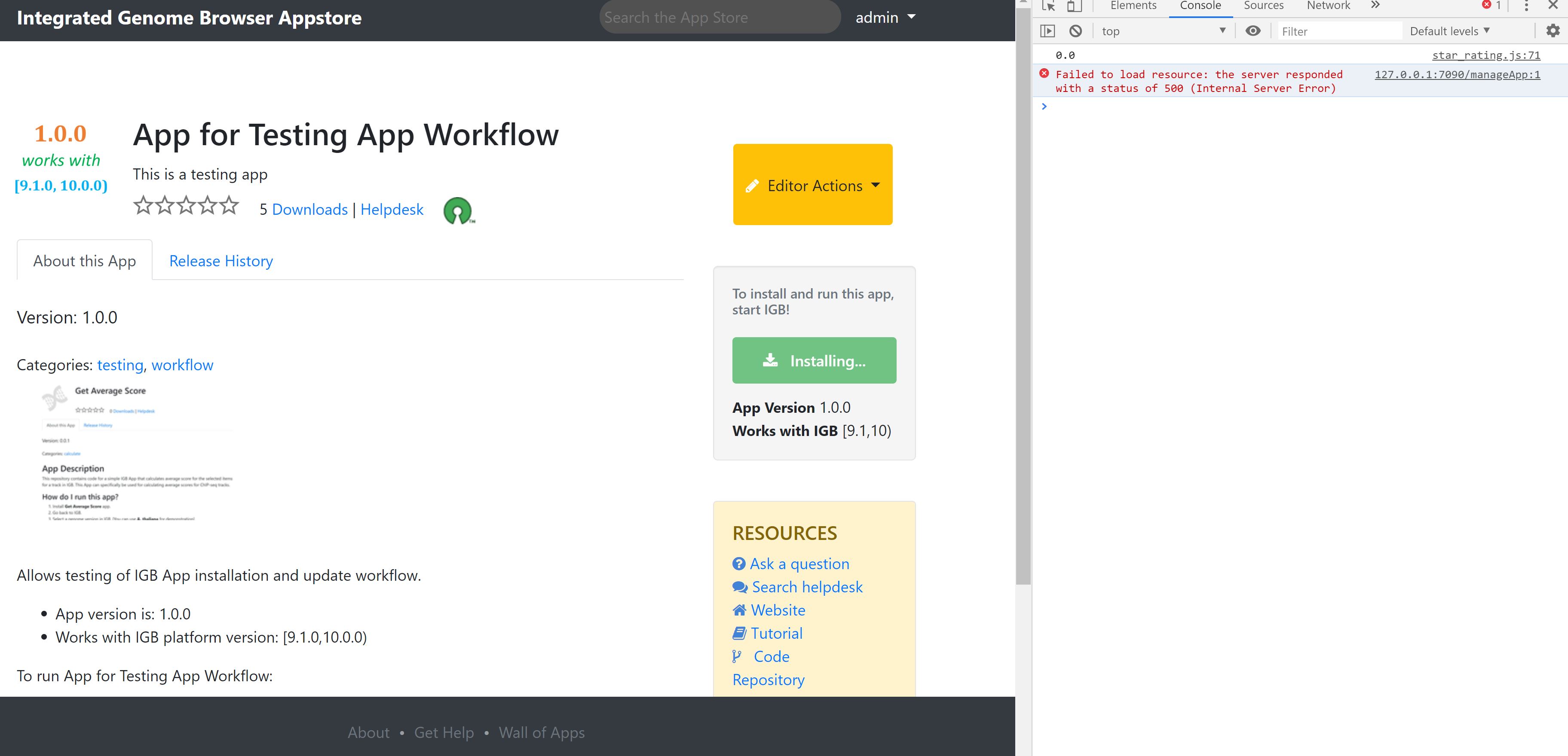
Sometimes, the button would freeze saying 'Installing' and when the page is refreshed the count remains unchanged even if the app actually gets installed. On checking the 'Inspect Element' we found an error and I am attaching a screenshot for this scenario.
Kindly check Prof. Ann Loraine, Riddhi Jagdish Patil, Sameer Shanbhag
Steps to reproduce the issue [It does not always throw this error. It is observed sometimes only]
Try releasing an app on Appstore. With IGB running, install the app from appstore by clicking on 'Install this app' button. Ideally, it changes to 'Installing' momentarily and then 'Installed' is displayed. But when there is an error as shown in the screenshot, the 'Installing' button does not change to 'Installed'. We need to refresh the page and then it shows 'Installed', the app gets installed too but the download count does not change.
Was Going through the install functionality in IGB. There is a part of code which calls the endpoint two times.
```
if (isInternetReachable(new URL(resource.getURI()))) <== First Call
```
Solution:
IsInternetReachable should call just the Domain and not the jar to check if there is an active Internet Connection
For Code Reference :
https://bitbucket.org/lorainelab/integrated-genome-browser/src/master/plugins/plugin-manager/src/main/java/org/lorainelab/igb/plugin/manager/BundleActionManager.java
This is probably right!
Please test it using master branch.
You can do it by using a JVM option that tells a java application to use a proxy server.
For ways to do it, see:
https://jira.transvar.org/browse/IGBF-2055
and
https://jira.transvar.org/browse/IGBF-2056
Assigning this JIRA to Sameer Shanbhag so he can test what happens if he makes above change to IGB code Wed morning.
cc: Riddhi Jagdish Patil
Problem Incrementing the Download Count 2 times has been fixed.
Pull Request Submitted:
https://bitbucket.org/lorainelab/integrated-genome-browser/pull-requests/760/igbf-2164/diff
Remaining Task:
Increment Download count when the app is downloaded(Installed / Upgraded) from IGB as well as Appstore (In Progress)
c.c. Prof. Ann Loraine
Merged to master.
Appstore part of this Ticket
Pull Request Submitted: https://bitbucket.org/lorainelab/appstore/pull-requests/191/igbf-2164fix/diff
After this pull request. We will be supporting increment in download count even when installed from IGB App Manager.
*NOTE *: Please Remove the Media rewrite rule from apache ssl-default.conf file
Steps:
1. On EC2 Navigate to '/etc/apache2/sites-available/'
2. Edit default-ssl.conf
3. Remove the following lines from the default-ssl.conf
RewriteRule "^/media/(.+)" "https://devappstore1-media-0000.s3.amazonaws.com/media/$1" [R,L]
4. Save the file
5. run this command > sudo a2ensite default-ssl
6. Restart the apache server to see the changes.
Tested the issue on dev-appstore-2 and latest early access version of IGB as discussed in the morning. Sameer Shanbhag, the count is updating properly now if we install the app from IGB as well as the appstore. Moving the ticket to done.
Professor,
There is one more case in downloads functionality which is not handled:
Do we need to handle this case?
Probable solutions-
1) When an app is downloaded from IGB, create a REST endpoint in Django which will be hit by IGB with Bundle_SymbolicName and Bundle_Version of downloaded app which can be stored in database.
2) Remove Install app button from IGB App Manager
cc. Ann Loraine