Details
-
Type:
Improvement
-
Status: First Level Review in Progress (View Workflow)
-
Priority:
 Blocker
-
Resolution: Unresolved
-
Affects Version/s: None
-
Fix Version/s: None
-
Labels:None
-
Story Points:4
-
Epic Link:
-
Sprint:Spring 2 2021 Apr 5 - Apr 16, Spring 3 2021 Apr 19 - Apr 30, Spring 4 2021 May 3 - May 14, Spring 5 2021 May 17 - May 28, Spring 6 2021 May 31 - June 11, Summer 1 2021 Jun 14 - Jun 25, Summer 2 2021 Jun 28 - Jul 9, Summer 3 2021 Jul 12 - Jul 23, Summer 4 2021 Aug 2 - Aug 13, Fall 1 2021 Aug 16 - Aug 27, Fall 2 2021 Aug 30 - Sep10, Fall 3 2021 Sep 13 - Sep 24, Fall 4 2021 Sep 27 - Oct 8
Description
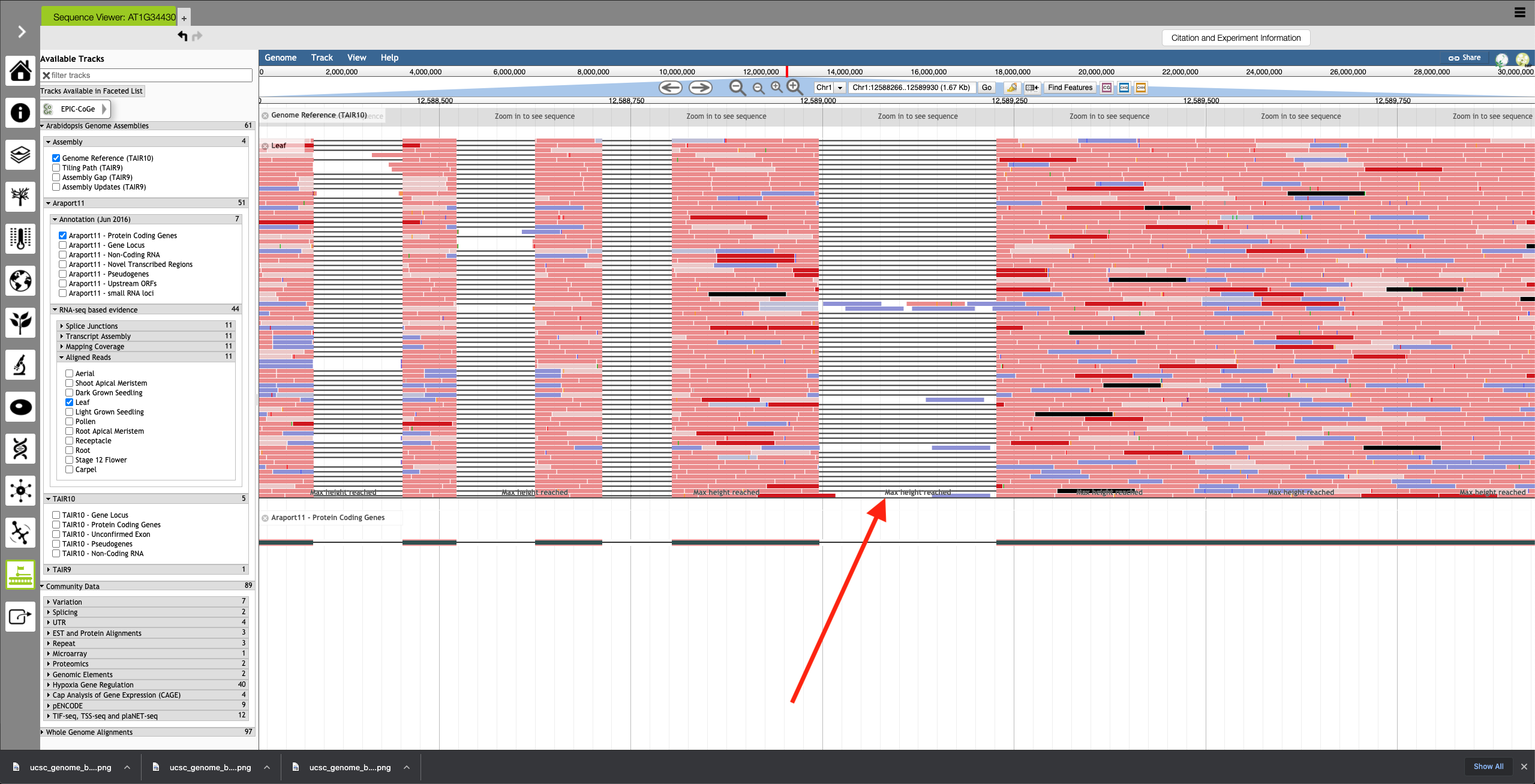
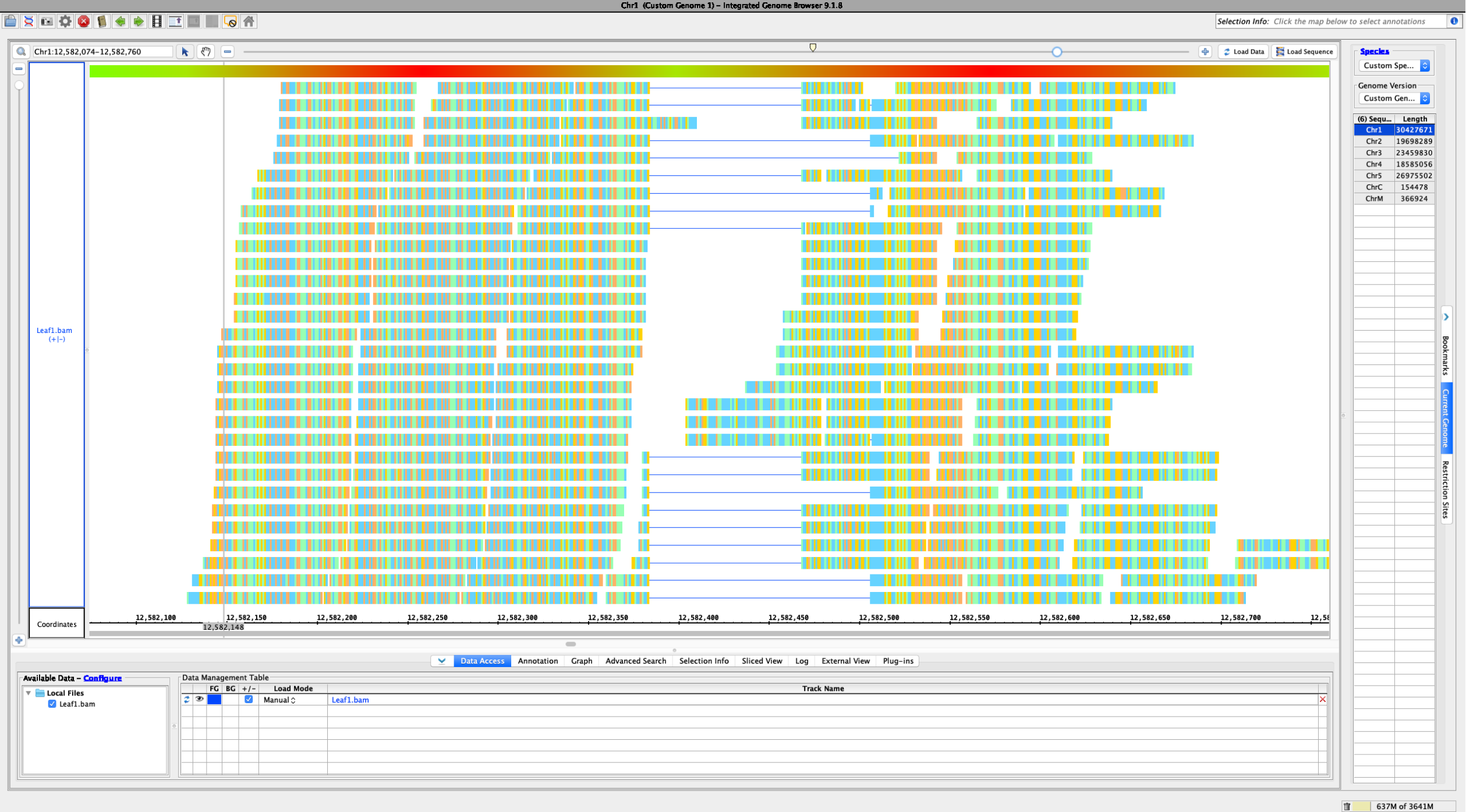
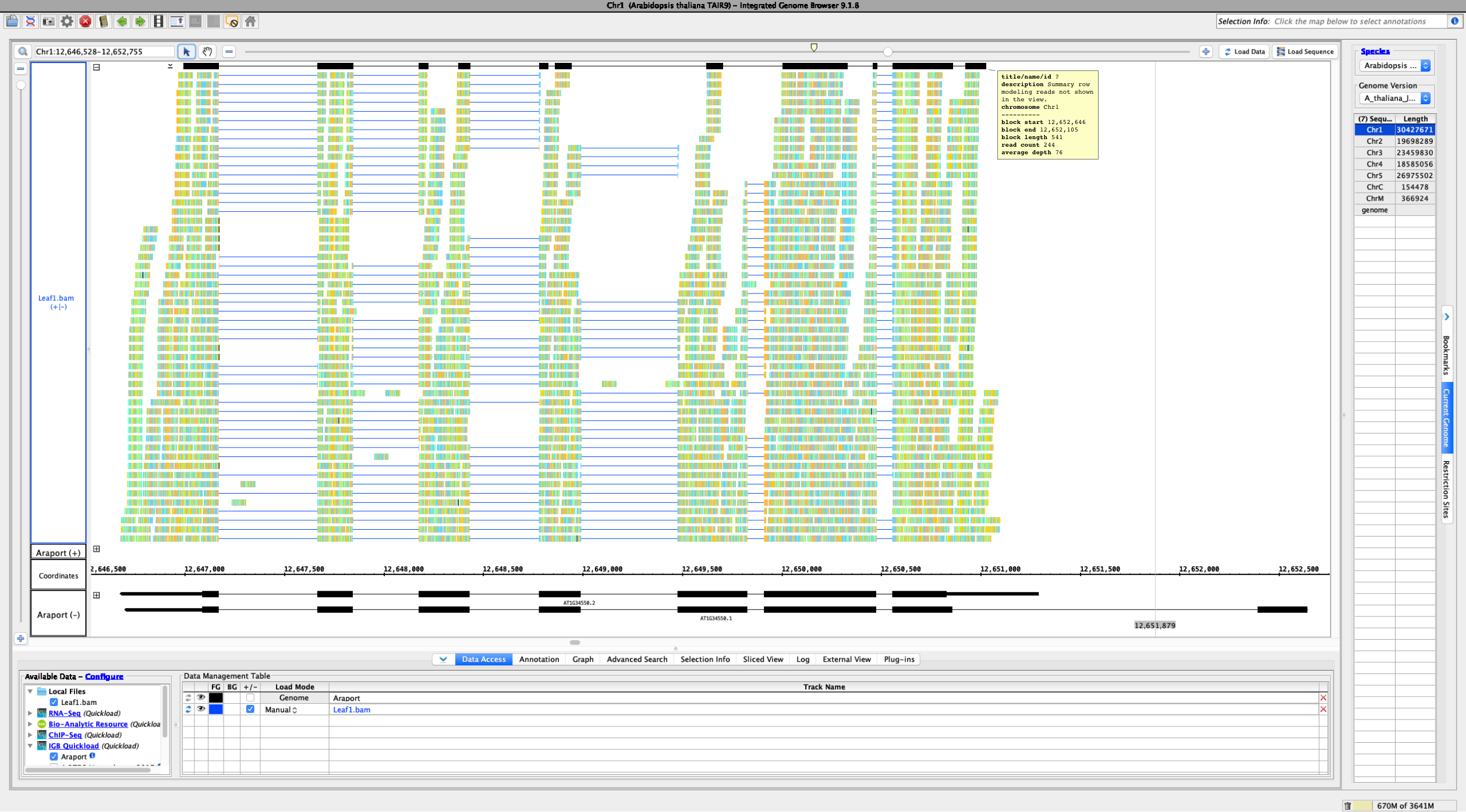
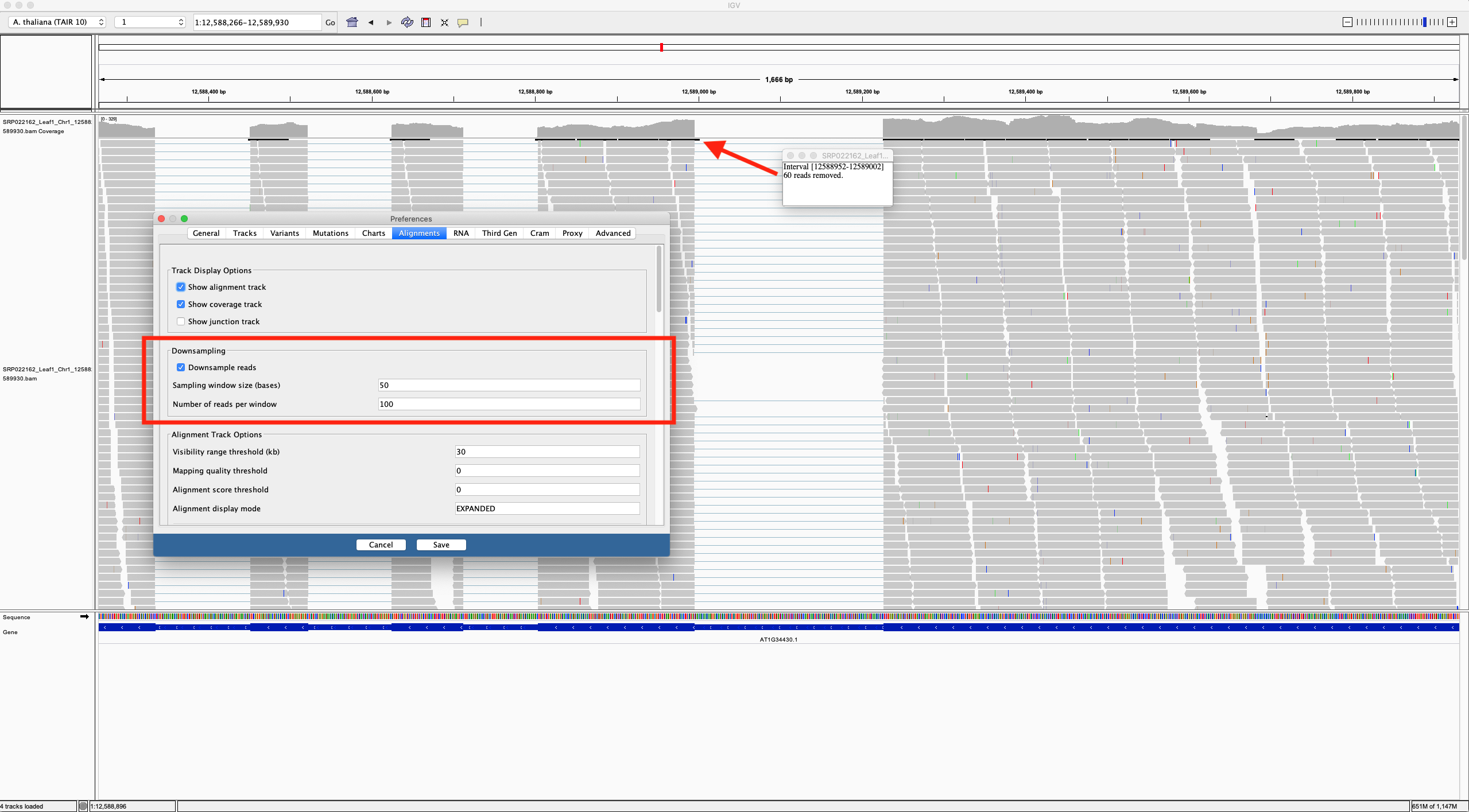
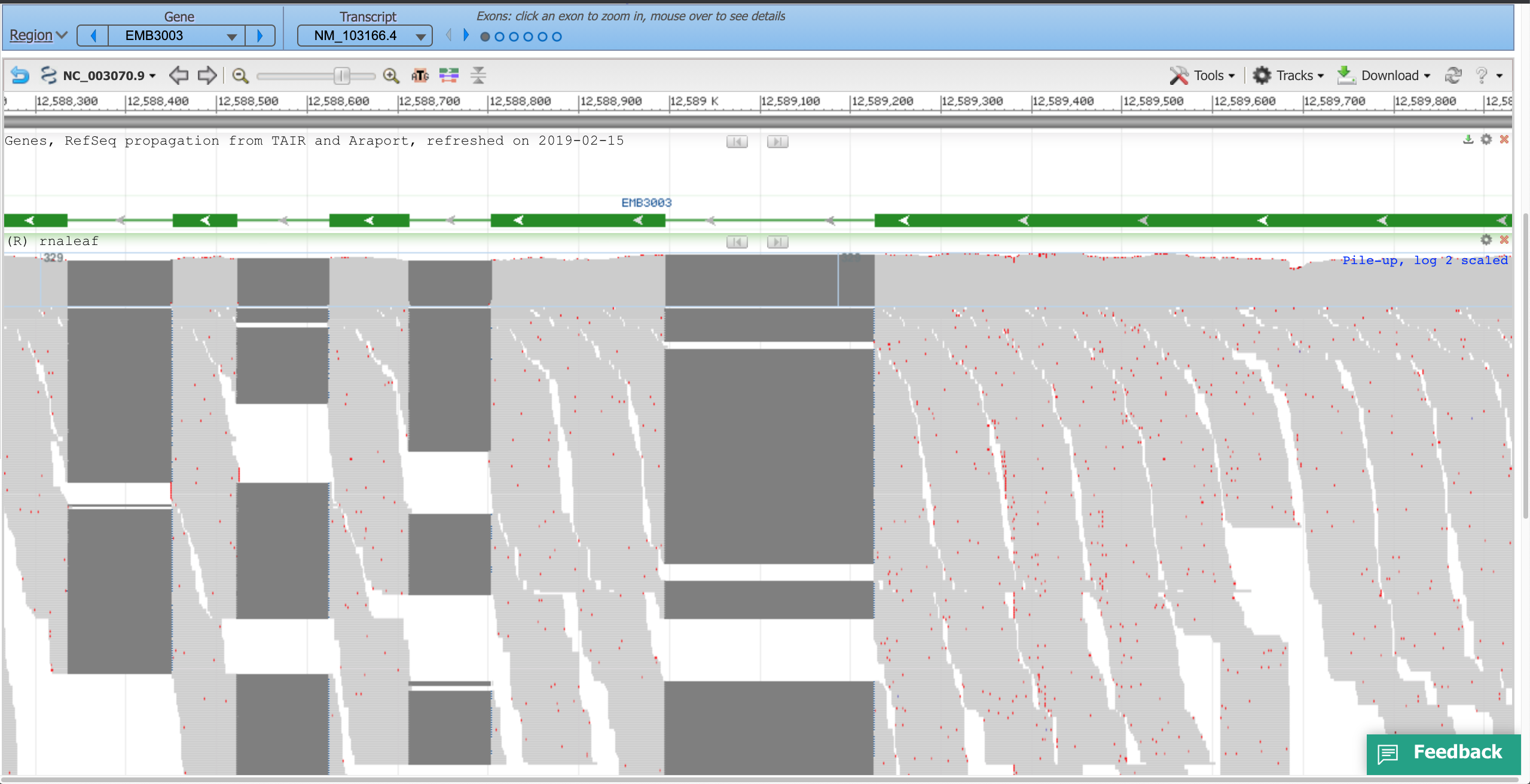
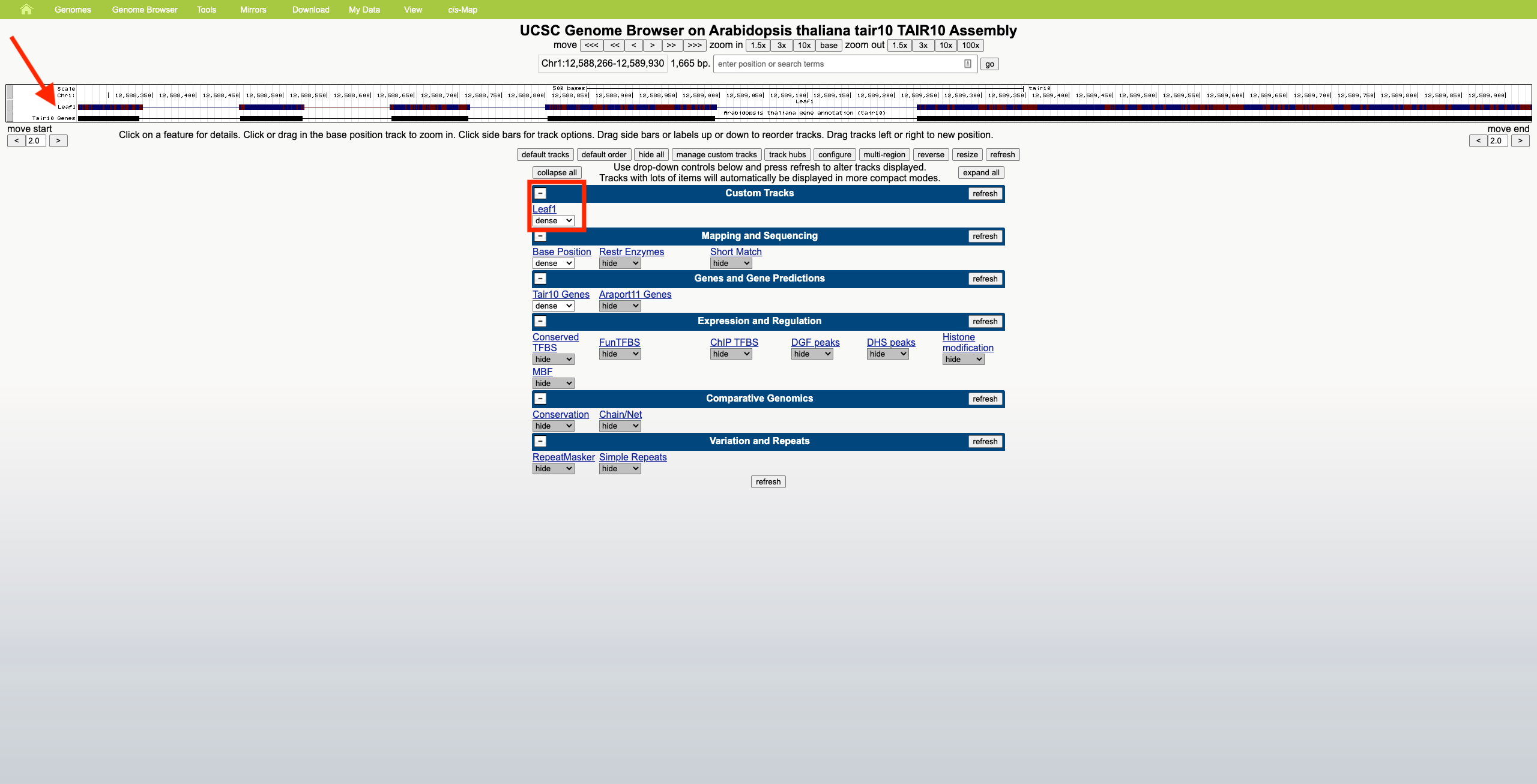
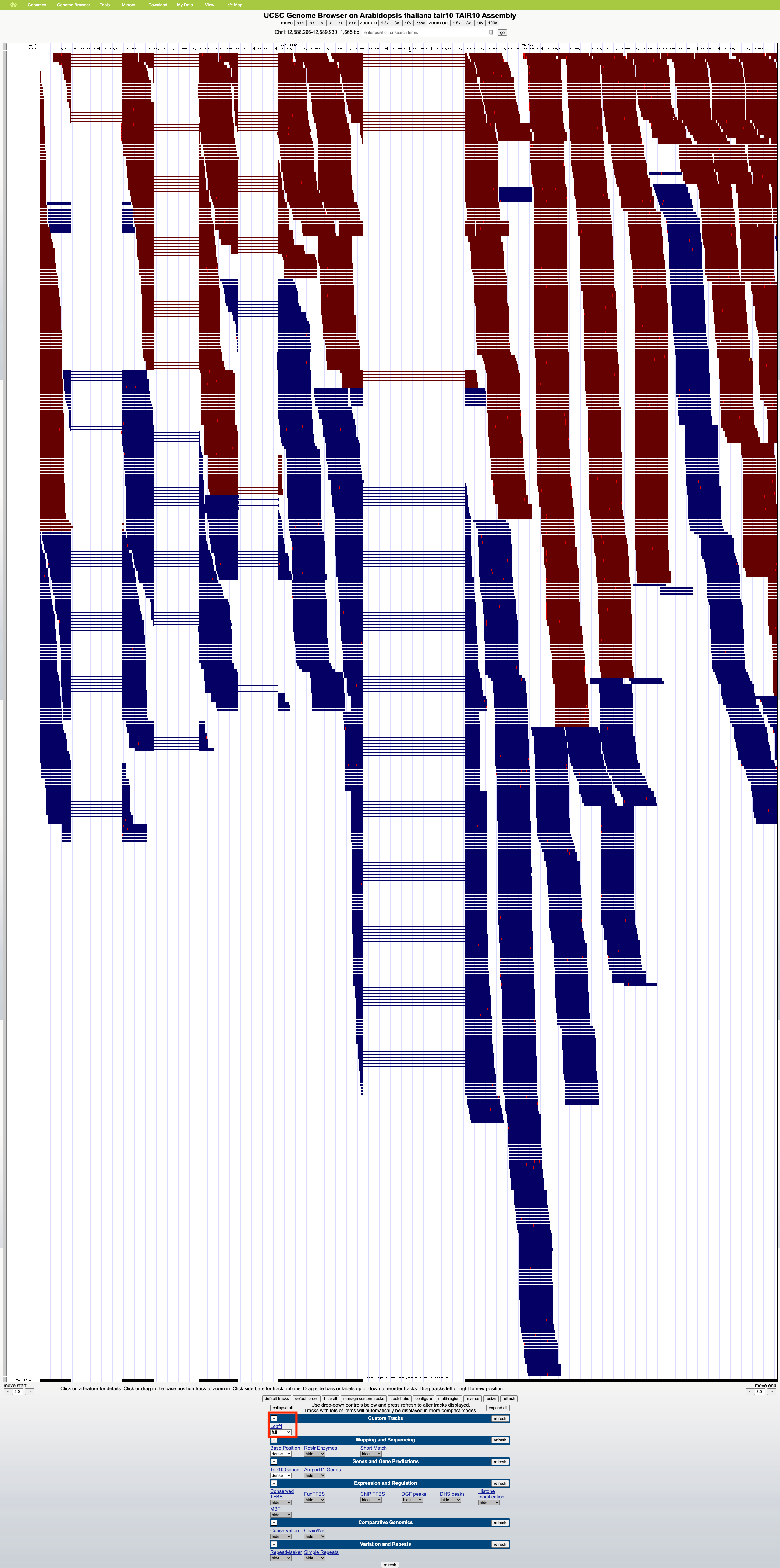
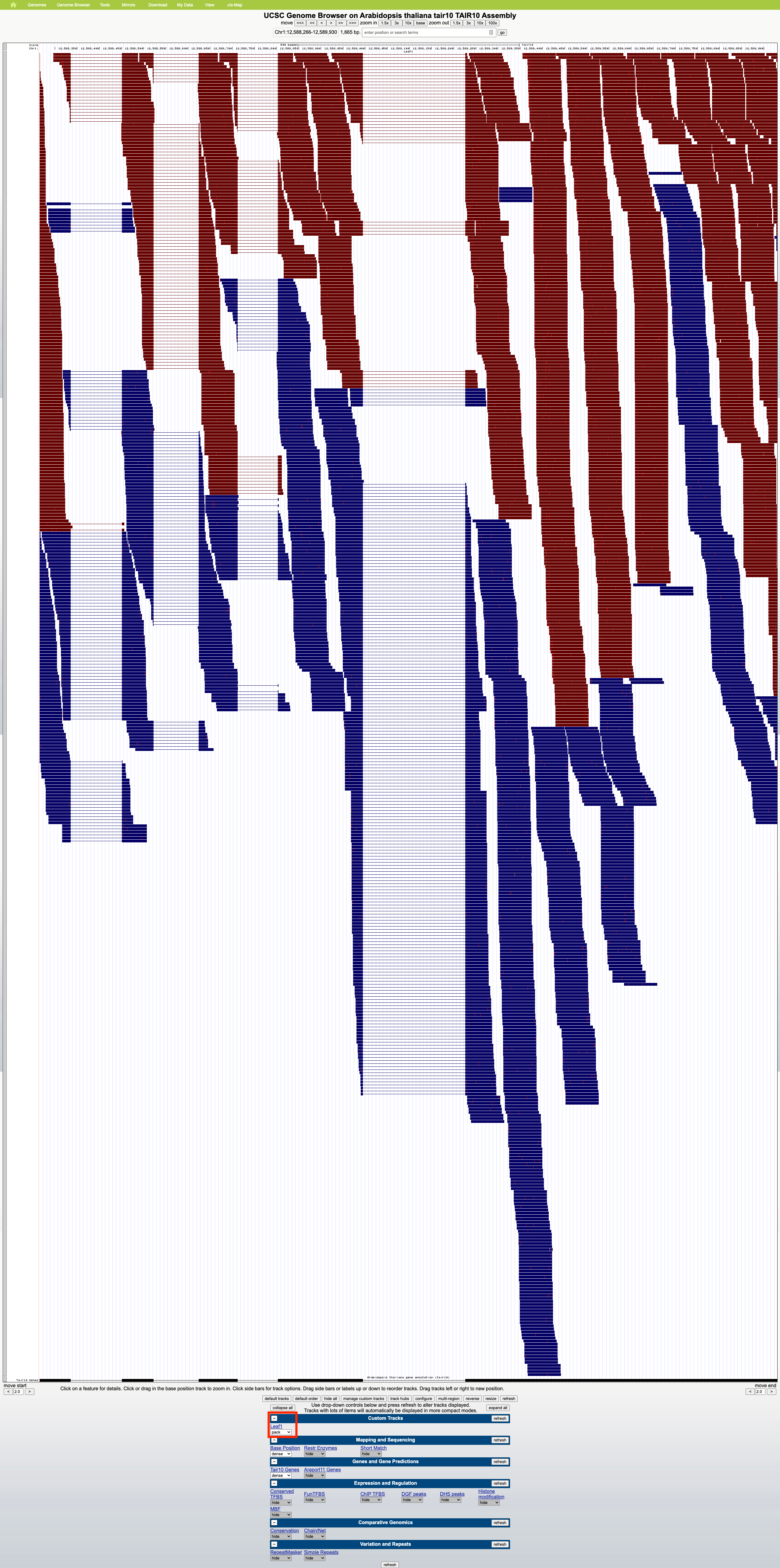
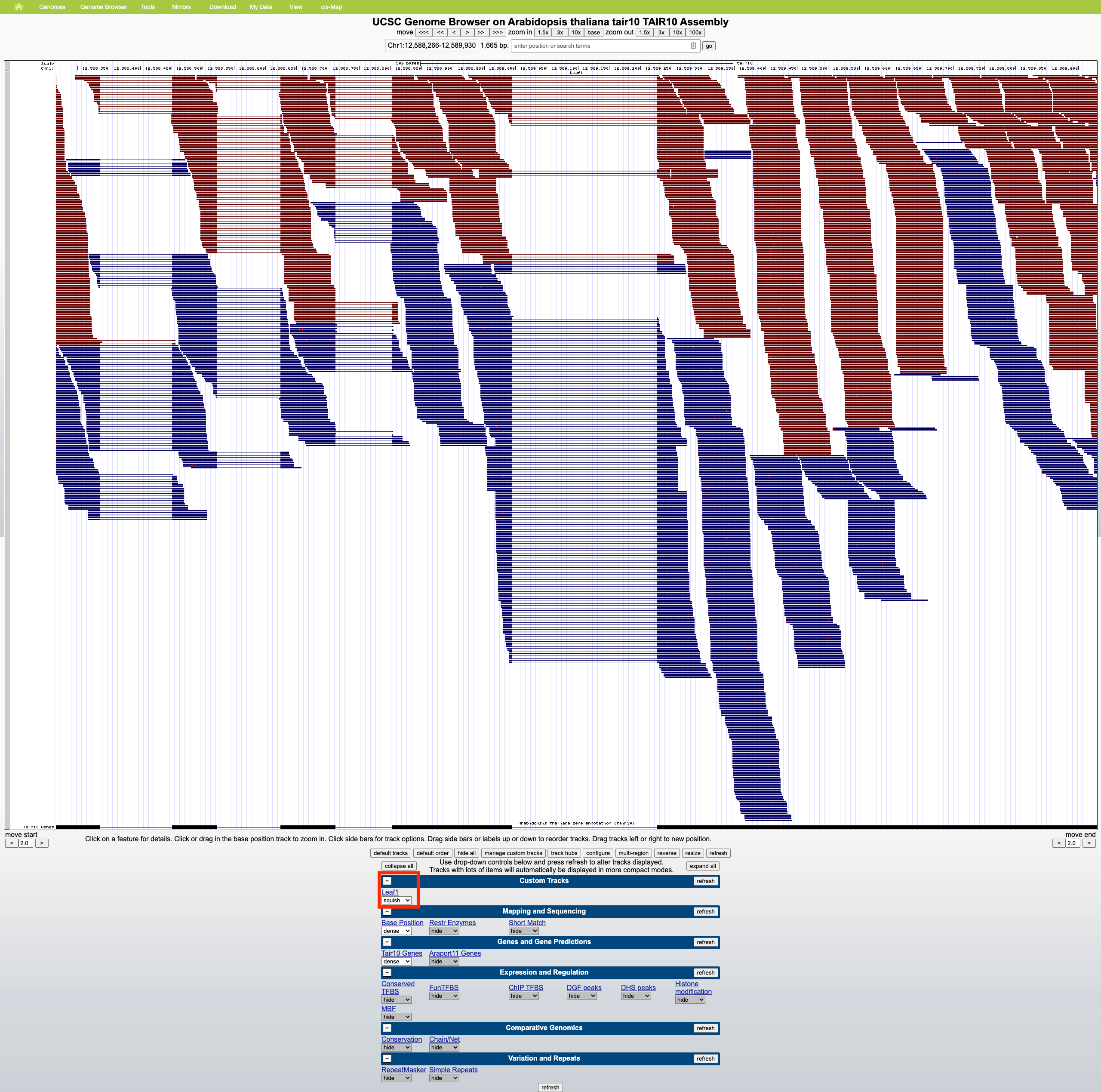
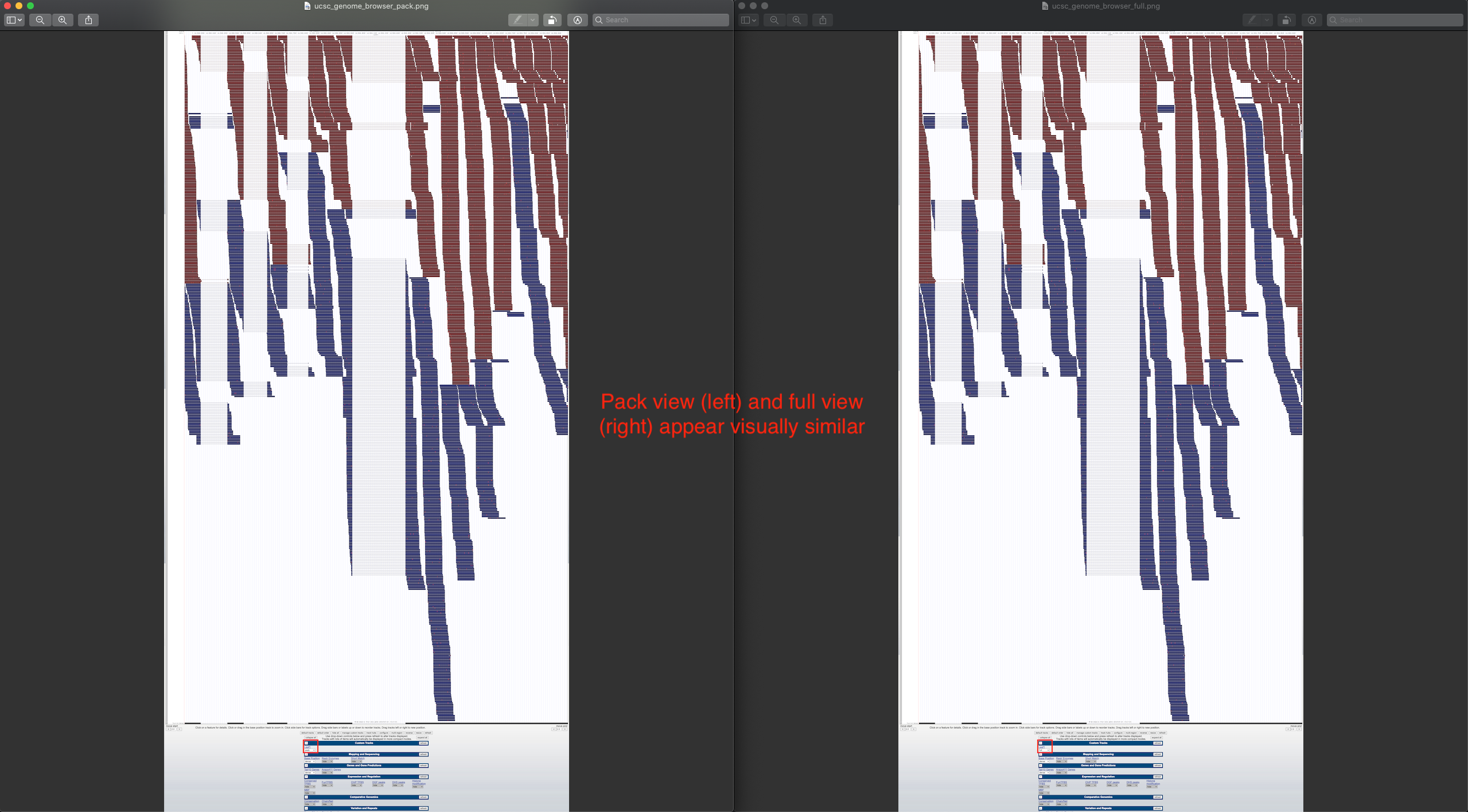
Currently, if the stack height is too small to show all feature in a track, IGB draws a summary row at the top of the every track which contains Glyphs that are drawn on top of each other.
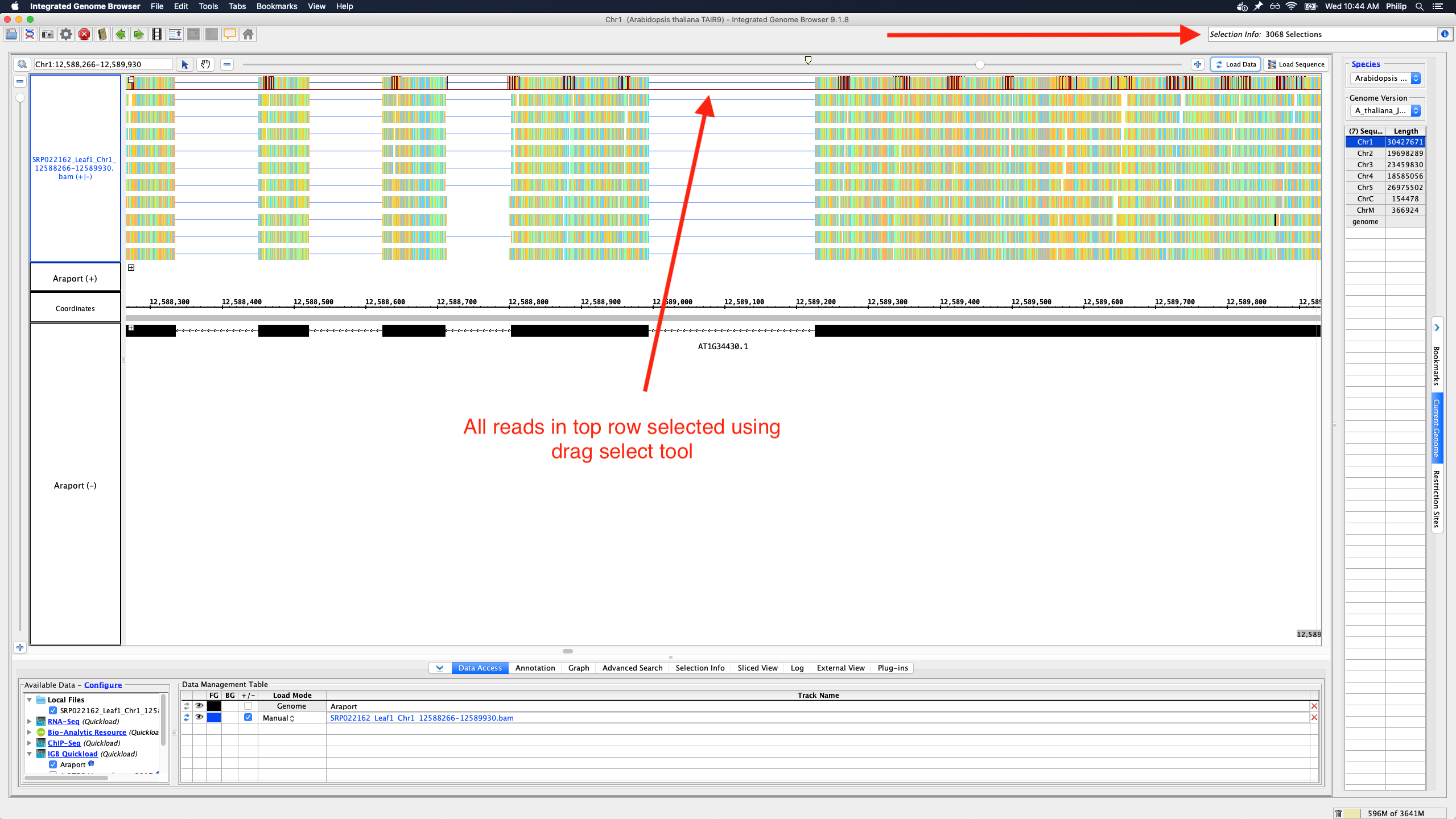
To save memory and speed up computation, not all data items are drawn and rendered into Glyphs in this top row. However, if you click-drag (rubber-banding) over the summary row to select everything that it is there, the "Selection Info" text box reports the correct number of items expected to be there.
One problem with summary row representation, however, is that it can be a bit misleading. For example, some horizontal gaps may appear, leading the user to think none of the data occupy the apparently empty location.
We need a better algorithm and representation style that will suggest to the user that:
- Individual data items are not being shown
- Any region that looks empty, really is empty (i.e., no data items from the track overlap it)
Some ideas:
- Please don't draw a histogram-style graph. The "summary" row is too short for that.
- Heatmap might be OK.
- We can show consecutive blocks with positive space and negative space only, where negative space indicates the absence of data
- We can show consecutive blocks with color intensity (or transparency) indicating the amount of data items underneath them
- Instead of drawing the summary row as a series of blocks, draw ellipses (tiny squares) in the top row wherever there is data.
In the above implementations, the summary row glyphs would not need to be selectable or countable. If a user wants to count features, they can instead set the stack height to everything being shown, collapse the track, and then click-drag over the collapsed track region.
Attachments
Activity
| Field | Original Value | New Value |
|---|---|---|
| Description |
Currently, if the stack height is too small to show all feature in a track, IGB draws a "slop" row at the top of the every track which contains features that are drawn on top of each other. This is horribly buggy. Sometimes the names are not rendered correctly. Also, not everything is drawn and sometimes there are extra features that are not being shown. This is misleading and awful. On the plus side, however, a user can click-drag over the summary row and other features in a track, selecting EVERYTHING that's there, and see a count of the number of items in the Selection Info box in the top right. I would prefer that EVERYTHING that is there should be shown and that the summary row simply be rendered as a collapsed row of features that are all being drawn but are being drawn on top of each other. However, Hiral said that this slowed down drawing considerably. I would like to see if this is really a problem in practical use. I didn't notice a big improvement in performance when he made the change from drawing everything over to drawing only a part of the data. However, if performance really is an issue, then here's what I would like to do instead of the current thing: Instead of drawing the summary row as a series of blocks, instead draw ellipses wherever there is data. The ellipses do NOT need to be selectable. If users want to count features, they can instead set the stack height to everything being shown, collapse the track, and then click-drag over the collapsed track. We don't need to support selecting items in the summary row. |
Currently, if the stack height is too small to show all feature in a track, IGB draws a summary row at the top of the every track which contains features that are drawn on top of each other. This is horribly buggy. Sometimes the names are not rendered correctly. Also, not everything is drawn and sometimes there are extra features that are not being shown. This is misleading and awful. On the plus side, however, a user can click-drag over the summary row and other features in a track, selecting EVERYTHING that's there, and see a count of the number of items in the Selection Info box in the top right. I would prefer that EVERYTHING that is there should be shown and that the summary row simply be rendered as a collapsed row of features that are all being drawn but are being drawn on top of each other. However, Hiral said that this slowed down drawing considerably. I would like to see if this is really a problem in practical use. I didn't notice a big improvement in performance when he made the change from drawing everything over to drawing only a part of the data. However, if performance really is an issue, then here's what I would like to do instead of the current thing: Instead of drawing the summary row as a series of blocks, instead draw ellipses wherever there is data. The ellipses do NOT need to be selectable. If users want to count features, they can instead set the stack height to everything being shown, collapse the track, and then click-drag over the collapsed track. We don't need to support selecting items in the summary row. |
| Description |
Currently, if the stack height is too small to show all feature in a track, IGB draws a summary row at the top of the every track which contains features that are drawn on top of each other. This is horribly buggy. Sometimes the names are not rendered correctly. Also, not everything is drawn and sometimes there are extra features that are not being shown. This is misleading and awful. On the plus side, however, a user can click-drag over the summary row and other features in a track, selecting EVERYTHING that's there, and see a count of the number of items in the Selection Info box in the top right. I would prefer that EVERYTHING that is there should be shown and that the summary row simply be rendered as a collapsed row of features that are all being drawn but are being drawn on top of each other. However, Hiral said that this slowed down drawing considerably. I would like to see if this is really a problem in practical use. I didn't notice a big improvement in performance when he made the change from drawing everything over to drawing only a part of the data. However, if performance really is an issue, then here's what I would like to do instead of the current thing: Instead of drawing the summary row as a series of blocks, instead draw ellipses wherever there is data. The ellipses do NOT need to be selectable. If users want to count features, they can instead set the stack height to everything being shown, collapse the track, and then click-drag over the collapsed track. We don't need to support selecting items in the summary row. |
Currently, if the stack height is too small to show all feature in a track, IGB draws a summary row at the top of the every track which contains features that are drawn on top of each other. This is horribly buggy. Sometimes the names are not rendered correctly. Also, not everything is drawn and sometimes there are extra features that are not being shown. This is misleading and awful. On the plus side, however, a user can click-drag over the summary row and other features in a track, selecting EVERYTHING that's there, and see a count of the number of items in the Selection Info box in the top right. I would prefer EVERYTHING be shown, not just part of the data. The summary row should be rendered as a collapsed row of features in which everything is being draw, but collapsed so that Glyphs are draw in the same space. However, Hiral said that drawing EVERYTHING was too slow. I would like to see if this is really a problem in practical use. I didn't notice a big improvement in performance when he made the change from drawing everything over to drawing only a part of the data. However, if performance really is an issue, then here's what I would like to do instead of the current thing: Instead of drawing the summary row as a series of blocks, instead draw ellipses (tiny squares) in the top row wherever there is data. The ellipses do NOT need to be selectable. If users want to count features, they can instead set the stack height to everything being shown, collapse the track, and then click-drag over the collapsed track. |
| Summary | improve summary row in the top of every track | Improve summary row in the top of every track. |
| Story Points | 4 |
| Rank | Ranked higher |
| Workflow | classic default workflow [ 14355 ] | Loraine Lab Workflow [ 14606 ] |
| Epic Link | IGBF-237 [ 15234 ] |
| Rank | Ranked higher |
| Rank | Ranked higher |
| Rank | Ranked higher |
| Rank | Ranked higher |
| Rank | Ranked higher |
| Epic Link | IGBF-237 [ 15234 ] | IGBF-440 [ 15498 ] |
| Rank | Ranked lower |
| Epic Link | IGBF-440 [ 15498 ] |
| Workflow | Loraine Lab Workflow [ 14606 ] | Fall 2019 Workflow Update [ 18714 ] |
| Workflow | Fall 2019 Workflow Update [ 18714 ] | Revised Fall 2019 Workflow Update [ 20834 ] |
| Status | Open [ 1 ] | To-Do [ 10305 ] |
| Rank | Ranked higher |
| Rank | Ranked higher |
| Priority | Major [ 3 ] | Blocker [ 1 ] |
| Description |
Currently, if the stack height is too small to show all feature in a track, IGB draws a summary row at the top of the every track which contains features that are drawn on top of each other. This is horribly buggy. Sometimes the names are not rendered correctly. Also, not everything is drawn and sometimes there are extra features that are not being shown. This is misleading and awful. On the plus side, however, a user can click-drag over the summary row and other features in a track, selecting EVERYTHING that's there, and see a count of the number of items in the Selection Info box in the top right. I would prefer EVERYTHING be shown, not just part of the data. The summary row should be rendered as a collapsed row of features in which everything is being draw, but collapsed so that Glyphs are draw in the same space. However, Hiral said that drawing EVERYTHING was too slow. I would like to see if this is really a problem in practical use. I didn't notice a big improvement in performance when he made the change from drawing everything over to drawing only a part of the data. However, if performance really is an issue, then here's what I would like to do instead of the current thing: Instead of drawing the summary row as a series of blocks, instead draw ellipses (tiny squares) in the top row wherever there is data. The ellipses do NOT need to be selectable. If users want to count features, they can instead set the stack height to everything being shown, collapse the track, and then click-drag over the collapsed track. |
Currently, if the stack height is too small to show all feature in a track, IGB draws a summary row at the top of the every track which contains features that are drawn on top of each other.
To save memory and speed up computation, not all data items are drawn and rendered into Glyphs in this top row. However, if you click-drag (rubber-banding) over the summary row to select everything that it there, the "Selection Info" textbooks reports the correct number of items expected to be there. One problem with this, however, is that it can be a bit misleading. For example, some horizontal gaps may appear, leading the user to think none of the data occupy the apparently empty location. We need a better algorithm and representation style that will suggest to the user that: * Individual data items are not being shown * Any region that looks empty, really is empty (i.e., no data items from the track overlap it) Some ideas: * Please don't draw a histogram-style graph. The "summary" row is too short for that * Heatmap might be OK. * We can show consecutive blocks with positive space and negative space only, where negative space indicates the absence of data * We can show consecutive blocks with color intensity indicating the amount of data items underneath them * Instead of drawing the summary row as a series of blocks, draw ellipses (tiny squares) in the top row wherever there is data. In the above implementations, the summary row glyphs would not need to be selectable or countable. If a user wants to count features, they can instead set the stack height to everything being shown, collapse the track, and then click-drag over the collapsed track region. |
| Assignee | David Norris [ dcnorris ] |
| Summary | Improve summary row in the top of every track. | Improve summary row in the top of every track |
| Rank | Ranked higher |
| Description |
Currently, if the stack height is too small to show all feature in a track, IGB draws a summary row at the top of the every track which contains features that are drawn on top of each other.
To save memory and speed up computation, not all data items are drawn and rendered into Glyphs in this top row. However, if you click-drag (rubber-banding) over the summary row to select everything that it there, the "Selection Info" textbooks reports the correct number of items expected to be there. One problem with this, however, is that it can be a bit misleading. For example, some horizontal gaps may appear, leading the user to think none of the data occupy the apparently empty location. We need a better algorithm and representation style that will suggest to the user that: * Individual data items are not being shown * Any region that looks empty, really is empty (i.e., no data items from the track overlap it) Some ideas: * Please don't draw a histogram-style graph. The "summary" row is too short for that * Heatmap might be OK. * We can show consecutive blocks with positive space and negative space only, where negative space indicates the absence of data * We can show consecutive blocks with color intensity indicating the amount of data items underneath them * Instead of drawing the summary row as a series of blocks, draw ellipses (tiny squares) in the top row wherever there is data. In the above implementations, the summary row glyphs would not need to be selectable or countable. If a user wants to count features, they can instead set the stack height to everything being shown, collapse the track, and then click-drag over the collapsed track region. |
Currently, if the stack height is too small to show all feature in a track, IGB draws a summary row at the top of the every track which contains Glyphs that are drawn on top of each other.
To save memory and speed up computation, not all data items are drawn and rendered into Glyphs in this top row. However, if you click-drag (rubber-banding) over the summary row to select everything that it is there, the "Selection Info" text box reports the correct number of items expected to be there. One problem with summary row representation, however, is that it can be a bit misleading. For example, some horizontal gaps may appear, leading the user to think none of the data occupy the apparently empty location. We need a better algorithm and representation style that will suggest to the user that: * Individual data items are not being shown * Any region that looks empty, really is empty (i.e., no data items from the track overlap it) Some ideas: * Please don't draw a histogram-style graph. The "summary" row is too short for that. * Heatmap might be OK. * We can show consecutive blocks with positive space and negative space only, where negative space indicates the absence of data * We can show consecutive blocks with color intensity indicating the amount of data items underneath them * Instead of drawing the summary row as a series of blocks, draw ellipses (tiny squares) in the top row wherever there is data. In the above implementations, the summary row glyphs would not need to be selectable or countable. If a user wants to count features, they can instead set the stack height to everything being shown, collapse the track, and then click-drag over the collapsed track region. |
| Rank | Ranked higher |
| Rank | Ranked higher |
| Assignee | Philip Badzuh [ pbadzuh ] |
| Sprint | Spring 2 2021 Apr 5 - Apr 16 [ 118 ] |
| Status | To-Do [ 10305 ] | In Progress [ 3 ] |
| Summary | Improve summary row in the top of every track | Improve summary row in the top of annotation tracks |
| Epic Link | IGBF-1765 [ 17855 ] |
| Sprint | Spring 2 2021 Apr 5 - Apr 16 [ 118 ] | Spring 2 2021 Apr 5 - Apr 16, Spring 3 2021 Apr 19 - Apr 30 [ 118, 119 ] |
| Rank | Ranked higher |
| Attachment | SRP022162_Leaf1_Chr1_12588266-12589930.bam [ 15751 ] | |
| Attachment | SRP022162_Leaf1_Chr1_12588266-12589930.bam.bai [ 15752 ] |
| Attachment | igb_summary_row.png [ 15754 ] | |
| Attachment | igv_expanded_downsampled.png [ 15755 ] | |
| Attachment | jbrowse.png [ 15756 ] | |
| Attachment | ncbi_genome_browser.png [ 15757 ] | |
| Attachment | ucsc_genome_browser.png [ 15758 ] |
| Attachment | jbrowse.png [ 15756 ] |
| Attachment | jbrowse.png [ 15759 ] |
| Attachment | ucsc_genome_browser.png [ 15758 ] |
| Attachment | ucsc_genome_browser_squish.png [ 15760 ] |
| Attachment | ucsc_genome_browser_squish.png [ 15760 ] |
| Attachment | ucsc_genome_browser_dense.png [ 15762 ] | |
| Attachment | ucsc_genome_browser_full.png [ 15763 ] | |
| Attachment | ucsc_genome_browser_pack.png [ 15764 ] | |
| Attachment | ucsc_genome_browser_squish.png [ 15765 ] | |
| Attachment | ucsc_pack_vs_full.png [ 15766 ] |
| Attachment | jbrowse.png [ 15759 ] |
| Attachment | eplant_jbrowse.png [ 15767 ] |
| Sprint | Spring 2 2021 Apr 5 - Apr 16, Spring 3 2021 Apr 19 - Apr 30 [ 118, 119 ] | Spring 2 2021 Apr 5 - Apr 16, Spring 3 2021 Apr 19 - Apr 30, Spring 4 2021 May 3 - May 14 [ 118, 119, 120 ] |
| Rank | Ranked higher |
| Description |
Currently, if the stack height is too small to show all feature in a track, IGB draws a summary row at the top of the every track which contains Glyphs that are drawn on top of each other.
To save memory and speed up computation, not all data items are drawn and rendered into Glyphs in this top row. However, if you click-drag (rubber-banding) over the summary row to select everything that it is there, the "Selection Info" text box reports the correct number of items expected to be there. One problem with summary row representation, however, is that it can be a bit misleading. For example, some horizontal gaps may appear, leading the user to think none of the data occupy the apparently empty location. We need a better algorithm and representation style that will suggest to the user that: * Individual data items are not being shown * Any region that looks empty, really is empty (i.e., no data items from the track overlap it) Some ideas: * Please don't draw a histogram-style graph. The "summary" row is too short for that. * Heatmap might be OK. * We can show consecutive blocks with positive space and negative space only, where negative space indicates the absence of data * We can show consecutive blocks with color intensity indicating the amount of data items underneath them * Instead of drawing the summary row as a series of blocks, draw ellipses (tiny squares) in the top row wherever there is data. In the above implementations, the summary row glyphs would not need to be selectable or countable. If a user wants to count features, they can instead set the stack height to everything being shown, collapse the track, and then click-drag over the collapsed track region. |
Currently, if the stack height is too small to show all feature in a track, IGB draws a summary row at the top of the every track which contains Glyphs that are drawn on top of each other.
To save memory and speed up computation, not all data items are drawn and rendered into Glyphs in this top row. However, if you click-drag (rubber-banding) over the summary row to select everything that it is there, the "Selection Info" text box reports the correct number of items expected to be there. One problem with summary row representation, however, is that it can be a bit misleading. For example, some horizontal gaps may appear, leading the user to think none of the data occupy the apparently empty location. We need a better algorithm and representation style that will suggest to the user that: * Individual data items are not being shown * Any region that looks empty, really is empty (i.e., no data items from the track overlap it) Some ideas: * Please don't draw a histogram-style graph. The "summary" row is too short for that. * Heatmap might be OK. * We can show consecutive blocks with positive space and negative space only, where negative space indicates the absence of data * We can show consecutive blocks with color intensity (or transparency) indicating the amount of data items underneath them * Instead of drawing the summary row as a series of blocks, draw ellipses (tiny squares) in the top row wherever there is data. In the above implementations, the summary row glyphs would not need to be selectable or countable. If a user wants to count features, they can instead set the stack height to everything being shown, collapse the track, and then click-drag over the collapsed track region. |
| Attachment | igb_summary_row_colored_prototype_1.png [ 16250 ] |
| Sprint | Spring 2 2021 Apr 5 - Apr 16, Spring 3 2021 Apr 19 - Apr 30, Spring 4 2021 May 3 - May 14 [ 118, 119, 120 ] | Spring 2 2021 Apr 5 - Apr 16, Spring 3 2021 Apr 19 - Apr 30, Spring 4 2021 May 3 - May 14, Spring 5 2021 May 17 - May 28 [ 118, 119, 120, 121 ] |
| Rank | Ranked higher |
| Attachment | igb_summary_row_design2.png [ 16351 ] |
| Sprint | Spring 2 2021 Apr 5 - Apr 16, Spring 3 2021 Apr 19 - Apr 30, Spring 4 2021 May 3 - May 14, Spring 5 2021 May 17 - May 28 [ 118, 119, 120, 121 ] | Spring 2 2021 Apr 5 - Apr 16, Spring 3 2021 Apr 19 - Apr 30, Spring 4 2021 May 3 - May 14, Spring 5 2021 May 17 - May 28, Spring 6 2021 May 31 - June 11 [ 118, 119, 120, 121, 122 ] |
| Rank | Ranked higher |
| Sprint | Spring 2 2021 Apr 5 - Apr 16, Spring 3 2021 Apr 19 - Apr 30, Spring 4 2021 May 3 - May 14, Spring 5 2021 May 17 - May 28, Spring 6 2021 May 31 - June 11 [ 118, 119, 120, 121, 122 ] | Spring 2 2021 Apr 5 - Apr 16, Spring 3 2021 Apr 19 - Apr 30, Spring 4 2021 May 3 - May 14, Spring 5 2021 May 17 - May 28, Spring 6 2021 May 31 - June 11, Summer 1 2021 Jun 14 - Jun 25 [ 118, 119, 120, 121, 122, 123 ] |
| Rank | Ranked higher |
| Sprint | Spring 2 2021 Apr 5 - Apr 16, Spring 3 2021 Apr 19 - Apr 30, Spring 4 2021 May 3 - May 14, Spring 5 2021 May 17 - May 28, Spring 6 2021 May 31 - June 11, Summer 1 2021 Jun 14 - Jun 25 [ 118, 119, 120, 121, 122, 123 ] | Spring 2 2021 Apr 5 - Apr 16, Spring 3 2021 Apr 19 - Apr 30, Spring 4 2021 May 3 - May 14, Spring 5 2021 May 17 - May 28, Spring 6 2021 May 31 - June 11, Summer 1 2021 Jun 14 - Jun 25, Summer 2 2021 Jun 28 - Jul 9 [ 118, 119, 120, 121, 122, 123, 124 ] |
| Rank | Ranked higher |
| Status | In Progress [ 3 ] | To-Do [ 10305 ] |
| Sprint | Spring 2 2021 Apr 5 - Apr 16, Spring 3 2021 Apr 19 - Apr 30, Spring 4 2021 May 3 - May 14, Spring 5 2021 May 17 - May 28, Spring 6 2021 May 31 - June 11, Summer 1 2021 Jun 14 - Jun 25, Summer 2 2021 Jun 28 - Jul 9 [ 118, 119, 120, 121, 122, 123, 124 ] | Spring 2 2021 Apr 5 - Apr 16, Spring 3 2021 Apr 19 - Apr 30, Spring 4 2021 May 3 - May 14, Spring 5 2021 May 17 - May 28, Spring 6 2021 May 31 - June 11, Summer 1 2021 Jun 14 - Jun 25, Summer 2 2021 Jun 28 - Jul 9, Summer 3 2021 Jul 12 - Jul 23 [ 118, 119, 120, 121, 122, 123, 124, 125 ] |
| Rank | Ranked higher |
| Status | To-Do [ 10305 ] | In Progress [ 3 ] |
| Status | In Progress [ 3 ] | Needs 1st Level Review [ 10005 ] |
| Assignee | Philip Badzuh [ pbadzuh ] | Ann Loraine [ aloraine ] |
| Sprint | Spring 2 2021 Apr 5 - Apr 16, Spring 3 2021 Apr 19 - Apr 30, Spring 4 2021 May 3 - May 14, Spring 5 2021 May 17 - May 28, Spring 6 2021 May 31 - June 11, Summer 1 2021 Jun 14 - Jun 25, Summer 2 2021 Jun 28 - Jul 9, Summer 3 2021 Jul 12 - Jul 23 [ 118, 119, 120, 121, 122, 123, 124, 125 ] | Spring 2 2021 Apr 5 - Apr 16, Spring 3 2021 Apr 19 - Apr 30, Spring 4 2021 May 3 - May 14, Spring 5 2021 May 17 - May 28, Spring 6 2021 May 31 - June 11, Summer 1 2021 Jun 14 - Jun 25, Summer 2 2021 Jun 28 - Jul 9, Summer 3 2021 Jul 12 - Jul 23, Summer 4 2021 Aug 2 - Aug 13 [ 118, 119, 120, 121, 122, 123, 124, 125, 126 ] |
| Rank | Ranked higher |
| Sprint | Spring 2 2021 Apr 5 - Apr 16, Spring 3 2021 Apr 19 - Apr 30, Spring 4 2021 May 3 - May 14, Spring 5 2021 May 17 - May 28, Spring 6 2021 May 31 - June 11, Summer 1 2021 Jun 14 - Jun 25, Summer 2 2021 Jun 28 - Jul 9, Summer 3 2021 Jul 12 - Jul 23, Summer 4 2021 Aug 2 - Aug 13 [ 118, 119, 120, 121, 122, 123, 124, 125, 126 ] | Spring 2 2021 Apr 5 - Apr 16, Spring 3 2021 Apr 19 - Apr 30, Spring 4 2021 May 3 - May 14, Spring 5 2021 May 17 - May 28, Spring 6 2021 May 31 - June 11, Summer 1 2021 Jun 14 - Jun 25, Summer 2 2021 Jun 28 - Jul 9, Summer 3 2021 Jul 12 - Jul 23, Summer 4 2021 Aug 2 - Aug 13, Fall 1 2021 Aug 16 - Aug 27 [ 118, 119, 120, 121, 122, 123, 124, 125, 126, 127 ] |
| Rank | Ranked higher |
| Sprint | Spring 2 2021 Apr 5 - Apr 16, Spring 3 2021 Apr 19 - Apr 30, Spring 4 2021 May 3 - May 14, Spring 5 2021 May 17 - May 28, Spring 6 2021 May 31 - June 11, Summer 1 2021 Jun 14 - Jun 25, Summer 2 2021 Jun 28 - Jul 9, Summer 3 2021 Jul 12 - Jul 23, Summer 4 2021 Aug 2 - Aug 13, Fall 1 2021 Aug 16 - Aug 27 [ 118, 119, 120, 121, 122, 123, 124, 125, 126, 127 ] | Spring 2 2021 Apr 5 - Apr 16, Spring 3 2021 Apr 19 - Apr 30, Spring 4 2021 May 3 - May 14, Spring 5 2021 May 17 - May 28, Spring 6 2021 May 31 - June 11, Summer 1 2021 Jun 14 - Jun 25, Summer 2 2021 Jun 28 - Jul 9, Summer 3 2021 Jul 12 - Jul 23, Summer 4 2021 Aug 2 - Aug 13, Fall 1 2021 Aug 16 - Aug 27, Fall 2 2021 Aug 30 - Aug 10 [ 118, 119, 120, 121, 122, 123, 124, 125, 126, 127, 128 ] |
| Rank | Ranked higher |
| Sprint | Spring 2 2021 Apr 5 - Apr 16, Spring 3 2021 Apr 19 - Apr 30, Spring 4 2021 May 3 - May 14, Spring 5 2021 May 17 - May 28, Spring 6 2021 May 31 - June 11, Summer 1 2021 Jun 14 - Jun 25, Summer 2 2021 Jun 28 - Jul 9, Summer 3 2021 Jul 12 - Jul 23, Summer 4 2021 Aug 2 - Aug 13, Fall 1 2021 Aug 16 - Aug 27, Fall 2 2021 Aug 30 - Sep10 [ 118, 119, 120, 121, 122, 123, 124, 125, 126, 127, 128 ] | Spring 2 2021 Apr 5 - Apr 16, Spring 3 2021 Apr 19 - Apr 30, Spring 4 2021 May 3 - May 14, Spring 5 2021 May 17 - May 28, Spring 6 2021 May 31 - June 11, Summer 1 2021 Jun 14 - Jun 25, Summer 2 2021 Jun 28 - Jul 9, Summer 3 2021 Jul 12 - Jul 23, Summer 4 2021 Aug 2 - Aug 13, Fall 1 2021 Aug 16 - Aug 27, Fall 2 2021 Aug 30 - Sep10, Fall 3 2021Sep 13 - Sep 24 [ 118, 119, 120, 121, 122, 123, 124, 125, 126, 127, 128, 129 ] |
| Rank | Ranked higher |
| Sprint | Spring 2 2021 Apr 5 - Apr 16, Spring 3 2021 Apr 19 - Apr 30, Spring 4 2021 May 3 - May 14, Spring 5 2021 May 17 - May 28, Spring 6 2021 May 31 - June 11, Summer 1 2021 Jun 14 - Jun 25, Summer 2 2021 Jun 28 - Jul 9, Summer 3 2021 Jul 12 - Jul 23, Summer 4 2021 Aug 2 - Aug 13, Fall 1 2021 Aug 16 - Aug 27, Fall 2 2021 Aug 30 - Sep10, Fall 3 2021 Sep 13 - Sep 24 [ 118, 119, 120, 121, 122, 123, 124, 125, 126, 127, 128, 129 ] | Spring 2 2021 Apr 5 - Apr 16, Spring 3 2021 Apr 19 - Apr 30, Spring 4 2021 May 3 - May 14, Spring 5 2021 May 17 - May 28, Spring 6 2021 May 31 - June 11, Summer 1 2021 Jun 14 - Jun 25, Summer 2 2021 Jun 28 - Jul 9, Summer 3 2021 Jul 12 - Jul 23, Summer 4 2021 Aug 2 - Aug 13, Fall 1 2021 Aug 16 - Aug 27, Fall 2 2021 Aug 30 - Sep10, Fall 3 2021 Sep 13 - Sep 24, Fall 4 2021 Sep 27 - Oct 8 [ 118, 119, 120, 121, 122, 123, 124, 125, 126, 127, 128, 129, 130 ] |
| Rank | Ranked higher |
| Sprint | Spring 2 2021 Apr 5 - Apr 16, Spring 3 2021 Apr 19 - Apr 30, Spring 4 2021 May 3 - May 14, Spring 5 2021 May 17 - May 28, Spring 6 2021 May 31 - June 11, Summer 1 2021 Jun 14 - Jun 25, Summer 2 2021 Jun 28 - Jul 9, Summer 3 2021 Jul 12 - Jul 23, Summer 4 2021 Aug 2 - Aug 13, Fall 1 2021 Aug 16 - Aug 27, Fall 2 2021 Aug 30 - Sep10, Fall 3 2021 Sep 13 - Sep 24, Fall 4 2021 Sep 27 - Oct 8 [ 118, 119, 120, 121, 122, 123, 124, 125, 126, 127, 128, 129, 130 ] | Spring 2 2021 Apr 5 - Apr 16, Spring 3 2021 Apr 19 - Apr 30, Spring 4 2021 May 3 - May 14, Spring 5 2021 May 17 - May 28, Spring 6 2021 May 31 - June 11, Summer 1 2021 Jun 14 - Jun 25, Summer 2 2021 Jun 28 - Jul 9, Summer 3 2021 Jul 12 - Jul 23, Summer 4 2021 Aug 2 - Aug 13, Fall 1 2021 Aug 16 - Aug 27, Fall 2 2021 Aug 30 - Sep10, Fall 3 2021 Sep 13 - Sep 24, Fall 4 2021 Sep 27 - Oct 8, Fall 5 2021 Oct 11 - Oct 22 [ 118, 119, 120, 121, 122, 123, 124, 125, 126, 127, 128, 129, 130, 131 ] |
| Rank | Ranked higher |
| Assignee | Ann Loraine [ aloraine ] |
| Sprint | Spring 2 2021 Apr 5 - Apr 16, Spring 3 2021 Apr 19 - Apr 30, Spring 4 2021 May 3 - May 14, Spring 5 2021 May 17 - May 28, Spring 6 2021 May 31 - June 11, Summer 1 2021 Jun 14 - Jun 25, Summer 2 2021 Jun 28 - Jul 9, Summer 3 2021 Jul 12 - Jul 23, Summer 4 2021 Aug 2 - Aug 13, Fall 1 2021 Aug 16 - Aug 27, Fall 2 2021 Aug 30 - Sep10, Fall 3 2021 Sep 13 - Sep 24, Fall 4 2021 Sep 27 - Oct 8, Fall 5 2021 Oct 11 - Oct 22 [ 118, 119, 120, 121, 122, 123, 124, 125, 126, 127, 128, 129, 130, 131 ] | Spring 2 2021 Apr 5 - Apr 16, Spring 3 2021 Apr 19 - Apr 30, Spring 4 2021 May 3 - May 14, Spring 5 2021 May 17 - May 28, Spring 6 2021 May 31 - June 11, Summer 1 2021 Jun 14 - Jun 25, Summer 2 2021 Jun 28 - Jul 9, Summer 3 2021 Jul 12 - Jul 23, Summer 4 2021 Aug 2 - Aug 13, Fall 1 2021 Aug 16 - Aug 27, Fall 2 2021 Aug 30 - Sep10, Fall 3 2021 Sep 13 - Sep 24, Fall 4 2021 Sep 27 - Oct 8, Fall 7 2021 Nov 8 - Nov 19 [ 118, 119, 120, 121, 122, 123, 124, 125, 126, 127, 128, 129, 130, 133 ] |
| Sprint | Spring 2 2021 Apr 5 - Apr 16, Spring 3 2021 Apr 19 - Apr 30, Spring 4 2021 May 3 - May 14, Spring 5 2021 May 17 - May 28, Spring 6 2021 May 31 - June 11, Summer 1 2021 Jun 14 - Jun 25, Summer 2 2021 Jun 28 - Jul 9, Summer 3 2021 Jul 12 - Jul 23, Summer 4 2021 Aug 2 - Aug 13, Fall 1 2021 Aug 16 - Aug 27, Fall 2 2021 Aug 30 - Sep10, Fall 3 2021 Sep 13 - Sep 24, Fall 4 2021 Sep 27 - Oct 8, Fall 7 2021 Nov 8 - Nov 19 [ 118, 119, 120, 121, 122, 123, 124, 125, 126, 127, 128, 129, 130, 133 ] | Spring 2 2021 Apr 5 - Apr 16, Spring 3 2021 Apr 19 - Apr 30, Spring 4 2021 May 3 - May 14, Spring 5 2021 May 17 - May 28, Spring 6 2021 May 31 - June 11, Summer 1 2021 Jun 14 - Jun 25, Summer 2 2021 Jun 28 - Jul 9, Summer 3 2021 Jul 12 - Jul 23, Summer 4 2021 Aug 2 - Aug 13, Fall 1 2021 Aug 16 - Aug 27, Fall 2 2021 Aug 30 - Sep10, Fall 3 2021 Sep 13 - Sep 24, Fall 4 2021 Sep 27 - Oct 8 [ 118, 119, 120, 121, 122, 123, 124, 125, 126, 127, 128, 129, 130 ] |
| Rank | Ranked higher |
| Status | Needs 1st Level Review [ 10005 ] | First Level Review in Progress [ 10301 ] |
| Assignee | Ann Loraine [ aloraine ] |
| Rank | Ranked higher |
| Sprint | Spring 2 2021 Apr 5 - Apr 16, Spring 3 2021 Apr 19 - Apr 30, Spring 4 2021 May 3 - May 14, Spring 5 2021 May 17 - May 28, Spring 6 2021 May 31 - June 11, Summer 1 2021 Jun 14 - Jun 25, Summer 2 2021 Jun 28 - Jul 9, Summer 3 2021 Jul 12 - Jul 23, Summer 4 2021 Aug 2 - Aug 13, Fall 1 2021 Aug 16 - Aug 27, Fall 2 2021 Aug 30 - Sep10, Fall 3 2021 Sep 13 - Sep 24, Fall 4 2021 Sep 27 - Oct 8 [ 118, 119, 120, 121, 122, 123, 124, 125, 126, 127, 128, 129, 130 ] | Spring 2 2021 Apr 5 - Apr 16, Spring 3 2021 Apr 19 - Apr 30, Spring 4 2021 May 3 - May 14, Spring 5 2021 May 17 - May 28, Spring 6 2021 May 31 - June 11, Summer 1 2021 Jun 14 - Jun 25, Summer 2 2021 Jun 28 - Jul 9, Summer 3 2021 Jul 12 - Jul 23, Summer 4 2021 Aug 2 - Aug 13, Fall 1 2021 Aug 16 - Aug 27, Fall 2 2021 Aug 30 - Sep10, Fall 3 2021 Sep 13 - Sep 24, Fall 4 2021 Sep 27 - Oct 8, Spring 7 2023 Apr 10 [ 118, 119, 120, 121, 122, 123, 124, 125, 126, 127, 128, 129, 130, 167 ] |
| Sprint | Spring 2 2021 Apr 5 - Apr 16, Spring 3 2021 Apr 19 - Apr 30, Spring 4 2021 May 3 - May 14, Spring 5 2021 May 17 - May 28, Spring 6 2021 May 31 - June 11, Summer 1 2021 Jun 14 - Jun 25, Summer 2 2021 Jun 28 - Jul 9, Summer 3 2021 Jul 12 - Jul 23, Summer 4 2021 Aug 2 - Aug 13, Fall 1 2021 Aug 16 - Aug 27, Fall 2 2021 Aug 30 - Sep10, Fall 3 2021 Sep 13 - Sep 24, Fall 4 2021 Sep 27 - Oct 8, Spring 7 2023 Apr 10 [ 118, 119, 120, 121, 122, 123, 124, 125, 126, 127, 128, 129, 130, 167 ] | Spring 2 2021 Apr 5 - Apr 16, Spring 3 2021 Apr 19 - Apr 30, Spring 4 2021 May 3 - May 14, Spring 5 2021 May 17 - May 28, Spring 6 2021 May 31 - June 11, Summer 1 2021 Jun 14 - Jun 25, Summer 2 2021 Jun 28 - Jul 9, Summer 3 2021 Jul 12 - Jul 23, Summer 4 2021 Aug 2 - Aug 13, Fall 1 2021 Aug 16 - Aug 27, Fall 2 2021 Aug 30 - Sep10, Fall 3 2021 Sep 13 - Sep 24, Fall 4 2021 Sep 27 - Oct 8 [ 118, 119, 120, 121, 122, 123, 124, 125, 126, 127, 128, 129, 130 ] |