Details
-
Type:
Task
-
Status: Closed (View Workflow)
-
Priority:
 Major
Major
-
Resolution: Done
-
Affects Version/s: None
-
Fix Version/s: None
-
Labels:
-
Story Points:2
-
Epic Link:
-
Sprint:Spring 8 : 24 Apr to 8 May, Spring 8 : 11 May to 25 May, Spring 9 : 25 May to 8 Jun, Summer 1: 8 Jun - 19 Jun, Fall 5, Fall 6
Description
NCBI Primer App is a tool that helps users design PCR primers to amplify DNA.
The UI works fine but some of the UI elements are poorly worded or consume too much space.
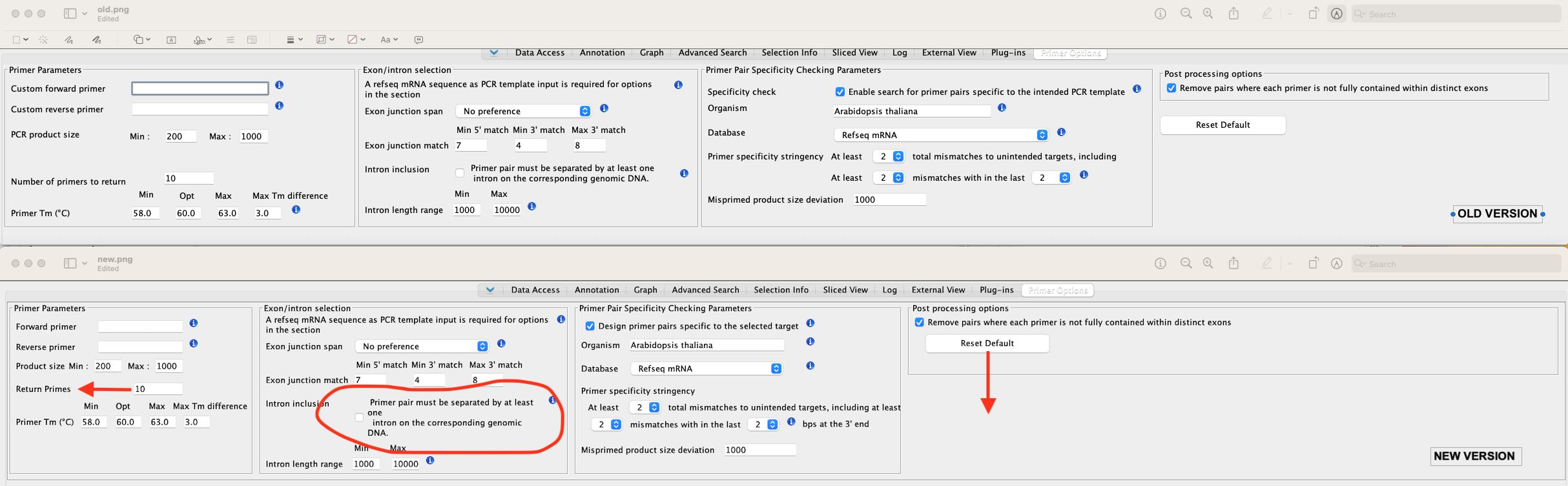
To improve it, make the following changes to the NCBI Primer Options tab UI:
- Move components closer to their labels
- Change wording: "Number of Primers to return" to: "Return primers:"
- Change wording:"Custom forward primer" to "Forward Primer" (same for Reverse primer)
- Change wording: "PCR product size" to "Product size"
- Remove label "Specificity check" (the checkbox text explains what this is about – the label is not really needed)
- Change "Enable search ...to the intended PCR template" to: "Design primer pairs specific to the selected target"
- Reduce the size of the "Database" dropdown
See: https://bitbucket.org/lorainelab/ncbi-primer/src/master/
Also see: https://drive.google.com/file/d/1hmdG4pKfSBFZ412Ew-ikHJoDvNptJ0RX/view?usp=sharing
Attachments
Issue Links

Activity
| Field | Original Value | New Value |
|---|---|---|
| Epic Link |
|
| Description |
The NCBI Primer Options panel contains all the correct components, and they are working fine.
However, to see all the components in the panel, the user has to enlarge the IGB window. Let's try to avoid making the user change the window size in order to use the options. For this task, modify and fine-tune the layout of the tabbed panel components so that more of it fits into a typical IGB window size. Look at the other tabbed panels in IGB to see how different designs handle the same challenge. Also, watch this video: Suggestions: * Reduce the size of the "Database" dropdown * Move components closer to their labels * Change "Number of Primers to return" to: "Return primers:" * Change "Custom forward primer" to "Forward Primer" (same for Reverse primer) * Change "PCR product size" to "Product size" * Remove label "Specificity check" (the checkbox text explains what this is about -- the label is not really needed) * Change "Enable search ...to the intended PCR template" to: "Design primer pairs specific to the selected target" * |
The NCBI Primer Options panel contains all the correct components, and they are working fine.
However, to see all the components in the panel, the user has to enlarge the IGB window. Let's try to avoid making the user change the window size in order to use the options. For this task, modify and fine-tune the layout of the tabbed panel components so that more of it fits into a typical IGB window size. Look at the other tabbed panels in IGB to see how different designs handle the same challenge. Also, watch this video: https://drive.google.com/file/d/1hmdG4pKfSBFZ412Ew-ikHJoDvNptJ0RX/view?usp=sharing Suggestions: * Reduce the size of the "Database" dropdown * Move components closer to their labels * Change "Number of Primers to return" to: "Return primers:" * Change "Custom forward primer" to "Forward Primer" (same for Reverse primer) * Change "PCR product size" to "Product size" * Remove label "Specificity check" (the checkbox text explains what this is about -- the label is not really needed) * Change "Enable search ...to the intended PCR template" to: "Design primer pairs specific to the selected target" |
| Assignee | Ann Loraine [ aloraine ] |
| Description |
The NCBI Primer Options panel contains all the correct components, and they are working fine.
However, to see all the components in the panel, the user has to enlarge the IGB window. Let's try to avoid making the user change the window size in order to use the options. For this task, modify and fine-tune the layout of the tabbed panel components so that more of it fits into a typical IGB window size. Look at the other tabbed panels in IGB to see how different designs handle the same challenge. Also, watch this video: https://drive.google.com/file/d/1hmdG4pKfSBFZ412Ew-ikHJoDvNptJ0RX/view?usp=sharing Suggestions: * Reduce the size of the "Database" dropdown * Move components closer to their labels * Change "Number of Primers to return" to: "Return primers:" * Change "Custom forward primer" to "Forward Primer" (same for Reverse primer) * Change "PCR product size" to "Product size" * Remove label "Specificity check" (the checkbox text explains what this is about -- the label is not really needed) * Change "Enable search ...to the intended PCR template" to: "Design primer pairs specific to the selected target" |
The NCBI Primer Options panel contains all the correct components, and they are working fine.
However, to see all the components in the panel, the user has to enlarge the IGB window. Let's try to avoid making the user change the window size in order to use the options. For this task, modify and fine-tune the layout of the tabbed panel components so that more of it fits into a typical IGB window size. Look at the other tabbed panels in IGB to see how different designs handle the same challenge. Investigate: Can you add the tabbed panel to the right side? A vertical "portrait" layout could work a lot better than the current horizontal "landscape" layout. Also, watch this video: https://drive.google.com/file/d/1hmdG4pKfSBFZ412Ew-ikHJoDvNptJ0RX/view?usp=sharing Suggestions: * Reduce the size of the "Database" dropdown * Move components closer to their labels * Change wording: "Number of Primers to return" to: "Return primers:" * Change wording:"Custom forward primer" to "Forward Primer" (same for Reverse primer) * Change wording: "PCR product size" to "Product size" * Remove label "Specificity check" (the checkbox text explains what this is about -- the label is not really needed) * Change "Enable search ...to the intended PCR template" to: "Design primer pairs specific to the selected target" |
| Description |
The NCBI Primer Options panel contains all the correct components, and they are working fine.
However, to see all the components in the panel, the user has to enlarge the IGB window. Let's try to avoid making the user change the window size in order to use the options. For this task, modify and fine-tune the layout of the tabbed panel components so that more of it fits into a typical IGB window size. Look at the other tabbed panels in IGB to see how different designs handle the same challenge. Investigate: Can you add the tabbed panel to the right side? A vertical "portrait" layout could work a lot better than the current horizontal "landscape" layout. Also, watch this video: https://drive.google.com/file/d/1hmdG4pKfSBFZ412Ew-ikHJoDvNptJ0RX/view?usp=sharing Suggestions: * Reduce the size of the "Database" dropdown * Move components closer to their labels * Change wording: "Number of Primers to return" to: "Return primers:" * Change wording:"Custom forward primer" to "Forward Primer" (same for Reverse primer) * Change wording: "PCR product size" to "Product size" * Remove label "Specificity check" (the checkbox text explains what this is about -- the label is not really needed) * Change "Enable search ...to the intended PCR template" to: "Design primer pairs specific to the selected target" |
The NCBI Primer Options panel contains all the correct components, and they are working fine.
However, to see all the components in the panel, the user has to enlarge the IGB window. Let's try to avoid making the user change the window size in order to use the options. For this task, modify and fine-tune the layout of the tabbed panel components so that more of it fits into a typical IGB window size. Look at the other tabbed panels in IGB to see how different designs handle the same challenge. Investigate: Can you add the tabbed panel to the right side? A vertical "portrait" layout could work a lot better than the current horizontal "landscape" layout. Also, there are fewer tabbed panels on the right side. It will be easier for users to notice the options panel if it is placed there. Also, watch this video: https://drive.google.com/file/d/1hmdG4pKfSBFZ412Ew-ikHJoDvNptJ0RX/view?usp=sharing Suggestions: * Reduce the size of the "Database" dropdown * Move components closer to their labels * Change wording: "Number of Primers to return" to: "Return primers:" * Change wording:"Custom forward primer" to "Forward Primer" (same for Reverse primer) * Change wording: "PCR product size" to "Product size" * Remove label "Specificity check" (the checkbox text explains what this is about -- the label is not really needed) * Change "Enable search ...to the intended PCR template" to: "Design primer pairs specific to the selected target" |
| Description |
The NCBI Primer Options panel contains all the correct components, and they are working fine.
However, to see all the components in the panel, the user has to enlarge the IGB window. Let's try to avoid making the user change the window size in order to use the options. For this task, modify and fine-tune the layout of the tabbed panel components so that more of it fits into a typical IGB window size. Look at the other tabbed panels in IGB to see how different designs handle the same challenge. Investigate: Can you add the tabbed panel to the right side? A vertical "portrait" layout could work a lot better than the current horizontal "landscape" layout. Also, there are fewer tabbed panels on the right side. It will be easier for users to notice the options panel if it is placed there. Also, watch this video: https://drive.google.com/file/d/1hmdG4pKfSBFZ412Ew-ikHJoDvNptJ0RX/view?usp=sharing Suggestions: * Reduce the size of the "Database" dropdown * Move components closer to their labels * Change wording: "Number of Primers to return" to: "Return primers:" * Change wording:"Custom forward primer" to "Forward Primer" (same for Reverse primer) * Change wording: "PCR product size" to "Product size" * Remove label "Specificity check" (the checkbox text explains what this is about -- the label is not really needed) * Change "Enable search ...to the intended PCR template" to: "Design primer pairs specific to the selected target" |
The NCBI Primer Options panel contains all the correct components, and they are working fine.
However, to see all the components in the panel, the user has to enlarge the IGB window. Let's try to avoid making the user change the window size in order to use the options. For this task, modify and fine-tune the layout of the tabbed panel components so that more of it fits into a typical IGB window size. Look at the other tabbed panels in IGB to see how different designs handle the same challenge. Investigate: Can you add the tabbed panel to the right side? A vertical "portrait" layout could work a lot better than the current horizontal "landscape" layout. Also, there are fewer tabbed panels on the right side. It will be easier for users to notice the options panel if it is placed there. Also, watch this video: https://drive.google.com/file/d/1hmdG4pKfSBFZ412Ew-ikHJoDvNptJ0RX/view?usp=sharing Suggestions: * *Create a wireframe mockup before starting to code.* * Reduce the size of the "Database" dropdown * Move components closer to their labels * Change wording: "Number of Primers to return" to: "Return primers:" * Change wording:"Custom forward primer" to "Forward Primer" (same for Reverse primer) * Change wording: "PCR product size" to "Product size" * Remove label "Specificity check" (the checkbox text explains what this is about -- the label is not really needed) * Change "Enable search ...to the intended PCR template" to: "Design primer pairs specific to the selected target" |
| Summary | Fine-tune layout of Primer Options tab | Fine-tune layout of Primer Options tab - first draft |
| Sprint | Spring 7 : 13 Apr to 24 Apr [ 92 ] | Spring 8 : 24 Apr to 8 May [ 93 ] |
| Rank | Ranked higher |
| Sprint | Spring 8 : 24 Apr to 8 May [ 93 ] | Spring 8 : 24 Apr to 8 May, Spring 8 : 11 May to 25 May [ 93, 94 ] |
| Rank | Ranked higher |
| Sprint | Spring 8 : 24 Apr to 8 May, Spring 8 : 11 May to 25 May [ 93, 94 ] | Spring 8 : 24 Apr to 8 May, Spring 8 : 11 May to 25 May, Spring 9 : 25 May to 8 Jun [ 93, 94, 95 ] |
| Rank | Ranked higher |
| Sprint | Spring 8 : 24 Apr to 8 May, Spring 8 : 11 May to 25 May, Spring 9 : 25 May to 8 Jun [ 93, 94, 95 ] | Spring 8 : 24 Apr to 8 May, Spring 8 : 11 May to 25 May, Spring 9 : 25 May to 8 Jun, Summer 1: 8 Jun - 19 Jun [ 93, 94, 95, 96 ] |
| Rank | Ranked higher |
| Description |
The NCBI Primer Options panel contains all the correct components, and they are working fine.
However, to see all the components in the panel, the user has to enlarge the IGB window. Let's try to avoid making the user change the window size in order to use the options. For this task, modify and fine-tune the layout of the tabbed panel components so that more of it fits into a typical IGB window size. Look at the other tabbed panels in IGB to see how different designs handle the same challenge. Investigate: Can you add the tabbed panel to the right side? A vertical "portrait" layout could work a lot better than the current horizontal "landscape" layout. Also, there are fewer tabbed panels on the right side. It will be easier for users to notice the options panel if it is placed there. Also, watch this video: https://drive.google.com/file/d/1hmdG4pKfSBFZ412Ew-ikHJoDvNptJ0RX/view?usp=sharing Suggestions: * *Create a wireframe mockup before starting to code.* * Reduce the size of the "Database" dropdown * Move components closer to their labels * Change wording: "Number of Primers to return" to: "Return primers:" * Change wording:"Custom forward primer" to "Forward Primer" (same for Reverse primer) * Change wording: "PCR product size" to "Product size" * Remove label "Specificity check" (the checkbox text explains what this is about -- the label is not really needed) * Change "Enable search ...to the intended PCR template" to: "Design primer pairs specific to the selected target" |
The NCBI Primer Options panel contains all the correct components, and they are working fine.
However, to see all the components in the panel, the user has to enlarge the IGB window. Let's try to avoid making the user change the window size in order to use the options. For this task, modify and fine-tune the layout of the tabbed panel components so that more of it fits into a typical IGB window size. Look at the other tabbed panels in IGB to see how different designs handle the same challenge. Investigate: Can you add the tabbed panel to the right side? A vertical "portrait" layout could work a lot better than the current horizontal "landscape" layout. Also, there are fewer tabbed panels on the right side. It will be easier for users to notice the options panel if it is placed there. Also, watch this video: https://drive.google.com/file/d/1hmdG4pKfSBFZ412Ew-ikHJoDvNptJ0RX/view?usp=sharing Suggestions: * *Create a wireframe mockup before starting to code.* Let this be the "first draft" * Reduce the size of the "Database" dropdown * Move components closer to their labels * Change wording: "Number of Primers to return" to: "Return primers:" * Change wording:"Custom forward primer" to "Forward Primer" (same for Reverse primer) * Change wording: "PCR product size" to "Product size" * Remove label "Specificity check" (the checkbox text explains what this is about -- the label is not really needed) * Change "Enable search ...to the intended PCR template" to: "Design primer pairs specific to the selected target" |
| Sprint | Spring 8 : 24 Apr to 8 May, Spring 8 : 11 May to 25 May, Spring 9 : 25 May to 8 Jun, Summer 1: 8 Jun - 19 Jun [ 93, 94, 95, 96 ] | Spring 8 : 24 Apr to 8 May, Spring 8 : 11 May to 25 May, Spring 9 : 25 May to 8 Jun, Summer 1: 8 Jun - 19 Jun, Summer 2: 22 Jun - 3 July [ 93, 94, 95, 96, 97 ] |
| Rank | Ranked higher |
| Summary | Fine-tune layout of Primer Options tab - first draft | Design Primer Options tab - first draft |
| Assignee | Rachel Weidenhammer [ rweidenh ] |
| Sprint | Spring 8 : 24 Apr to 8 May, Spring 8 : 11 May to 25 May, Spring 9 : 25 May to 8 Jun, Summer 1: 8 Jun - 19 Jun, Summer 2: 22 Jun - 3 Jul [ 93, 94, 95, 96, 97 ] | Spring 8 : 24 Apr to 8 May, Spring 8 : 11 May to 25 May, Spring 9 : 25 May to 8 Jun, Summer 1: 8 Jun - 19 Jun, Summer 3: 3 Jul - 14 Jul [ 93, 94, 95, 96, 98 ] |
| Rank | Ranked lower |
| Sprint | Spring 8 : 24 Apr to 8 May, Spring 8 : 11 May to 25 May, Spring 9 : 25 May to 8 Jun, Summer 1: 8 Jun - 19 Jun, Summer 3: 6 Jul - 17 Jul [ 93, 94, 95, 96, 98 ] | Spring 8 : 24 Apr to 8 May, Spring 8 : 11 May to 25 May, Spring 9 : 25 May to 8 Jun, Summer 1: 8 Jun - 19 Jun [ 93, 94, 95, 96 ] |
| Assignee | Rachel Weidenhammer [ rweidenh ] |
| Rank | Ranked higher |
| Sprint | Spring 8 : 24 Apr to 8 May, Spring 8 : 11 May to 25 May, Spring 9 : 25 May to 8 Jun, Summer 1: 8 Jun - 19 Jun [ 93, 94, 95, 96 ] | Spring 8 : 24 Apr to 8 May, Spring 8 : 11 May to 25 May, Spring 9 : 25 May to 8 Jun, Summer 1: 8 Jun - 19 Jun, Summer 6: 17 Aug - 28 Aug [ 93, 94, 95, 96, 101 ] |
| Assignee | Rachel Weidenhammer [ rweidenh ] |
| Assignee | Rachel Weidenhammer [ rweidenh ] | Ann Loraine [ aloraine ] |
| Sprint | Spring 8 : 24 Apr to 8 May, Spring 8 : 11 May to 25 May, Spring 9 : 25 May to 8 Jun, Summer 1: 8 Jun - 19 Jun, Summer 6: 17 Aug - 28 Aug [ 93, 94, 95, 96, 101 ] | Spring 8 : 24 Apr to 8 May, Spring 8 : 11 May to 25 May, Spring 9 : 25 May to 8 Jun, Summer 1: 8 Jun - 19 Jun [ 93, 94, 95, 96 ] |
| Assignee | Ann Loraine [ aloraine ] |
| Description |
The NCBI Primer Options panel contains all the correct components, and they are working fine.
However, to see all the components in the panel, the user has to enlarge the IGB window. Let's try to avoid making the user change the window size in order to use the options. For this task, modify and fine-tune the layout of the tabbed panel components so that more of it fits into a typical IGB window size. Look at the other tabbed panels in IGB to see how different designs handle the same challenge. Investigate: Can you add the tabbed panel to the right side? A vertical "portrait" layout could work a lot better than the current horizontal "landscape" layout. Also, there are fewer tabbed panels on the right side. It will be easier for users to notice the options panel if it is placed there. Also, watch this video: https://drive.google.com/file/d/1hmdG4pKfSBFZ412Ew-ikHJoDvNptJ0RX/view?usp=sharing Suggestions: * *Create a wireframe mockup before starting to code.* Let this be the "first draft" * Reduce the size of the "Database" dropdown * Move components closer to their labels * Change wording: "Number of Primers to return" to: "Return primers:" * Change wording:"Custom forward primer" to "Forward Primer" (same for Reverse primer) * Change wording: "PCR product size" to "Product size" * Remove label "Specificity check" (the checkbox text explains what this is about -- the label is not really needed) * Change "Enable search ...to the intended PCR template" to: "Design primer pairs specific to the selected target" |
Also, watch this video: https://drive.google.com/file/d/1hmdG4pKfSBFZ412Ew-ikHJoDvNptJ0RX/view?usp=sharing Please make the following small changes to the NCBI Primer Options tab: * Reduce the size of the "Database" dropdown * Move components closer to their labels * Change wording: "Number of Primers to return" to: "Return primers:" * Change wording:"Custom forward primer" to "Forward Primer" (same for Reverse primer) * Change wording: "PCR product size" to "Product size" * Remove label "Specificity check" (the checkbox text explains what this is about -- the label is not really needed) * Change "Enable search ...to the intended PCR template" to: "Design primer pairs specific to the selected target" |
| Summary | Design Primer Options tab - first draft | Improve Primer Options tab - minor changes |
| Description |
Also, watch this video: https://drive.google.com/file/d/1hmdG4pKfSBFZ412Ew-ikHJoDvNptJ0RX/view?usp=sharing Please make the following small changes to the NCBI Primer Options tab: * Reduce the size of the "Database" dropdown * Move components closer to their labels * Change wording: "Number of Primers to return" to: "Return primers:" * Change wording:"Custom forward primer" to "Forward Primer" (same for Reverse primer) * Change wording: "PCR product size" to "Product size" * Remove label "Specificity check" (the checkbox text explains what this is about -- the label is not really needed) * Change "Enable search ...to the intended PCR template" to: "Design primer pairs specific to the selected target" |
Make the following small changes to the NCBI Primer Options tab:
* Move components closer to their labels * Change wording: "Number of Primers to return" to: "Return primers:" * Change wording:"Custom forward primer" to "Forward Primer" (same for Reverse primer) * Change wording: "PCR product size" to "Product size" * Remove label "Specificity check" (the checkbox text explains what this is about -- the label is not really needed) * Change "Enable search ...to the intended PCR template" to: "Design primer pairs specific to the selected target" * Reduce the size of the "Database" dropdown Before starting, watch: https://drive.google.com/file/d/1hmdG4pKfSBFZ412Ew-ikHJoDvNptJ0RX/view?usp=sharing |
| Epic Link |
|
| Epic Link | IGBF-1765 [ 17855 ] |
| Description |
Make the following small changes to the NCBI Primer Options tab:
* Move components closer to their labels * Change wording: "Number of Primers to return" to: "Return primers:" * Change wording:"Custom forward primer" to "Forward Primer" (same for Reverse primer) * Change wording: "PCR product size" to "Product size" * Remove label "Specificity check" (the checkbox text explains what this is about -- the label is not really needed) * Change "Enable search ...to the intended PCR template" to: "Design primer pairs specific to the selected target" * Reduce the size of the "Database" dropdown Before starting, watch: https://drive.google.com/file/d/1hmdG4pKfSBFZ412Ew-ikHJoDvNptJ0RX/view?usp=sharing |
NCBI Primer App is a tool that helps users design PCR primers to amplify DNA.
The UI works fine but some of the UI elements are poorly worded or consume too much space. To improve it, make the following changes to the NCBI Primer Options tab UI: * Move components closer to their labels * Change wording: "Number of Primers to return" to: "Return primers:" * Change wording:"Custom forward primer" to "Forward Primer" (same for Reverse primer) * Change wording: "PCR product size" to "Product size" * Remove label "Specificity check" (the checkbox text explains what this is about -- the label is not really needed) * Change "Enable search ...to the intended PCR template" to: "Design primer pairs specific to the selected target" * Reduce the size of the "Database" dropdown See: https://bitbucket.org/lorainelab/ncbi-primer/src/master/ Also see: https://drive.google.com/file/d/1hmdG4pKfSBFZ412Ew-ikHJoDvNptJ0RX/view?usp=sharing |
| Labels | Beginner |
| Sprint | Spring 8 : 24 Apr to 8 May, Spring 8 : 11 May to 25 May, Spring 9 : 25 May to 8 Jun, Summer 1: 8 Jun - 19 Jun [ 93, 94, 95, 96 ] | Spring 8 : 24 Apr to 8 May, Spring 8 : 11 May to 25 May, Spring 9 : 25 May to 8 Jun, Summer 1: 8 Jun - 19 Jun, Summer 2 2023 May 29 [ 93, 94, 95, 96, 171 ] |
| Sprint | Spring 8 : 24 Apr to 8 May, Spring 8 : 11 May to 25 May, Spring 9 : 25 May to 8 Jun, Summer 1: 8 Jun - 19 Jun, Summer 2 2023 May 29 [ 93, 94, 95, 96, 171 ] | Spring 8 : 24 Apr to 8 May, Spring 8 : 11 May to 25 May, Spring 9 : 25 May to 8 Jun, Summer 1: 8 Jun - 19 Jun [ 93, 94, 95, 96 ] |
| Assignee | Jaya Sravani Sirigineedi [ jsirigin ] |
| Sprint | Spring 8 : 24 Apr to 8 May, Spring 8 : 11 May to 25 May, Spring 9 : 25 May to 8 Jun, Summer 1: 8 Jun - 19 Jun [ 93, 94, 95, 96 ] | Spring 8 : 24 Apr to 8 May, Spring 8 : 11 May to 25 May, Spring 9 : 25 May to 8 Jun, Summer 1: 8 Jun - 19 Jun, Fall 5 [ 93, 94, 95, 96, 181 ] |
| Status | To-Do [ 10305 ] | In Progress [ 3 ] |
| Status | In Progress [ 3 ] | Needs 1st Level Review [ 10005 ] |
| Assignee | Jaya Sravani Sirigineedi [ jsirigin ] |
| Status | Needs 1st Level Review [ 10005 ] | First Level Review in Progress [ 10301 ] |
| Assignee | Nowlan Freese [ nfreese ] |
| Attachment | comparison.png [ 18079 ] |
| Assignee | Nowlan Freese [ nfreese ] | Jaya Sravani Sirigineedi [ jsirigin ] |
| Status | First Level Review in Progress [ 10301 ] | To-Do [ 10305 ] |
| Status | To-Do [ 10305 ] | In Progress [ 3 ] |
| Status | In Progress [ 3 ] | Needs 1st Level Review [ 10005 ] |
| Assignee | Jaya Sravani Sirigineedi [ jsirigin ] |
| Status | Needs 1st Level Review [ 10005 ] | First Level Review in Progress [ 10301 ] |
| Assignee | Nowlan Freese [ nfreese ] |
| Assignee | Nowlan Freese [ nfreese ] | Jaya Sravani Sirigineedi [ jsirigin ] |
| Status | First Level Review in Progress [ 10301 ] | To-Do [ 10305 ] |
| Status | To-Do [ 10305 ] | In Progress [ 3 ] |
| Status | In Progress [ 3 ] | Needs 1st Level Review [ 10005 ] |
| Assignee | Jaya Sravani Sirigineedi [ jsirigin ] | Nowlan Freese [ nfreese ] |
| Status | Needs 1st Level Review [ 10005 ] | First Level Review in Progress [ 10301 ] |
| Assignee | Nowlan Freese [ nfreese ] | Jaya Sravani Sirigineedi [ jsirigin ] |
| Status | First Level Review in Progress [ 10301 ] | Ready for Pull Request [ 10304 ] |
| Status | Ready for Pull Request [ 10304 ] | Pull Request Submitted [ 10101 ] |
| Assignee | Jaya Sravani Sirigineedi [ jsirigin ] |
| Sprint | Spring 8 : 24 Apr to 8 May, Spring 8 : 11 May to 25 May, Spring 9 : 25 May to 8 Jun, Summer 1: 8 Jun - 19 Jun, Fall 5 [ 93, 94, 95, 96, 181 ] | Spring 8 : 24 Apr to 8 May, Spring 8 : 11 May to 25 May, Spring 9 : 25 May to 8 Jun, Summer 1: 8 Jun - 19 Jun, Fall 5, Fall 6 [ 93, 94, 95, 96, 181, 182 ] |
| Rank | Ranked higher |
| Status | Pull Request Submitted [ 10101 ] | Reviewing Pull Request [ 10303 ] |
| Status | Reviewing Pull Request [ 10303 ] | Merged Needs Testing [ 10002 ] |
| Assignee | Nowlan Freese [ nfreese ] |
| Status | Merged Needs Testing [ 10002 ] | Post-merge Testing In Progress [ 10003 ] |
| Resolution | Done [ 10000 ] | |
| Status | Post-merge Testing In Progress [ 10003 ] | Closed [ 6 ] |
| Assignee | Nowlan Freese [ nfreese ] | Jaya Sravani Sirigineedi [ jsirigin ] |