Details
-
Type:
Improvement
-
Status: Closed (View Workflow)
-
Priority:
 Major
Major
-
Resolution: Done
-
Affects Version/s: None
-
Fix Version/s: None
-
Labels:
-
Story Points:1
-
Sprint:Winter 2018 Sprint 3, Spring 2019 Sprint 1
Description
First noticed with in version 8.2.0:
User story:
The Find Junctions feature lets a user created so-called "junction features" in a new track using a BAM (alignments) track as input.
To use the feature, a user:
- loads a BAM track
- right-clicks the BAM track's track label
- selects Tracks Operations
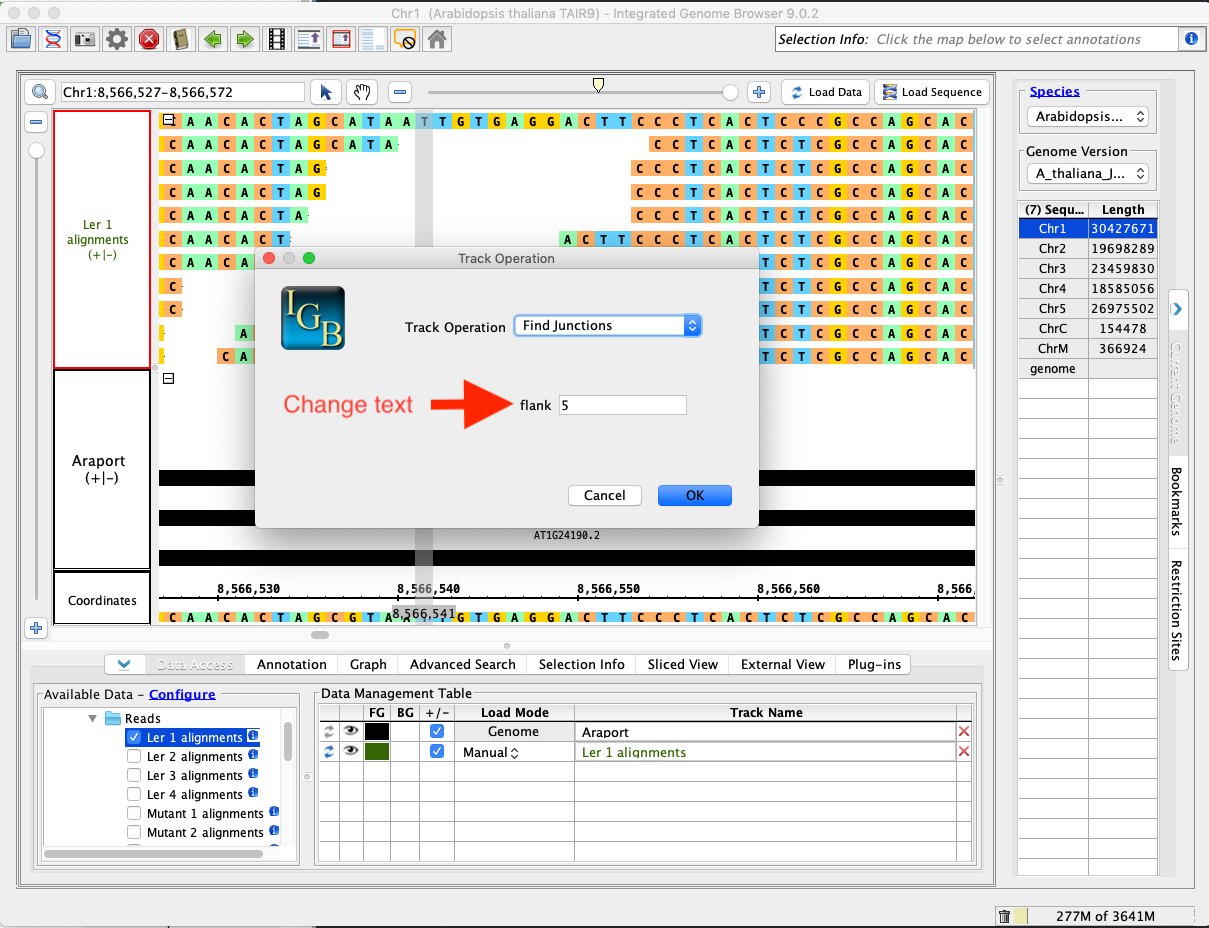
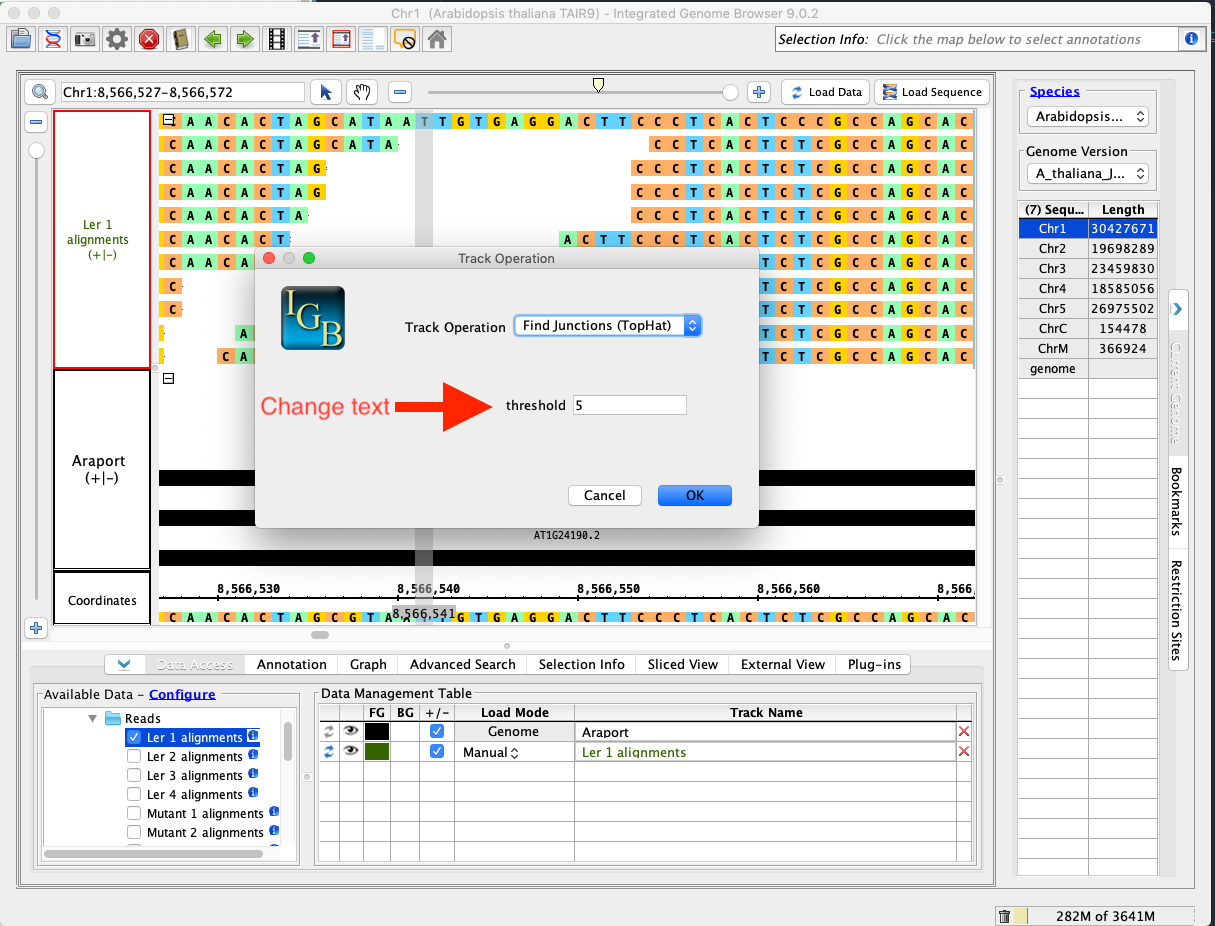
- selects Find Junctions or Find Junctions (Tophat)
(These are just two different ways to calculate a junction feature).
When the user selects a Find Junctions operation, a new window appears with settings for the operation. One of the setting is poorly labeled and likely does not make sense to a new user. This needs to be fixed. For "Find Junctions" the setting is called "flank" and for "Find Junctions (Tophat)" the setting is labeled "threshold". They have the same effect and the description should be the same.
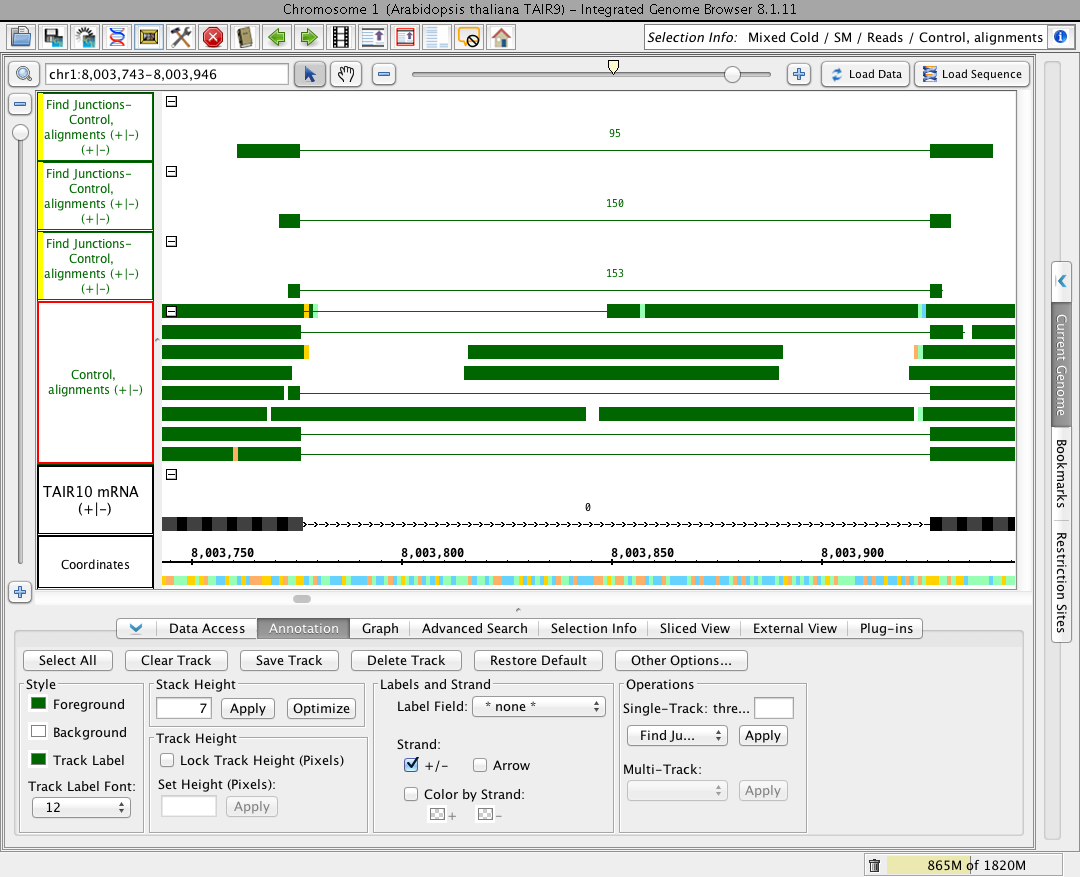
What they mean: This setting determines the minimum number of bases that need to align across a junction on either side in order for a split read to be used to create a junction feature. The fact that the track that is made has blocks that are the threshold size helps make this apparent, but it would be really good to have a tool tip, or optional info button or something to help the user figure out what the threshold option does.
Task:
- Investigate whether or not we can change this labeling, and how to do it. To be more informative, the label should read:
- Add a comment making note of files and modules that would need to be edited.
- Make the change as required, if feasible.
"Enter minimum number of bases required to align on each side of the intron/junction:"
Note: Consult with Dr. Freese if you have questions about how to proceed.
Caution: All Track Operations are using the same UI code. Watch out!
Attachments
Activity
| Field | Original Value | New Value |
|---|---|---|
| Resolution | Unresolved [ 10101 ] | |
| Attachment | Single-Track_thre.png [ 12892 ] |
| Description |
Version noticed: 8.2.0
When you choose the operation “find junctions”, and option called "thres…” comes up where you can enter a value.This is not intuitive, and my first thought was that it was the threshold for the minimum number of reads supporting a junction for the junction to be reported, which its not. I’m pretty sure it is actually the number of bases that a read must have on each side of the junction in order to contribute to the score for that junction. The fact that the track that is made has blocks that are the threshold size helps make this apparent, but it would be really good to have a tool tip, or optional info button or something to help the user figure out what the threshold option does. |
*Version noticed: 8.2.0
When you choose the operation “find junctions”, and option called "thres…” comes up where you can enter a value.This is not intuitive, and my first thought was that it was the threshold for the minimum number of reads supporting a junction for the junction to be reported, which its not. I’m pretty sure it is actually the number of bases that a read must have on each side of the junction in order to contribute to the score for that junction. The fact that the track that is made has blocks that are the threshold size helps make this apparent, but it would be really good to have a tool tip, or optional info button or something to help the user figure out what the threshold option does. |
| Rank | Ranked higher |
| Rank | Ranked lower |
| Rank | Ranked lower |
| Epic Link | IGBF-440 [ 15498 ] |
| Resolution | Unresolved [ 10101 ] | |
| Status | Open [ 1 ] | Open [ 1 ] |
| Rank | Ranked lower |
| Epic Link | IGBF-440 [ 15498 ] |
| Assignee | David Norris [ dcnorris ] |
| Rank | Ranked higher |
| Description |
*Version noticed: 8.2.0
When you choose the operation “find junctions”, and option called "thres…” comes up where you can enter a value.This is not intuitive, and my first thought was that it was the threshold for the minimum number of reads supporting a junction for the junction to be reported, which its not. I’m pretty sure it is actually the number of bases that a read must have on each side of the junction in order to contribute to the score for that junction. The fact that the track that is made has blocks that are the threshold size helps make this apparent, but it would be really good to have a tool tip, or optional info button or something to help the user figure out what the threshold option does. |
First noticed with in version 8.2.0:
User story: The Find Junctions feature lets a user created so-called "junction features" in a new track using a BAM (alignments) track as input. To use the feature, a user: * loads a BAM track * right-clicks the BAM track's track label * selects Tracks Operations * selects Find Junctions or Find Junctions (Tophat) (These are just two different ways to calculate a junction feature). When the user selects a Find Junctions operation, a new window appears with settings for the operation. One of the setting is poorly labeled and likely does not make sense to a new user. This needs to be fixed. For "Find Junctions" the setting is called "flank" and for "Find Junctions (Tophat)" the setting is labeled "threshold". They have the same effect and the description should be the same. What they mean: This setting determines the minimum number of bases that need to align across a junction on either side in order for a split read to be used to create a junction feature. The fact that the track that is made has blocks that are the threshold size helps make this apparent, but it would be really good to have a tool tip, or optional info button or something to help the user figure out what the threshold option does. Task: * Investigate whether or not we can change this labeling, and how to do it. To be more informative, the label should read: * Add a comment making note of files and modules that would need to be edited. * Make the change as required, if feasible. "Enter minimum number of bases required to align on each side of the intron/junction:" Note: Consult with Dr. Freese if you have questions about how to proceed. |
| Summary | "Thres..." option for the FindJunctions feature is confusing | Improve labeling for FindJunctions settings |
| Summary | Improve labeling for FindJunctions settings | Improve labeling for FindJunctions Track Operation settings |
| Description |
First noticed with in version 8.2.0:
User story: The Find Junctions feature lets a user created so-called "junction features" in a new track using a BAM (alignments) track as input. To use the feature, a user: * loads a BAM track * right-clicks the BAM track's track label * selects Tracks Operations * selects Find Junctions or Find Junctions (Tophat) (These are just two different ways to calculate a junction feature). When the user selects a Find Junctions operation, a new window appears with settings for the operation. One of the setting is poorly labeled and likely does not make sense to a new user. This needs to be fixed. For "Find Junctions" the setting is called "flank" and for "Find Junctions (Tophat)" the setting is labeled "threshold". They have the same effect and the description should be the same. What they mean: This setting determines the minimum number of bases that need to align across a junction on either side in order for a split read to be used to create a junction feature. The fact that the track that is made has blocks that are the threshold size helps make this apparent, but it would be really good to have a tool tip, or optional info button or something to help the user figure out what the threshold option does. Task: * Investigate whether or not we can change this labeling, and how to do it. To be more informative, the label should read: * Add a comment making note of files and modules that would need to be edited. * Make the change as required, if feasible. "Enter minimum number of bases required to align on each side of the intron/junction:" Note: Consult with Dr. Freese if you have questions about how to proceed. |
First noticed with in version 8.2.0:
User story: The Find Junctions feature lets a user created so-called "junction features" in a new track using a BAM (alignments) track as input. To use the feature, a user: * loads a BAM track * right-clicks the BAM track's track label * selects Tracks Operations * selects Find Junctions or Find Junctions (Tophat) (These are just two different ways to calculate a junction feature). When the user selects a Find Junctions operation, a new window appears with settings for the operation. One of the setting is poorly labeled and likely does not make sense to a new user. This needs to be fixed. For "Find Junctions" the setting is called "flank" and for "Find Junctions (Tophat)" the setting is labeled "threshold". They have the same effect and the description should be the same. What they mean: This setting determines the minimum number of bases that need to align across a junction on either side in order for a split read to be used to create a junction feature. The fact that the track that is made has blocks that are the threshold size helps make this apparent, but it would be really good to have a tool tip, or optional info button or something to help the user figure out what the threshold option does. Task: * Investigate whether or not we can change this labeling, and how to do it. To be more informative, the label should read: * Add a comment making note of files and modules that would need to be edited. * Make the change as required, if feasible. "Enter minimum number of bases required to align on each side of the intron/junction:" Note: Consult with Dr. Freese if you have questions about how to proceed. Caution: All Track Operations are using the same UI code. Watch out! |
| Story Points | 1 | |
| Sprint | Winter 2018 Sprint 3 [ 58 ] | |
| Labels | Beginner |
| Attachment | findJunctions.png [ 14213 ] | |
| Attachment | findJunctionsTopHat.png [ 14214 ] |
| Assignee | Sai Charan Reddy Vallapureddy [ svallapu ] |
| Status | Open [ 1 ] | In Progress [ 3 ] |
| Status | In Progress [ 3 ] | Needs 1st Level Review [ 10005 ] |
| Assignee | Sai Charan Reddy Vallapureddy [ svallapu ] |
| Status | Needs 1st Level Review [ 10005 ] | Reviewing [ 10301 ] |
| Assignee | Nowlan Freese [ nfreese ] |
| Assignee | Nowlan Freese [ nfreese ] | Sai Charan Reddy Vallapureddy [ svallapu ] |
| Status | Reviewing [ 10301 ] | Ready for Pull Request [ 10304 ] |
| Rank | Ranked higher |
| Sprint | Winter 2018 Sprint 3 [ 58 ] | Winter 2018 Sprint 3, Spring 2019 Sprint 1 [ 58, 59 ] |
| Rank | Ranked higher |
| Status | Ready for Pull Request [ 10304 ] | Pull Request Submitted [ 10101 ] |
| Assignee | Sai Charan Reddy Vallapureddy [ svallapu ] |
| Status | Pull Request Submitted [ 10101 ] | Needs Testing [ 10002 ] |
| Status | Needs Testing [ 10002 ] | Testing In Progress [ 10003 ] |
| Resolution | Done [ 10000 ] | |
| Status | Testing In Progress [ 10003 ] | Closed [ 6 ] |
| Assignee | Sai Charan Reddy Vallapureddy [ svallapu ] |
| Workflow | Loraine Lab Workflow [ 15503 ] | Fall 2019 Workflow Update [ 19271 ] |
| Workflow | Fall 2019 Workflow Update [ 19271 ] | Revised Fall 2019 Workflow Update [ 21388 ] |