Uploaded image for project: 'IGB'
  1. IGB
  2. IGBF-2974

Fix back button redirection at the end of history error

    Details

    • Type: Bug
    • Status: Closed (View Workflow)
    • Priority: Major
    • Resolution: Done
    • Affects Version/s: None
    • Fix Version/s: None
    • Labels:
      None

      Description

      On clicking the back button from home directory, the loading spinner does not go away.

      Error in console:
      Uncaught TypeError: Cannot read properties of undefined (reading 'includes')
      at getFileList (cyverse.js:403)
      at window.onhashchange (cyverse.js:164)

        Attachments
          Activity

          Hide
          karthik Karthik Raveendran added a comment - - edited

          In function getFileList. there is an object that where the current URL and other records are saved. When the user hits the back button, values of the object is passed to the geFileLust() from the another object that saves the history of user visits in BioViz Connect in that session. When user goes too far (beyond the history's limit) a null set is passed and that causes the type error.

          Show
          karthik Karthik Raveendran added a comment - - edited In function getFileList. there is an object that where the current URL and other records are saved. When the user hits the back button, values of the object is passed to the geFileLust() from the another object that saves the history of user visits in BioViz Connect in that session. When user goes too far (beyond the history's limit) a null set is passed and that causes the type error.
          Hide
          karthik Karthik Raveendran added a comment - - edited

          Error line in getFileList: if (object['redirect_savedurl'].includes('searchDirectory'))

          In this line, string function 'includes' throws an error because the value of the object is undefined.
          However. this line is check before saving the section in which the user is searching if the user uses the search function. Adding a check before this line for any error works: The user is redirected to CAS login as per the browser history.

          Note: The check should not be too specific to a certain error value because no matter what the error value maybe when the user hits the back button or forward at the end of the history, they should be redirected to previous page. As long as it has a string value it should be good to go.

          Show
          karthik Karthik Raveendran added a comment - - edited Error line in getFileList: if (object ['redirect_savedurl'] .includes('searchDirectory')) In this line, string function 'includes' throws an error because the value of the object is undefined. However. this line is check before saving the section in which the user is searching if the user uses the search function. Adding a check before this line for any error works: The user is redirected to CAS login as per the browser history. Note: The check should not be too specific to a certain error value because no matter what the error value maybe when the user hits the back button or forward at the end of the history, they should be redirected to previous page. As long as it has a string value it should be good to go.
          Hide
          karthik Karthik Raveendran added a comment - - edited

          Pushed changes to repo. Commit in IGBF-2974

          Testing Protocol:
          a) When you are logged in to Bioviz Connect and home page is loaded, hit the back button to see if you are redirected to CAS (CAS is CyVerse login page)
          b) Navigate through the directories and hit the back button to check if it follows the breadcrumbs and at the end of history you should be redirected to CAS (CAS is CyVerse login page)
          c) Check to see if the Search function is working as it should be

          Show
          karthik Karthik Raveendran added a comment - - edited Pushed changes to repo. Commit in IGBF-2974 Testing Protocol: a) When you are logged in to Bioviz Connect and home page is loaded, hit the back button to see if you are redirected to CAS (CAS is CyVerse login page) b) Navigate through the directories and hit the back button to check if it follows the breadcrumbs and at the end of history you should be redirected to CAS (CAS is CyVerse login page) c) Check to see if the Search function is working as it should be
          Show
          nfreese Nowlan Freese added a comment - Merged https://bitbucket.org/nfreese/bioviz-connect/pull-requests/263/igbf-2974-fix-back-button-redirection-at?link_source=email
          Hide
          ann.loraine Ann Loraine added a comment -

          Deployed for testing to https://bvctest6.bioviz.org.

          Show
          ann.loraine Ann Loraine added a comment - Deployed for testing to https://bvctest6.bioviz.org .
          Hide
          omarne Omkar Marne (Inactive) added a comment - - edited

          Test results:

          • When I pressed the back button after logging in, the page redirected to CAS login page but when I hit forward button it logged out successfully. ( Please see attached screenshot.)
          • When I tried to log in again through the link on the log out page, I logged in successfully but it redirected me to the above page. (Please see 'Log in successful' screenshot). Not sure if that's a bug.
          • After navigating through the directories and hitting the back the button it redirects to CAS login page but repeats above after hitting forward button.
          • Search function is working fine on the community page but its not working on the home page. Please see attached screen shots.
          • If I sign out from my profile it redirects me to the https://www.bioviz.org/connect.html instead of CAS login page. Not sure if that's a bug too.

          Moving the ticket back to to-do.

          Show
          omarne Omkar Marne (Inactive) added a comment - - edited Test results: When I pressed the back button after logging in, the page redirected to CAS login page but when I hit forward button it logged out successfully. ( Please see attached screenshot.) When I tried to log in again through the link on the log out page, I logged in successfully but it redirected me to the above page. (Please see 'Log in successful' screenshot). Not sure if that's a bug. After navigating through the directories and hitting the back the button it redirects to CAS login page but repeats above after hitting forward button. Search function is working fine on the community page but its not working on the home page. Please see attached screen shots. If I sign out from my profile it redirects me to the https://www.bioviz.org/connect.html instead of CAS login page. Not sure if that's a bug too. Moving the ticket back to to-do.
          Hide
          omarne Omkar Marne (Inactive) added a comment -

          As per Dr. Freese, search function problem with the home page is a known issue. It usually happens when some one creates a new bioviz connect account ( which I did).
          We ran analysis on of the files and the result is as expected and we are able to the load the data in IGB.
          Closing the ticket.

          Show
          omarne Omkar Marne (Inactive) added a comment - As per Dr. Freese, search function problem with the home page is a known issue. It usually happens when some one creates a new bioviz connect account ( which I did). We ran analysis on of the files and the result is as expected and we are able to the load the data in IGB. Closing the ticket.
          Hide
          ann.loraine Ann Loraine added a comment -

          Please describe the known issue above so that if it occurs again, someone search and find this ticket to learn what the "known issue" above actually is, and why it occurs.

          Show
          ann.loraine Ann Loraine added a comment - Please describe the known issue above so that if it occurs again, someone search and find this ticket to learn what the "known issue" above actually is, and why it occurs.
          Hide
          omarne Omkar Marne (Inactive) added a comment - - edited

          Known issue:

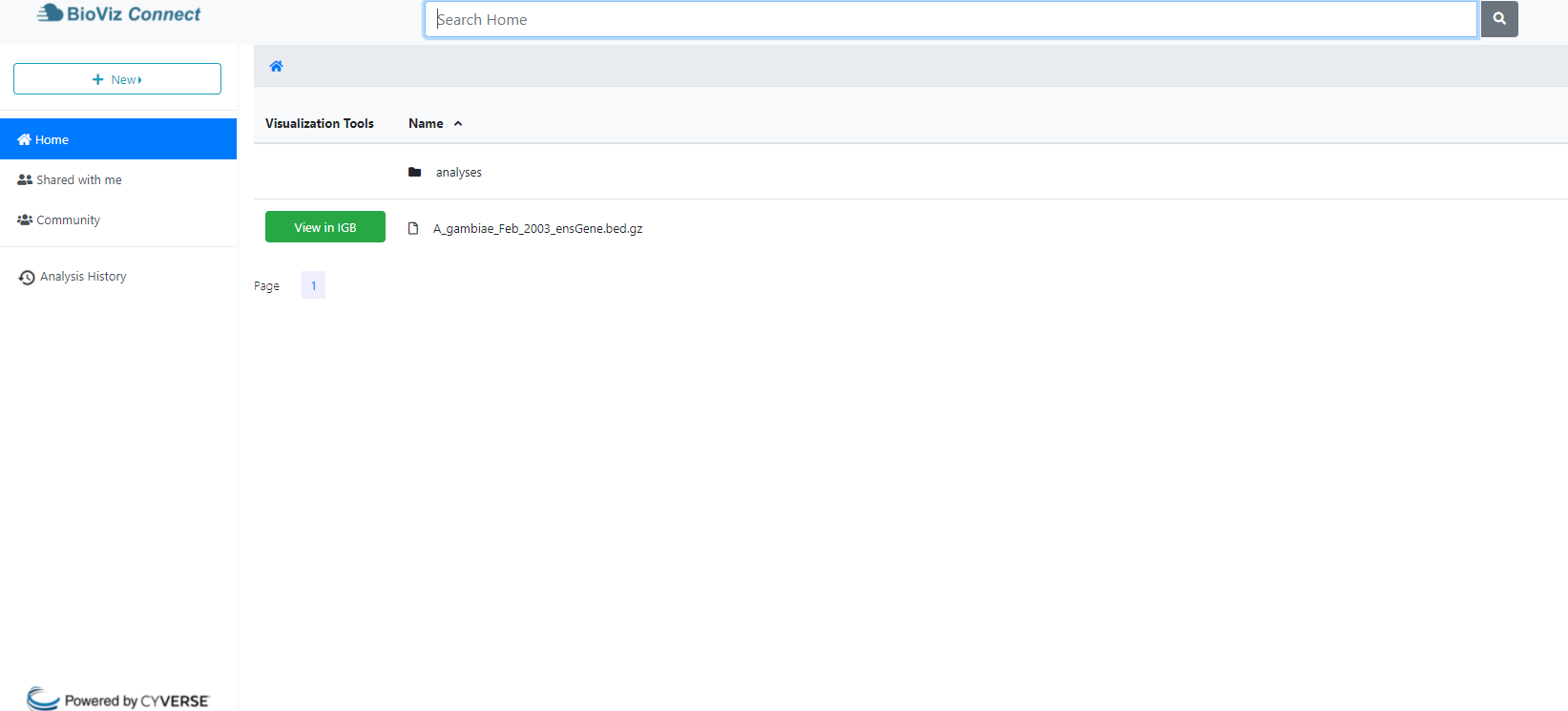
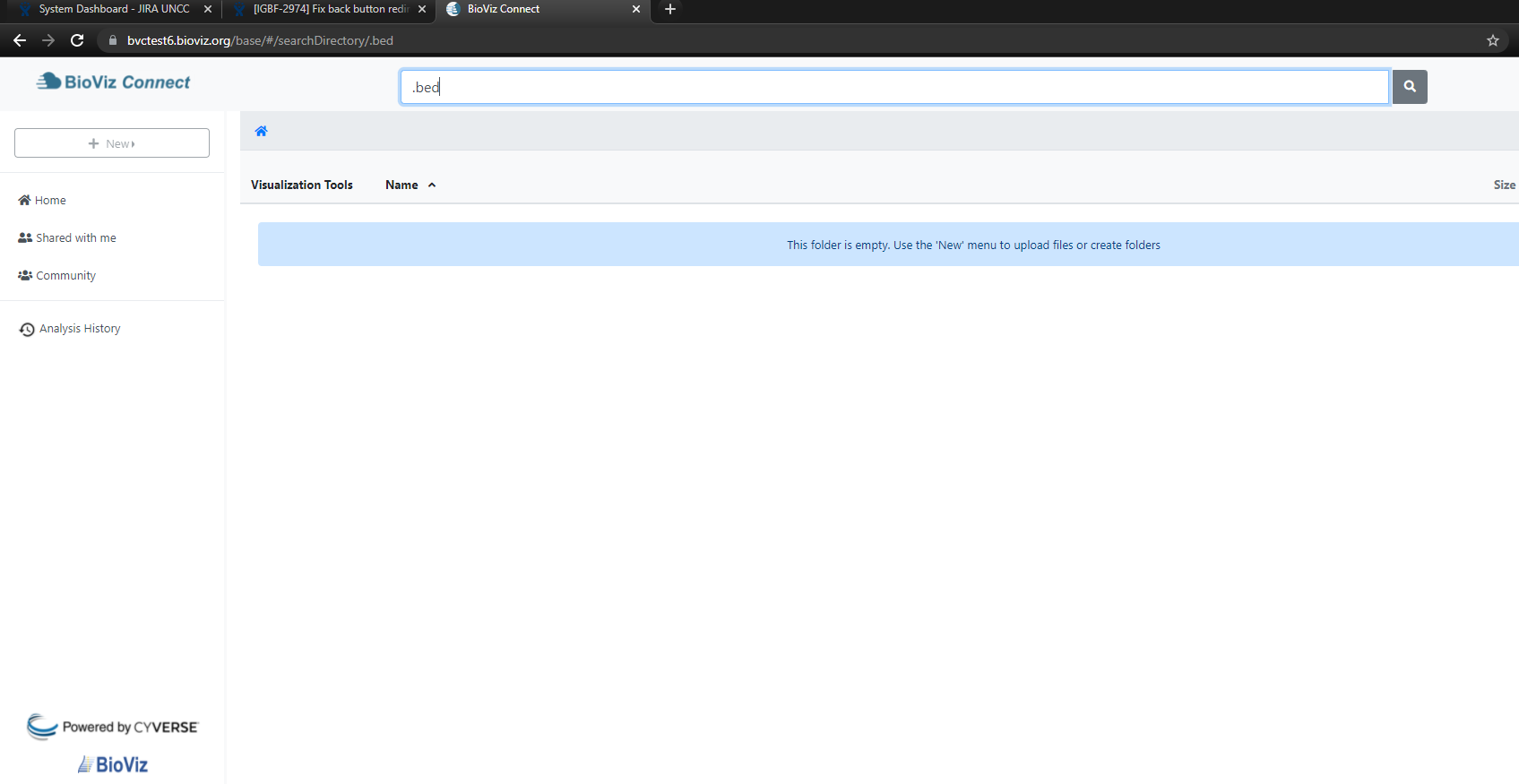
          • I have a uploaded a .bed file on my account. ( Please see "Home page" sceenshot ). If I try to search the file on the Home page its not appearing in the search results. ( Please see "bug" screenshot.). It usually takes 24 to 72 hrs for the new user to appear his search results. For me its more than 72 hrs but I am not able to see the results.
          • Also, If try to log out and log back in, it redirects me to the production site https://www.bioviz.org/connect.html instead of testing site https://bvctest6.bioviz.org.

          I tried on chrome and firefox after clearing both their cache's but I am getting the same result.

          Karthik Raveendran Please look into it.

          Show
          omarne Omkar Marne (Inactive) added a comment - - edited Known issue: I have a uploaded a .bed file on my account. ( Please see "Home page" sceenshot ). If I try to search the file on the Home page its not appearing in the search results. ( Please see "bug" screenshot.). It usually takes 24 to 72 hrs for the new user to appear his search results. For me its more than 72 hrs but I am not able to see the results. Also, If try to log out and log back in, it redirects me to the production site https://www.bioviz.org/connect.html instead of testing site https://bvctest6.bioviz.org . I tried on chrome and firefox after clearing both their cache's but I am getting the same result. Karthik Raveendran Please look into it.
          Hide
          karthik Karthik Raveendran added a comment - - edited

          1) As discussed, the search error seems to happen only for new users for a certain period of time, and for older users, the search seems to work just fine. This is most likely because Cyverse is taking a while indexing files for new users for the search functionality or the indexing happens only periodically. Nevertheless, this does not seem to have anything to do with this ticket so it's not a blocker. Please check once more if the search works for your profile, Omkar Marne and if it does not a new ticket can be created for this.
          2) This is not a bug but intended behavior. When re-logging to BioViz Connect after logging out the user should be redirected to the production site, https://www.bioviz.org/connect.html, even if the user started off with the test server.

          Show
          karthik Karthik Raveendran added a comment - - edited 1) As discussed, the search error seems to happen only for new users for a certain period of time, and for older users, the search seems to work just fine. This is most likely because Cyverse is taking a while indexing files for new users for the search functionality or the indexing happens only periodically. Nevertheless, this does not seem to have anything to do with this ticket so it's not a blocker. Please check once more if the search works for your profile, Omkar Marne and if it does not a new ticket can be created for this. 2) This is not a bug but intended behavior. When re-logging to BioViz Connect after logging out the user should be redirected to the production site, https://www.bioviz.org/connect.html , even if the user started off with the test server.
          Hide
          omarne Omkar Marne (Inactive) added a comment - - edited

          Karthik Raveendran I checked with my profile again on production website https://www.bioviz.org/connect.html. Its still not working for me for the home page.

          Show
          omarne Omkar Marne (Inactive) added a comment - - edited Karthik Raveendran I checked with my profile again on production website https://www.bioviz.org/connect.html . Its still not working for me for the home page.
          Hide
          karthik Karthik Raveendran added a comment -

          I will create a new investigate ticket for that and move this ticket to done

          Show
          karthik Karthik Raveendran added a comment - I will create a new investigate ticket for that and move this ticket to done

            People

            • Assignee:
              karthik Karthik Raveendran
              Reporter:
              karthik Karthik Raveendran
            • Votes:
              0 Vote for this issue
              Watchers:
              4 Start watching this issue

              Dates

              • Created:
                Updated:
                Resolved: