Uploaded image for project: 'IGB'
  1. IGB
  2. IGBF-3023

Fix UI for the delay in renaming file/folder names

    Details

    • Type: Improvement
    • Status: Closed (View Workflow)
    • Priority: Major
    • Resolution: Done
    • Affects Version/s: None
    • Fix Version/s: None
    • Labels:
      None
    • Story Points:
      2
    • Sprint:
      Fall 8 2021 Nov 29 - Dec 10, Fall 9 2021 Dec 13 - Dec 24, Spring 1 2022 Jan 3 - Jan 14

      Description

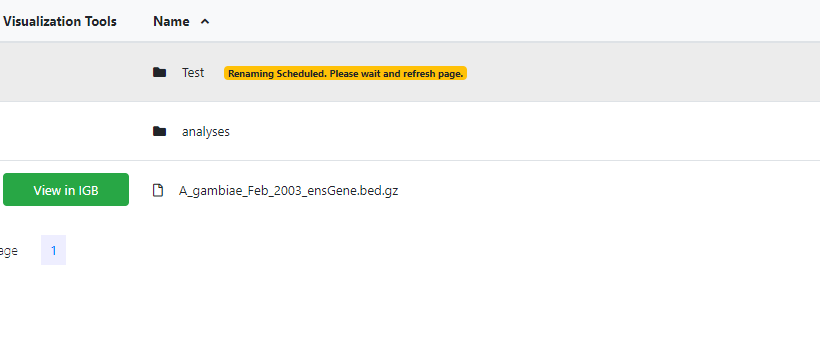
      1) Find a way to indicate to the user that they need to wait for sometime before the file is renamed and then refresh the page
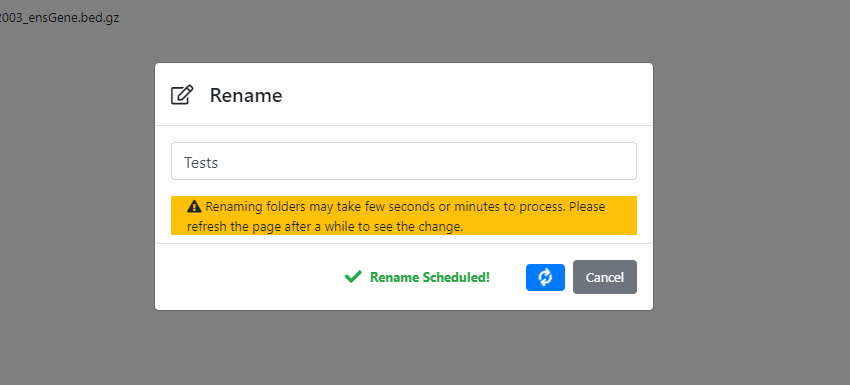
      2) In the rename dialog-box, change title from "Rename..." to "Rename"
      3) Fix the cryptic alert message ( "Sorry!...or contact admin") when Manage Link is opened and the old filename is still not replaced.
      4) Fix loading spinner of Manage Link to turn off after the alert box has been dismissed

        Attachments

        1. DeleteModalWindow.jpg
          DeleteModalWindow.jpg
          22 kB
        2. loading.png
          loading.png
          16 kB
        3. Rename badge.jpg
          Rename badge.jpg
          15 kB
        4. RenameModalWindow.jpg
          RenameModalWindow.jpg
          28 kB
        5. Rename warning.png
          Rename warning.png
          18 kB
        6. scheduled.png
          scheduled.png
          10 kB

          Activity

          karthik Karthik Raveendran created issue -
          karthik Karthik Raveendran made changes -
          Field Original Value New Value
          Epic Link IGBF-2376 [ 18533 ]
          karthik Karthik Raveendran made changes -
          Assignee Ann Loraine [ aloraine ] Karthik Raveendran [ karthik ]
          karthik Karthik Raveendran made changes -
          Description 1) Find a way to indicate to the user that they need to wait for sometime before the file is renamed and then refresh the page
          2) In the rename dialog-box, change title from "Rename..." to "Rename"
          3) Fix the cryptic alert message when Manage Link is opened when the filename is still displayed - "Sorry!...or contact admin"
          4) Fix loading spinner of Manage Link to turn off after the alert box has been dismissed
          1) Find a way to indicate to the user that they need to wait for sometime before the file is renamed and then refresh the page
          2) In the rename dialog-box, change title from "Rename..." to "Rename"
          3) Fix the cryptic alert message ( "Sorry!...or contact admin") when Manage Link is opened and the old filename is still not replaced.
          4) Fix loading spinner of Manage Link to turn off after the alert box has been dismissed
          karthik Karthik Raveendran made changes -
          Status To-Do [ 10305 ] In Progress [ 3 ]
          Hide
          karthik Karthik Raveendran added a comment -

          Changes made so far:
          1) Rename title has been changed
          2) In the rename pop-up modal window, the delay warning can be seen during both file or folder renaming process (not just folder renaming)
          3) A 5sec delay is added before the modal window is closed and bvc page is refreshed. This works for file renames but folder renames need more time as indicated by the warning
          4) When the rename requested and the response is 200 OK, in the modal window next to the "Save Changes" button a message appears that says "Rename Scheduled! " with a 'tick' icon. This is consistent with delete function.
          5) The cryptic message in the alert message existed in many alert messages throughout the application. All the messages are modified.
          Commit

          Show
          karthik Karthik Raveendran added a comment - Changes made so far: 1) Rename title has been changed 2) In the rename pop-up modal window, the delay warning can be seen during both file or folder renaming process (not just folder renaming) 3) A 5sec delay is added before the modal window is closed and bvc page is refreshed. This works for file renames but folder renames need more time as indicated by the warning 4) When the rename requested and the response is 200 OK, in the modal window next to the "Save Changes" button a message appears that says "Rename Scheduled! " with a 'tick' icon. This is consistent with delete function. 5) The cryptic message in the alert message existed in many alert messages throughout the application. All the messages are modified. Commit
          Hide
          karthik Karthik Raveendran added a comment - - edited

          Thoughts on improving the rename process:
          When renaming a file/folder, public link works for the old name until the name has been changed in the database. Once the change happens the link returns a 404 error. We could check that periodically to see if the name has changed and add a "wait" icon to the file row. When the name is changed, the wait icon can change to a refresh icon that the use can click to refresh the page. Problem is if the user navigates away from the page. Need to look into that.

          Show
          karthik Karthik Raveendran added a comment - - edited Thoughts on improving the rename process: When renaming a file/folder, public link works for the old name until the name has been changed in the database. Once the change happens the link returns a 404 error. We could check that periodically to see if the name has changed and add a "wait" icon to the file row. When the name is changed, the wait icon can change to a refresh icon that the use can click to refresh the page. Problem is if the user navigates away from the page. Need to look into that.
          Hide
          karthik Karthik Raveendran added a comment - - edited

          Thoughts on improving the rename process:
          A crude method to work around the renaming delay
          Step 1 - Add a rename list to the page cookie that looks like so:

          {"rename":{
                    "<directory_path_1>" :{
                                            "<file_uuid_1>": "<new_filename>",
                                            "<file_uuid_2>": "<new_filename>",
                                            "<file_uuid_3>": "<new_filename>"
                                           },
                    "<directory_path_2>" : {
                                            "<file_uuid_1>": "<new_filename>",
                                            "<file_uuid_2>": "<new_filename>",
                                            "<file_uuid_3>": "<new_filename>"
                                           }
                   }
          }
          

          Step 2 - (Pseudocode)

          if currentdirctory = directory_path_in_list:
            for(uuid in list){
               if uuid_filename = new_filename:
                 deletefromcookielist()
               else:
                 add_wait_icon() // adds "wait" icon to the file row in the table 
                 gray_out_file_row() // disables the row
                 disable_rightclick_popup() // disables rightclick menu
                 click_on row_toast_popup() // clicks on the row, a toast appears with a "wait" message
          }
          

          Problems with this method -
          1) It will take a long time to implement because whenever the user navigates through the application, the checking mechanism has to be triggered and the payoff for this change is very low
          2) Adding the list to the browser cookie with file UUIDs does not seem like a good idea from a security standpoint but it would be necessary if the user navigates away from the current directory

          Show
          karthik Karthik Raveendran added a comment - - edited Thoughts on improving the rename process: A crude method to work around the renaming delay Step 1 - Add a rename list to the page cookie that looks like so: { "rename" :{ "<directory_path_1>" :{ "<file_uuid_1>" : "<new_filename>" , "<file_uuid_2>" : "<new_filename>" , "<file_uuid_3>" : "<new_filename>" }, "<directory_path_2>" : { "<file_uuid_1>" : "<new_filename>" , "<file_uuid_2>" : "<new_filename>" , "<file_uuid_3>" : "<new_filename>" } } } Step 2 - (Pseudocode) if currentdirctory = directory_path_in_list: for (uuid in list){ if uuid_filename = new_filename: deletefromcookielist() else : add_wait_icon() // adds "wait" icon to the file row in the table gray_out_file_row() // disables the row disable_rightclick_popup() // disables rightclick menu click_on row_toast_popup() // clicks on the row, a toast appears with a "wait" message } Problems with this method - 1) It will take a long time to implement because whenever the user navigates through the application, the checking mechanism has to be triggered and the payoff for this change is very low 2) Adding the list to the browser cookie with file UUIDs does not seem like a good idea from a security standpoint but it would be necessary if the user navigates away from the current directory
          karthik Karthik Raveendran made changes -
          Attachment RenameModalWindow.jpg [ 16996 ]
          Attachment DeleteModalWindow.jpg [ 16997 ]
          karthik Karthik Raveendran made changes -
          Story Points 2
          karthik Karthik Raveendran made changes -
          Status In Progress [ 3 ] Needs 1st Level Review [ 10005 ]
          karthik Karthik Raveendran made changes -
          Assignee Karthik Raveendran [ karthik ]
          karthik Karthik Raveendran made changes -
          Status Needs 1st Level Review [ 10005 ] First Level Review in Progress [ 10301 ]
          karthik Karthik Raveendran made changes -
          Status First Level Review in Progress [ 10301 ] Ready for Pull Request [ 10304 ]
          karthik Karthik Raveendran made changes -
          Status Ready for Pull Request [ 10304 ] Pull Request Submitted [ 10101 ]
          karthik Karthik Raveendran made changes -
          Status Pull Request Submitted [ 10101 ] Reviewing Pull Request [ 10303 ]
          karthik Karthik Raveendran made changes -
          Status Reviewing Pull Request [ 10303 ] Merged Needs Testing [ 10002 ]
          karthik Karthik Raveendran made changes -
          Status Merged Needs Testing [ 10002 ] Post-merge Testing In Progress [ 10003 ]
          karthik Karthik Raveendran made changes -
          Status Post-merge Testing In Progress [ 10003 ] To-Do [ 10305 ]
          karthik Karthik Raveendran made changes -
          Status To-Do [ 10305 ] In Progress [ 3 ]
          karthik Karthik Raveendran made changes -
          Assignee Karthik Raveendran [ karthik ]
          ann.loraine Ann Loraine made changes -
          Comment [ Why is this in Needs Review?
          attn: [~karthik] ]
          Hide
          karthik Karthik Raveendran added a comment - - edited

          For the logic in the previous comment, the problem of UUIDs (Problem 2) and security is not a concern as thought to be earlier. In the BioViz Connect directory table, file UUIDs are being used as the 'id' attribute for table rows. Moreover, a timeout can be included to expire the cookies. Cookies can also be emptied when the browser or browser tab is closed.
          How to use Django sessions

          Setting and getting values to and from redis cache is already being done in BioViz Connect backend during Move File & Folder, Create File & Folder, Signout and almost all error handling functions. Generally, the cookie sessionid is used as the key value for the data in the these cases. Therefore, to implement the renaming logic described in the previous comment, the key <sessionid>'_rename' is being used to save renamed files and folders names in the cache. in views.py, the function,"updateRenameList" does basic CRUD operations in the cache for <sessionid>'_rename'.
          The logic for the cookie expiry on timeout has been implemented and the cookie expiry on browser close is yet to be included. The UI complications (Problem 1) still remains and requires thorough investigation before changes.

          Show
          karthik Karthik Raveendran added a comment - - edited For the logic in the previous comment, the problem of UUIDs (Problem 2) and security is not a concern as thought to be earlier. In the BioViz Connect directory table, file UUIDs are being used as the 'id' attribute for table rows. Moreover, a timeout can be included to expire the cookies. Cookies can also be emptied when the browser or browser tab is closed. How to use Django sessions Setting and getting values to and from redis cache is already being done in BioViz Connect backend during Move File & Folder, Create File & Folder, Signout and almost all error handling functions. Generally, the cookie sessionid is used as the key value for the data in the these cases. Therefore, to implement the renaming logic described in the previous comment, the key <sessionid>'_rename' is being used to save renamed files and folders names in the cache. in views.py, the function,"updateRenameList" does basic CRUD operations in the cache for <sessionid>'_rename'. The logic for the cookie expiry on timeout has been implemented and the cookie expiry on browser close is yet to be included. The UI complications (Problem 1) still remains and requires thorough investigation before changes.
          karthik Karthik Raveendran made changes -
          Attachment Rename badge.jpg [ 17007 ]
          Hide
          karthik Karthik Raveendran added a comment - - edited

          UI has been implemented (please see image, "Rename Badge"). When a user renames the file or folder,
          a) A badge is added to the file/folder row to indicate that the file name is being changed and row is greyed out.
          b) Clicking the badge refreshes the page.
          c) Click events are unbound from the row.

          See Commit

          Show
          karthik Karthik Raveendran added a comment - - edited UI has been implemented (please see image, "Rename Badge"). When a user renames the file or folder, a) A badge is added to the file/folder row to indicate that the file name is being changed and row is greyed out. b) Clicking the badge refreshes the page. c) Click events are unbound from the row. See Commit
          karthik Karthik Raveendran made changes -
          Status In Progress [ 3 ] Needs 1st Level Review [ 10005 ]
          karthik Karthik Raveendran made changes -
          Assignee Karthik Raveendran [ karthik ]
          Hide
          karthik Karthik Raveendran added a comment -

          Note: Unbinding the event handlers from the row is important because if the user changes the name of a folder and then proceeds to change the name of a child file/folder, a duplicate of the original folder is created (along with its child files and folders) in the parent directory.

          Show
          karthik Karthik Raveendran added a comment - Note: Unbinding the event handlers from the row is important because if the user changes the name of a folder and then proceeds to change the name of a child file/folder, a duplicate of the original folder is created (along with its child files and folders) in the parent directory.
          ann.loraine Ann Loraine made changes -
          Assignee Ann Loraine [ aloraine ]
          ann.loraine Ann Loraine made changes -
          Status Needs 1st Level Review [ 10005 ] First Level Review in Progress [ 10301 ]
          ann.loraine Ann Loraine made changes -
          Comment [ I highly recommend NOT doing this.

          Stick with the simplicity of storing the cookie using the session id. If you do not do this, and instead start constructing non-obvious keys, such as [sessions_id]_[a_string], it will rapidly become impossible to maintain or modify this site. Instead, simply modify the cookie to include whatever information you need.

          (In my humble opinion, HTTP is fundamentally stateless and cookies are an evil hack to impose state. Don't make the evil worse.)

          ]
          ann.loraine Ann Loraine made changes -
          Comment [ How about: [sessionid]_application_state ]
          Hide
          ann.loraine Ann Loraine added a comment -

          Re discussion today during the scrum: I got confused as to where the state data was being saved. I understand now it will be stored as a dictionary in the redis database, using a key string that includes the session identifier.

          I have a question for Karthik Raveendran:

          Can you explain here (in a comment) how this state data will be deleted? You mentioned something about an expiration today during the meeting, and that the data will only be stored temporarily in the redis database for five minutes, and then deleted. How will this be done?

          Show
          ann.loraine Ann Loraine added a comment - Re discussion today during the scrum: I got confused as to where the state data was being saved. I understand now it will be stored as a dictionary in the redis database, using a key string that includes the session identifier. I have a question for Karthik Raveendran : Can you explain here (in a comment) how this state data will be deleted? You mentioned something about an expiration today during the meeting, and that the data will only be stored temporarily in the redis database for five minutes, and then deleted. How will this be done?
          ann.loraine Ann Loraine made changes -
          Status First Level Review in Progress [ 10301 ] To-Do [ 10305 ]
          ann.loraine Ann Loraine made changes -
          Assignee Ann Loraine [ aloraine ] Karthik Raveendran [ karthik ]
          Hide
          karthik Karthik Raveendran added a comment -

          While setting the Redis cache, I am setting a timeout on the key of the data, in this case the "[sessionId]_rename" key. My understanding of this is that when the key is read, the timeout is also read to see if the time is up. If the time is up, then the key is deleted. This is how I believe this is happening based on the link below.
          Redis Expire

          Show
          karthik Karthik Raveendran added a comment - While setting the Redis cache, I am setting a timeout on the key of the data, in this case the " [sessionId] _rename" key. My understanding of this is that when the key is read, the timeout is also read to see if the time is up. If the time is up, then the key is deleted. This is how I believe this is happening based on the link below. Redis Expire
          ann.loraine Ann Loraine made changes -
          Sprint Fall 8 2021 Nov 29 - Dec 10 [ 134 ] Fall 8 2021 Nov 29 - Dec 10, Fall 9 2021 Dec 13 - Dec 24 [ 134, 135 ]
          ann.loraine Ann Loraine made changes -
          Rank Ranked higher
          karthik Karthik Raveendran made changes -
          Status To-Do [ 10305 ] In Progress [ 3 ]
          Show
          nfreese Nowlan Freese added a comment - Merged https://bitbucket.org/nfreese/bioviz-connect/pull-requests/268/igbf-3025?link_source=email
          ann.loraine Ann Loraine made changes -
          Assignee Karthik Raveendran [ karthik ] Ann Loraine [ aloraine ]
          Hide
          ann.loraine Ann Loraine added a comment -

          Nowlan Freese: notes that a lot of testing must be done. Karthik Raveendran will need to carefully and thoroughly define the testing protocol.

          Show
          ann.loraine Ann Loraine added a comment - Nowlan Freese : notes that a lot of testing must be done. Karthik Raveendran will need to carefully and thoroughly define the testing protocol.
          Hide
          ann.loraine Ann Loraine added a comment -

          New code is deployed to bvctest7.bioviz.org. Ready for testing.

          attn: Omkar Marne

          Show
          ann.loraine Ann Loraine added a comment - New code is deployed to bvctest7.bioviz.org. Ready for testing. attn: Omkar Marne
          ann.loraine Ann Loraine made changes -
          Status In Progress [ 3 ] Needs 1st Level Review [ 10005 ]
          ann.loraine Ann Loraine made changes -
          Status Needs 1st Level Review [ 10005 ] First Level Review in Progress [ 10301 ]
          ann.loraine Ann Loraine made changes -
          Status First Level Review in Progress [ 10301 ] Ready for Pull Request [ 10304 ]
          ann.loraine Ann Loraine made changes -
          Status Ready for Pull Request [ 10304 ] Pull Request Submitted [ 10101 ]
          ann.loraine Ann Loraine made changes -
          Status Pull Request Submitted [ 10101 ] Reviewing Pull Request [ 10303 ]
          ann.loraine Ann Loraine made changes -
          Status Reviewing Pull Request [ 10303 ] Merged Needs Testing [ 10002 ]
          ann.loraine Ann Loraine made changes -
          Assignee Ann Loraine [ aloraine ]
          omarne Omkar Marne (Inactive) made changes -
          Assignee Omkar Marne [ omarne ]
          Hide
          karthik Karthik Raveendran added a comment - - edited

          Testing Protocol:
          The testing may need a few iterations to notice any errors, if any.

          • 1) Go to https://bvctest7.bioviz.org.
          • 2) Create a folder and create folders within it and so on to create an elaborate directory system.
          • 3) Add test files like .txt to these folders as many as needed.
          • 4) Right-click on the parent folder and rename the folder. Look out for the following:
            • a) The rename window should have a warning about the time taken to rename.
            • b) Save changes button icon should change to loading icon on click.
            • c) After click, the "Rename Scheduled!" should appear next to the button.
            • d) The window should close after a few seconds.
            • e) Once the window closes, the corressponding table row should be greyed out.
            • f) A yellow badge should be appear next to the foldername that says, "Renaming Scheduled. Please wait and refresh page."
            • g) Double-clicking the folder should be disabled.
            • h) Right-clicking the folder/file should be disabled.
            • i) Clicking on the badge refreshes the page.
              Note: Upon testing please note in the comments if these things are working as its supposed to every time.
          • 5) When the renaming process is happening nagivate away from the directory and come back and check if the badge is still there.
          • 6) If it is, check if all the features in 4 works. If not, check if the file/folder name is the new one.
          • 7) Special Case:
            When the folder is in the renaming process, the double-click wont work. But if you
            • a) Open the folder first, b) Move back to the parent folder using the Breadcrumbs feature, c) and then rename the folder d)you can hit the back button to enter the folder again.

          This should not effect the users ability to use the app by throwing an error. Please test if that's the case.

          Please check in the above case if the Manage Link, Analyses and Metadata does not act differently. After 7)d), you might want to wait a few minutes before testing these, giving sufficient time for the parent folder name to change.

          Show
          karthik Karthik Raveendran added a comment - - edited Testing Protocol: The testing may need a few iterations to notice any errors, if any. 1) Go to https://bvctest7.bioviz.org . 2) Create a folder and create folders within it and so on to create an elaborate directory system. 3) Add test files like .txt to these folders as many as needed. 4) Right-click on the parent folder and rename the folder. Look out for the following: a) The rename window should have a warning about the time taken to rename. b) Save changes button icon should change to loading icon on click. c) After click, the "Rename Scheduled!" should appear next to the button. d) The window should close after a few seconds. e) Once the window closes, the corressponding table row should be greyed out. f) A yellow badge should be appear next to the foldername that says, "Renaming Scheduled. Please wait and refresh page." g) Double-clicking the folder should be disabled. h) Right-clicking the folder/file should be disabled. i) Clicking on the badge refreshes the page. Note: Upon testing please note in the comments if these things are working as its supposed to every time. 5) When the renaming process is happening nagivate away from the directory and come back and check if the badge is still there. 6) If it is, check if all the features in 4 works. If not, check if the file/folder name is the new one. 7) Special Case: When the folder is in the renaming process, the double-click wont work. But if you a) Open the folder first, b) Move back to the parent folder using the Breadcrumbs feature, c) and then rename the folder d)you can hit the back button to enter the folder again. This should not effect the users ability to use the app by throwing an error. Please test if that's the case. Please check in the above case if the Manage Link, Analyses and Metadata does not act differently. After 7)d), you might want to wait a few minutes before testing these, giving sufficient time for the parent folder name to change.
          omarne Omkar Marne (Inactive) made changes -
          Comment [ [~karthik] Please add testing instructions for this ticket. ]
          omarne Omkar Marne (Inactive) made changes -
          Status Merged Needs Testing [ 10002 ] Post-merge Testing In Progress [ 10003 ]
          omarne Omkar Marne (Inactive) made changes -
          Attachment Rename warning.png [ 17032 ]
          omarne Omkar Marne (Inactive) made changes -
          Attachment loading.png [ 17033 ]
          omarne Omkar Marne (Inactive) made changes -
          Attachment scheduled.png [ 17034 ]
          Hide
          omarne Omkar Marne (Inactive) added a comment - - edited

          Test results after performing the testing protocol.

          I created a parent folder and subfolders inside the parent folder and uploaded .txt files.

          After right-clicking, I performed the below actions and their results were as per the testing protocol.

          • The rename had a warning about the time taken to rename.
          • Save changes button icon should change to loading icon on click.
          • After the click, the "Rename Scheduled!" appeared next to the button.
          • The window closed after a few seconds.
          • Once the window closes, the corresponding table greyed out.
          • A yellow badge had appeared next to the folder name. that says, "Renaming Scheduled. Please wait and refresh the page."
          • Double-clicking the folder got disabled when badge appeared
          • Right-clicking the folder/file got disabled when badge appeared
          • Clicking on the badge refreshed the page.
          • When the renaming process was happening I navigated away from the directory and came back and checked that the badge was still there.

          Manage Link, Metadata, and Analyse option did not act differently during the process.

          ( Please see attached snapshots for the test results.)

          Although, I have found a few bugs. I am not sure if they are related to the above testing protocol.

          I followed the same steps for the subfolders but the behavior was different.

          • A yellow badge did not appear next to the folder name that says, "Renaming Scheduled. Please wait and refresh the page."
          • Rename was not successful after refreshing the page.
          • Double click and right-click were unsuccessful during the renaming process.

          Before moving this ticket back to to-do I need to check with Karthik Raveendran if the above behavior is expected.

          Show
          omarne Omkar Marne (Inactive) added a comment - - edited Test results after performing the testing protocol. I created a parent folder and subfolders inside the parent folder and uploaded .txt files. After right-clicking, I performed the below actions and their results were as per the testing protocol. The rename had a warning about the time taken to rename. Save changes button icon should change to loading icon on click. After the click, the "Rename Scheduled!" appeared next to the button. The window closed after a few seconds. Once the window closes, the corresponding table greyed out. A yellow badge had appeared next to the folder name. that says, "Renaming Scheduled. Please wait and refresh the page." Double-clicking the folder got disabled when badge appeared Right-clicking the folder/file got disabled when badge appeared Clicking on the badge refreshed the page. When the renaming process was happening I navigated away from the directory and came back and checked that the badge was still there. Manage Link, Metadata, and Analyse option did not act differently during the process. ( Please see attached snapshots for the test results.) Although, I have found a few bugs. I am not sure if they are related to the above testing protocol. I followed the same steps for the subfolders but the behavior was different. A yellow badge did not appear next to the folder name that says, "Renaming Scheduled. Please wait and refresh the page." Rename was not successful after refreshing the page. Double click and right-click were unsuccessful during the renaming process. Before moving this ticket back to to-do I need to check with Karthik Raveendran if the above behavior is expected.
          Hide
          karthik Karthik Raveendran added a comment -

          Yellow badge not appearing is could be a problem but I was not able to replicate it. Rename not successful can happen. Double-click and right-click not working during the renaming process is meant to happen.

          Show
          karthik Karthik Raveendran added a comment - Yellow badge not appearing is could be a problem but I was not able to replicate it. Rename not successful can happen. Double-click and right-click not working during the renaming process is meant to happen.
          Hide
          omarne Omkar Marne (Inactive) added a comment -

          Karthik Raveendran Moving this ticket back to to-do.

          Show
          omarne Omkar Marne (Inactive) added a comment - Karthik Raveendran Moving this ticket back to to-do.
          omarne Omkar Marne (Inactive) made changes -
          Status Post-merge Testing In Progress [ 10003 ] To-Do [ 10305 ]
          omarne Omkar Marne (Inactive) made changes -
          Assignee Omkar Marne [ omarne ] Karthik Raveendran [ karthik ]
          Hide
          karthik Karthik Raveendran added a comment -

          Omkar Marne Showed me the issue. For some folders the rename UI features were not being imposed but the renaming was happening like before the changes made in this issues. This is because of special characters in the path name (like space). Correcting this fixes the issue.

          Show
          karthik Karthik Raveendran added a comment - Omkar Marne Showed me the issue. For some folders the rename UI features were not being imposed but the renaming was happening like before the changes made in this issues. This is because of special characters in the path name (like space). Correcting this fixes the issue.
          karthik Karthik Raveendran made changes -
          Status To-Do [ 10305 ] In Progress [ 3 ]
          Hide
          karthik Karthik Raveendran added a comment -

          There were two issues in the rename functionality. As mentioned in the earlier comment the the special characters in URI needed to be encoded. But after fixing that, I realized that the error handling in rename function was not effective if there is a value error. This poses a big problem because the user will be blocked from using the folder if the error is not handled well. So in the commit below the error has been handled as well.

          [ Commit | https://bitbucket.org/nfreese/bioviz-connect/pull-requests/269/igbf-3023]

          Show
          karthik Karthik Raveendran added a comment - There were two issues in the rename functionality. As mentioned in the earlier comment the the special characters in URI needed to be encoded. But after fixing that, I realized that the error handling in rename function was not effective if there is a value error. This poses a big problem because the user will be blocked from using the folder if the error is not handled well. So in the commit below the error has been handled as well. [ Commit | https://bitbucket.org/nfreese/bioviz-connect/pull-requests/269/igbf-3023 ]
          karthik Karthik Raveendran made changes -
          Status In Progress [ 3 ] Needs 1st Level Review [ 10005 ]
          karthik Karthik Raveendran made changes -
          Assignee Karthik Raveendran [ karthik ]
          omarne Omkar Marne (Inactive) made changes -
          Assignee Omkar Marne [ omarne ]
          Show
          nfreese Nowlan Freese added a comment - - edited Merged https://bitbucket.org/nfreese/bioviz-connect/pull-requests/269/igbf-3023
          nfreese Nowlan Freese made changes -
          Status Needs 1st Level Review [ 10005 ] First Level Review in Progress [ 10301 ]
          nfreese Nowlan Freese made changes -
          Status First Level Review in Progress [ 10301 ] Ready for Pull Request [ 10304 ]
          nfreese Nowlan Freese made changes -
          Status Ready for Pull Request [ 10304 ] Pull Request Submitted [ 10101 ]
          nfreese Nowlan Freese made changes -
          Status Pull Request Submitted [ 10101 ] Reviewing Pull Request [ 10303 ]
          nfreese Nowlan Freese made changes -
          Status Reviewing Pull Request [ 10303 ] Merged Needs Testing [ 10002 ]
          ann.loraine Ann Loraine made changes -
          Sprint Fall 8 2021 Nov 29 - Dec 10, Fall 9 2021 Dec 13 - Dec 24 [ 134, 135 ] Fall 8 2021 Nov 29 - Dec 10, Fall 9 2021 Dec 13 - Dec 24, Spring 1 2022 Jan 3 - Jan 14 [ 134, 135, 136 ]
          ann.loraine Ann Loraine made changes -
          Rank Ranked higher
          omarne Omkar Marne (Inactive) made changes -
          Status Merged Needs Testing [ 10002 ] Post-merge Testing In Progress [ 10003 ]
          Hide
          omarne Omkar Marne (Inactive) added a comment - - edited

          Karthik Raveendran Rename of the subfolders was successful and after the click, the "Rename Scheduled!" appeared next to the button but the yellow badge did not appear next to the folder name that says, "Renaming Scheduled. Please wait and refresh the page."

          Please let me know if that's expected.

          Show
          omarne Omkar Marne (Inactive) added a comment - - edited Karthik Raveendran Rename of the subfolders was successful and after the click, the "Rename Scheduled!" appeared next to the button but the yellow badge did not appear next to the folder name that says, "Renaming Scheduled. Please wait and refresh the page." Please let me know if that's expected.
          Hide
          omarne Omkar Marne (Inactive) added a comment -

          Dr. [~aloraine] Could you please run the playbooks to merge the Karthik's changes into bvctest7.

          Show
          omarne Omkar Marne (Inactive) added a comment - Dr. [~aloraine] Could you please run the playbooks to merge the Karthik's changes into bvctest7.
          Hide
          omarne Omkar Marne (Inactive) added a comment -

          Test results after performing the testing protocol.

          I created a parent folder and subfolders inside the parent folder and uploaded .txt files.

          After right-clicking, I performed the below actions and their results were as per the testing protocol.

          • The rename had a warning about the time taken to rename.
          • Save changes button icon should change to loading icon on click.
          • After the click, the "Rename Scheduled!" appeared next to the button.
          • The window closed after a few seconds.
          • Once the window closes, the corresponding table greyed out.
          • A yellow badge had appeared next to the folder name. that says, "Renaming Scheduled. Please wait and refresh the page."
          • Double-clicking the folder got disabled when badge appeared
          • Right-clicking the folder/file got disabled when badge appeared
          • Clicking on the badge refreshed the page.
          • When the renaming process was happening I navigated away from the directory and came back and checked that the badge was still there.

          I was able to perform on subfolders too and they behave as expected.

          Closing the ticket.

          Show
          omarne Omkar Marne (Inactive) added a comment - Test results after performing the testing protocol. I created a parent folder and subfolders inside the parent folder and uploaded .txt files. After right-clicking, I performed the below actions and their results were as per the testing protocol. The rename had a warning about the time taken to rename. Save changes button icon should change to loading icon on click. After the click, the "Rename Scheduled!" appeared next to the button. The window closed after a few seconds. Once the window closes, the corresponding table greyed out. A yellow badge had appeared next to the folder name. that says, "Renaming Scheduled. Please wait and refresh the page." Double-clicking the folder got disabled when badge appeared Right-clicking the folder/file got disabled when badge appeared Clicking on the badge refreshed the page. When the renaming process was happening I navigated away from the directory and came back and checked that the badge was still there. I was able to perform on subfolders too and they behave as expected. Closing the ticket.
          omarne Omkar Marne (Inactive) made changes -
          Resolution Done [ 10000 ]
          Status Post-merge Testing In Progress [ 10003 ] Closed [ 6 ]
          omarne Omkar Marne (Inactive) made changes -
          Assignee Omkar Marne [ omarne ] Karthik Raveendran [ karthik ]

            People

            • Assignee:
              karthik Karthik Raveendran
              Reporter:
              karthik Karthik Raveendran
            • Votes:
              0 Vote for this issue
              Watchers:
              4 Start watching this issue

              Dates

              • Created:
                Updated:
                Resolved: