Details
-
Type:
Bug
-
Status: Closed (View Workflow)
-
Priority:
 Major
Major
-
Resolution: Done
-
Affects Version/s: None
-
Fix Version/s: 10.1.0
-
Labels:None
-
Story Points:1
-
Epic Link:
-
Sprint:Summer 5, Summer 6
Attachments
Issue Links
- relates to
-
IGBF-3421 Investigate: RENCI hosting failed August 28 2023
-
- Closed
-
Activity
Jaya Sravani Sirigineedi, I'm having some trouble testing this ticket. In an effort to reproduce the issue of IGB stalling upon launch when it encounters a broken Quickload link, I tried adding the following URL to IGB 10.0.1 as a Quickload, then closing and restarting IGB: http://www.google.com:81/. However, even though this link sits and spins in Chrome, IGB 10.0.1 is launching as usual.
Do you have any ideas for how I can come up with a test case for this ticket?
Paige Kulzer - That's what the fix is supposed to do, if any website isn't responding it will just show the exception in the logs and continue running the application. You can check the behavior of the before IGB version against this, before version won't be launching it will be stuck waiting for the response from the provided url.
Paige Kulzer Sorry for the above confusion, I have looked into the code and it goes through the same part of the code when you add a new Quickload manually but I think the issue is with the connection as I explained in the first comment there are two types of timeouts one is connectTimeout and the other is readTimeout the issue we were facing with the quickload server was the connection is established but the API isn't giving a response for a long time, in this case, I believe it's the connection that's not being established and the connectTimeout is stopping the API call. Below is the picture of the API timing window in inspect and you can see that the connection is not being established.
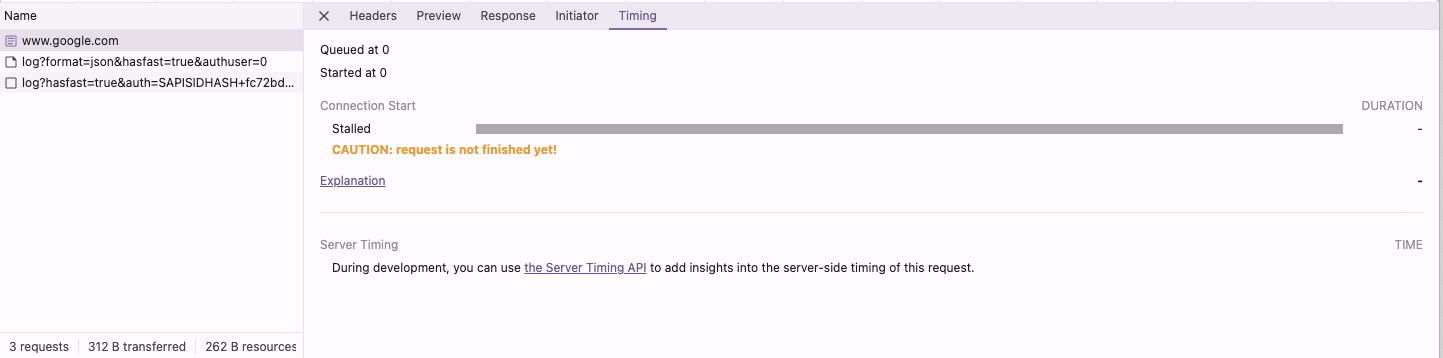
Also, as of now, I am still trying to figure out how to recreate this server issue, even if we change the igbDefaultPrefs.json with this, it's gonna behave the same.
This stackoverflow was the closest thing I could find to a delayed response.
Since this is a one line code change and Sravani tested it at the time of the issue, I think we can go ahead and close this ticket.
Update:
The same error is occurring again, so I am sending similar bug report to RENCI as before, to help.renci.org.
Hello,
This is Ann Loraine, Professor at UNC Charlotte.
Just for a little background, my bioinformatics research team is using a VM hosted under the domain name lorainelab-quickload.scidas.org, hosted on RENCI infrastructure. It provides data for a desktop application called "Integrated Genome Browser," funded by NIH and NSF, and used by thousands of researchers worldwide to visualize genomic data.
Today the address http://lorainelab-quickload.scidas.org is no longer responding, and although I am able to log into the host, commands such as "ls" are hanging.
Can you help?
Ann Loraine, PhD
Professor
Department of Bioinformatics and Genomics
College of Computing and Informatics
University of North Carolina at Charlotte
Found the issue, the main quick load URLs (http://lorainelab-quickload.scidas.org) aren't responding, it might be some issue with the server, the API is taking a lot of time to respond with a site-not-reachable error. There is no read timeout specified in the HTTP connection code, because of that the HTTP request is waiting till it gets a response.
Types of timeout to set in HttpUrlConnection:
Connect Timeout: Time to establish a connection.
Read Timeout: Time to wait for data after the connection is established.
Typical Usage: Both should be set to reasonable values to ensure your application does not hang indefinitely waiting for a connection or data.
In the code, only connect timeout is set, updated it to have both the timeouts and everything's working correctly. Here is the changed code: https://bitbucket.org/jaya-sravani/integrated-genome-browser/branch/IGBF-3819. [~ann.loraine] Nowlan Freese Please review and let me know if there are any issues.