Uploaded image for project: 'IGB'
  1. IGB
  2. IGBF-4026

Design EC2 user permissions for modifying instance state and security groups

    Details

    • Type: Task
    • Status: Closed (View Workflow)
    • Priority: Major
    • Resolution: Done
    • Affects Version/s: None
    • Fix Version/s: None
    • Labels:
      None

      Description

      Enable AWS Admin to achieve the following functionality for users in a specific group:

      Users added to the group should have permissions to perform the following actions only for EC2 instances with a specific tag:

      • Modify EC2 instance state (Start, Stop, and Restart)
      • Modify Security Groups associated with those instances

        Attachments
        1. policy.json
          2 kB
          Pranav Bhatia
        2. policy_v2.json
          1 kB
          Pranav Bhatia
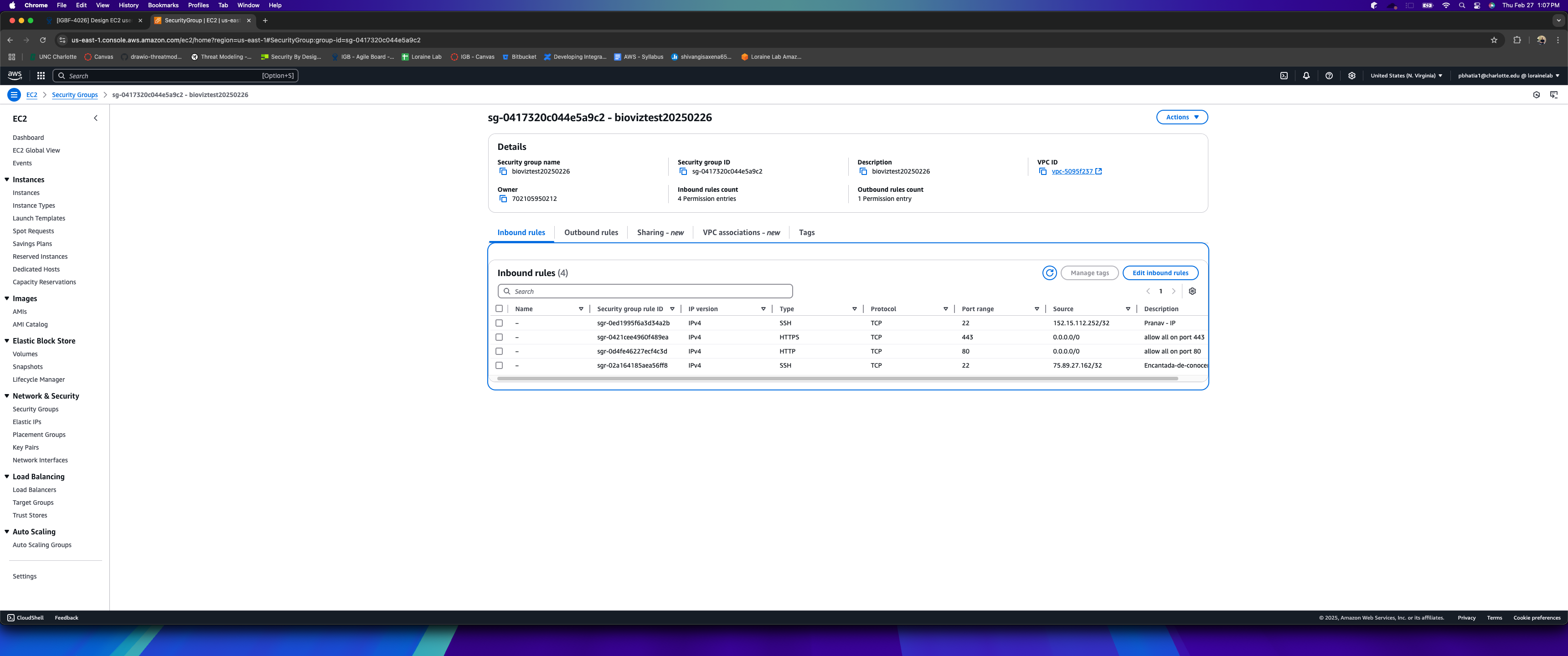
        3. AWS Screenshot.png
          773 kB
          Pranav Bhatia

          Issue Links

            Activity

            Hide
            ann.loraine Ann Loraine added a comment -

            Thanks Pranav Bhatia!

            Show
            ann.loraine Ann Loraine added a comment - Thanks Pranav Bhatia !
            Hide
            pbhatia1 Pranav Bhatia (Inactive) added a comment - - edited

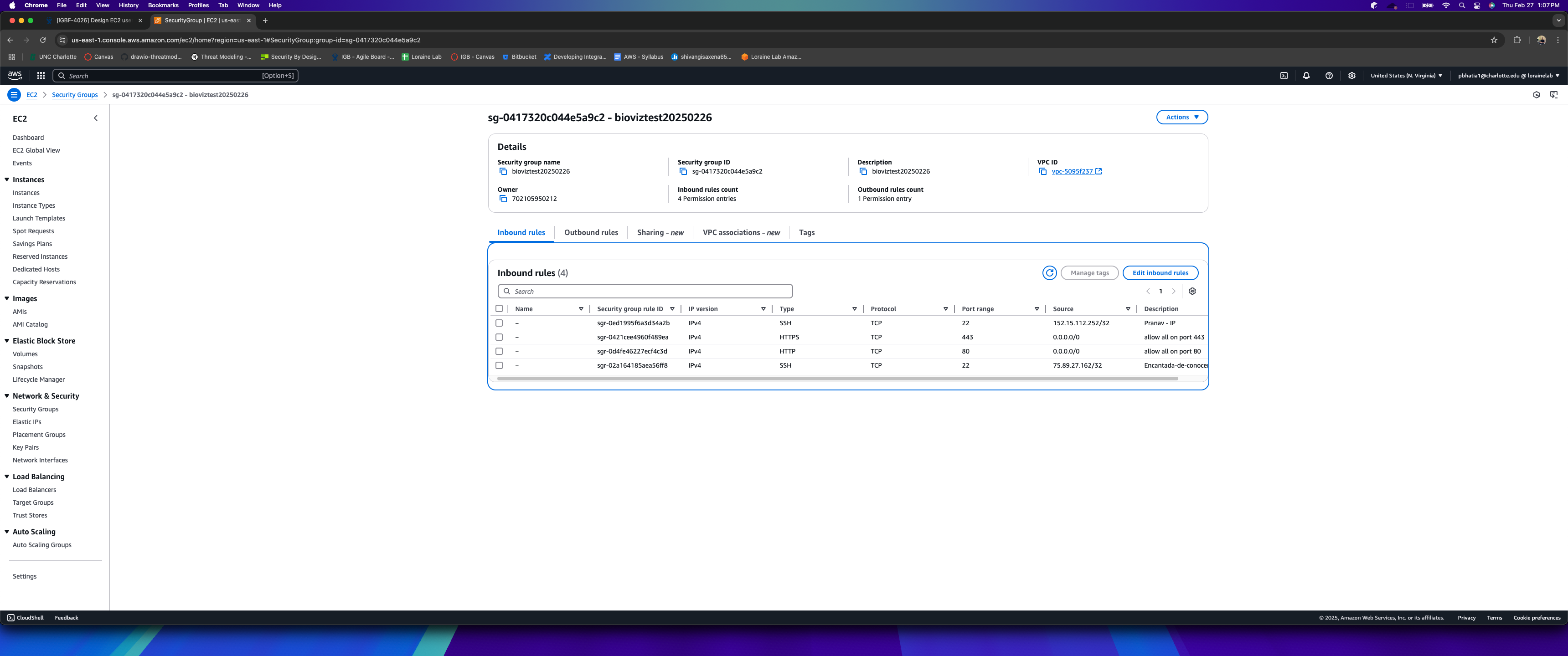
            Tested the security group rule modifications for bioviztest20250226. Successfully added an SSH ingress rule with my current IP, and the changes saved without errors, confirming the setup is working as expected.

            Attached is the screenshot for reference. !AWS
            Show
            pbhatia1 Pranav Bhatia (Inactive) added a comment - - edited Tested the security group rule modifications for bioviztest20250226. Successfully added an SSH ingress rule with my current IP, and the changes saved without errors, confirming the setup is working as expected. Attached is the screenshot for reference. !AWS
            Hide
            ann.loraine Ann Loraine added a comment - - edited

            Manually adding the tags needed to allow developers to turn on and off, and also add or delete new security group rules, from the new host I just set up, for testing purposes.

            Ready for testing.

            To test:

            • Ensure that your Loraine Lab AWS user id belongs to group 2025-EC2Developer (ask Ann Loraine to confirm for you)
            • Log into the AWS console using your LoraineLab user id.
            • Navigate to the EC2 dashboard.
            • Select EC2 called bioviztest20250226
            • Select the security group for bioviztest20250226
            • Choose the option to modify / edit the ingress rules
            • Choose the option to add a new ingress rule for access using "ssh" and your current IP address
            • Choose "save"
            • If the "save" action completes without an error, this means the configuration is working as expected. If that happens, kindly close this ticket.
            Show
            ann.loraine Ann Loraine added a comment - - edited Manually adding the tags needed to allow developers to turn on and off, and also add or delete new security group rules, from the new host I just set up, for testing purposes. Ready for testing. To test: Ensure that your Loraine Lab AWS user id belongs to group 2025-EC2Developer (ask Ann Loraine to confirm for you) Log into the AWS console using your LoraineLab user id. Navigate to the EC2 dashboard. Select EC2 called bioviztest20250226 Select the security group for bioviztest20250226 Choose the option to modify / edit the ingress rules Choose the option to add a new ingress rule for access using "ssh" and your current IP address Choose "save" If the "save" action completes without an error, this means the configuration is working as expected. If that happens, kindly close this ticket.
            Hide
            ann.loraine Ann Loraine added a comment -

            The error above was due to that particular task executing before the apache web server gets installed. I moved that particular task to the end of the "apache" role, which took care of the problem.

            Show
            ann.loraine Ann Loraine added a comment - The error above was due to that particular task executing before the apache web server gets installed. I moved that particular task to the end of the "apache" role, which took care of the problem.
            Hide
            ann.loraine Ann Loraine added a comment -

            Made new EC2 and ran setup.yml, but got this error:

            ASK [clone : Make symbolic link from cloned repository to /usr/lib/cgi-bin/geneIdLookup.py] ***
            fatal: [bioviztest20250226]: FAILED! =>

            Unknown macro: {"changed"}
            Show
            ann.loraine Ann Loraine added a comment - Made new EC2 and ran setup.yml, but got this error: ASK [clone : Make symbolic link from cloned repository to /usr/lib/cgi-bin/geneIdLookup.py] *** fatal: [bioviztest20250226] : FAILED! => Unknown macro: {"changed"}

              People

              • Assignee:
                pbhatia1 Pranav Bhatia (Inactive)
                Reporter:
                pbhatia1 Pranav Bhatia (Inactive)
              • Votes:
                0 Vote for this issue
                Watchers:
                2 Start watching this issue

                Dates

                • Created:
                  Updated:
                  Resolved: