Details
-
Type:
Task
-
Status: Closed (View Workflow)
-
Priority:
 Major
Major
-
Resolution: Done
-
Affects Version/s: None
-
Fix Version/s: None
-
Labels:None
-
Story Points:1
-
Epic Link:
-
Sprint:Fall 7, Winter 1, Spring 1, Spring 2, Spring 3
Description
Enable AWS Admin to achieve the following functionality for users in a specific group:
Users added to the group should have permissions to perform the following actions only for EC2 instances with a specific tag:
- Modify EC2 instance state (Start, Stop, and Restart)
- Modify Security Groups associated with those instances
Attachments
Issue Links
- is cloned by
-
-
- Closed
-
Activity
| Field | Original Value | New Value |
|---|---|---|
| Epic Link | IGBF-2323 [ 18477 ] |
| Summary | AWS - User Permissions for Modifying EC2 Instance State and Security Groups | Design EC2 user permissions for modifying instance state and security groups |
| Sprint | Fall 7 [ 208 ] | Fall 7, Fall 8 [ 208, 209 ] |
| Rank | Ranked higher |
| Status | To-Do [ 10305 ] | In Progress [ 3 ] |
| Attachment | Policy.rtf [ 18602 ] |
| Attachment | Policy.rtf [ 18602 ] |
| Attachment | policy.json [ 18603 ] |
| Attachment | policy.json [ 18603 ] |
| Attachment | policy.json [ 18604 ] |
Ann Loraine Please let me know when we can review the current configurations on the main AWS account and test the updated policy.
| Status | In Progress [ 3 ] | Needs 1st Level Review [ 10005 ] |
| Assignee | Pranav Bhatia [ pbhatia1 ] |
| Attachment | policy_v2.json [ 18607 ] |
Ann Loraine I have attached a new JSON file (policy_v2). Please test and implement the policy outlined in this version. The new JSON is more refined and offers improvements over the previous file.

| Status | Needs 1st Level Review [ 10005 ] | First Level Review in Progress [ 10301 ] |
| Assignee | Ann Loraine [ aloraine ] |
Proceeding to deploy new file policy_v2.json to Loraine Lab AWS account.
Our AWS account has a user group named "Ec2Developer". All our current developers are in this group, including Pranav Bhatia.
This user group (Ec2Developer) has two policies attached to it:
- AmazonEC2ReadOnlyAccess - an AWS-managed policy (we can't edit this)
- EC2Developer - a user-managed policy (we wrote this and are managing it)
The policy EC2Developer was supposed to enable users to shut down and restart any EC2 that had their user name as a property name of "UserName", "Collaborator" or "Collaborator1".
It was also supposed to enable users to modify the security groups so that they could add their IP addresses. The security groups modification stopped working for some reason....and I never figured out a way to fix it.
However, one problem with that original design was that a user had their "own" security group that could be attached to one or more EC2 instances. Over time, we started associated security groups with EC2 and a single security group only ever was associated with one and only one EC2. This was a much better approach than having one security group per user, because it avoided the problem of having the same user's single security group attached to multiple EC2s. Having a single security group attached to multiple EC2s meant that some EC2s were getting ports opened up to more IP addresses than required, since some people had their security group attached to more than one EC2, only some of which were they actively using.
This old (legacy) policy is shown below:
{
	"Version": "2012-10-17",
	"Statement": [
		{
			"Effect": "Allow",
			"Action": [
				"ec2:DescribeInstances",
				"ec2:DescribeSecurityGroupRules",
				"ec2:DescribeInstanceAttribute",
				"ec2:DescribeNetworkAcls",
				"ec2:DescribeSecurityGroups",
				"ec2:DescribeInstanceStatus"
			],
			"Resource": "*"
		},
		{
			"Effect": "Allow",
			"Action": [
				"ec2:StartInstances",
				"ec2:StopInstances",
				"ec2:RebootInstances"
			],
			"Resource": "arn:aws:ec2:*:702105950212:instance/*",
			"Condition": {
				"StringEquals": {
					"ec2:ResourceTag/UserName": "${aws:username}"
				}
			}
		},
		{
			"Effect": "Allow",
			"Action": [
				"ec2:StartInstances",
				"ec2:StopInstances",
				"ec2:RebootInstances"
			],
			"Resource": "arn:aws:ec2:*:702105950212:instance/*",
			"Condition": {
				"StringEquals": {
					"ec2:ResourceTag/Collaborator": "${aws:username}",
					"ec2:ResourceTag/Collaborator1": "${aws:username}"
				}
			}
		},
		{
			"Effect": "Allow",
			"Action": [
				"ec2:DescribeSecurityGroups"
			],
			"Resource": "*"
		},
		{
			"Effect": "Allow",
			"Action": [
				"ec2:AuthorizeSecurityGroupIngress",
				"ec2:RevokeSecurityGroupIngress",
				"ec2:AuthorizeSecurityGroupEgress",
				"ec2:RevokeSecurityGroupEgress",
				"ec2:ModifySecurityGroupRules",
				"ec2:UpdateSecurityGroupRuleDescriptionsEgress",
				"ec2:UpdateSecurityGroupRuleDescriptionsIngress"
			],
			"Resource": "arn:aws:ec2:*:702105950212:security-group/*",
			"Condition": {
				"StringEquals": {
					"ec2:ResourceTag/UserName": "${aws:username}"
				}
			}
		}
	]
}
For testing, created a new user group and attached a new policy to it.
Policy and user group names are both "2025-EC2Developer". The policy is identical to the one in attached file
Changed password of old user called "lorainelabtest" to something new so that I can log in to the AWS console as this user.
I defined the "2025-EC2Developer" policy using the same text as in policy_v2.json (attached) but used "2025-EC2Developer" as the tag.
Code snippet:
"ec2:ResourceTag/Environment": "2025-EC2Developer"
The way we think this would work is that if an EC2 or security group has tag "2025-EC2Developer", then any user in user group 2025-EC2Developer (which has this policy attached) will be able to modify those resources in the specified ways.
| Sprint | Fall 7, Winter 1 [ 208, 209 ] | Fall 7, Winter 1, Spring 1 [ 208, 209, 210 ] |
| Rank | Ranked higher |
| Sprint | Fall 7, Winter 1, Spring 1 [ 208, 209, 210 ] | Fall 7, Winter 1, Spring 1, Spring 2 [ 208, 209, 210, 211 ] |
| Rank | Ranked higher |
| Sprint | Fall 7, Winter 1, Spring 1, Spring 2 [ 208, 209, 210, 211 ] | Fall 7, Winter 1, Spring 1, Spring 2, Spring 3 [ 208, 209, 210, 211, 212 ] |
| Rank | Ranked higher |
Using work by Pranav Bhatia, made this 2024-EC2Developer policy:
{
	"Version": "2012-10-17",
	"Statement": [
		{
			"Effect": "Allow",
			"Action": [
				"ec2:Describe*",
				"cloudwatch:Describe*"
			],
			"Resource": "*"
		},
		{
			"Effect": "Allow",
			"Action": [
				"ec2:StartInstances",
				"ec2:StopInstances",
				"ec2:RebootInstances"
			],
			"Resource": "*",
			"Condition": {
				"StringEquals": {
					"ec2:ResourceTag/Developer": "2025-EC2Developer"
				}
			}
		},
		{
			"Effect": "Allow",
			"Action": [
				"ec2:DescribeSecurityGroupRules",
				"ec2:AuthorizeSecurityGroupIngress",
				"ec2:RevokeSecurityGroupIngress",
				"ec2:AuthorizeSecurityGroupEgress",
				"ec2:RevokeSecurityGroupEgress",
				"ec2:ModifySecurityGroupRules",
				"ec2:UpdateSecurityGroupRuleDescriptionsEgress",
				"ec2:UpdateSecurityGroupRuleDescriptionsIngress"
			],
			"Resource": [
				"arn:aws:ec2:*:*:security-group/*",
				"arn:aws:ec2:*:*:security-group-rule/*"
			],
			"Condition": {
				"StringEquals": {
					"ec2:ResourceTag/Developer": "2025-EC2Developer"
				}
			}
		}
	]
}
Tested above policy while logged in as test user with above policy attached:
- User couldn't change the IP address of an existing security group rule (e.g., modify the rule), unless that individual rule had ResourceTag "Developer" equal to "2025-EC2Developer"
- User could delete and create new security group rules
- User couldn't add tags or edit the Name field of security group rules
- User could stop and start EC2 instance with ResourceTag "Developer" equal to "2025-EC2Developer"
Tested using EC2 named "translate", the host for publicly accessible track hub converter back end web application.
I am cool with this setup. It is OK with me if users cannot modify security group rules.
Possible unintended consequences:
- Users might sometimes forget to remove security group rules when their need for that rule disappears. This could encourage proliferation of stale ssh ingress rules creating opportunities for unauthorized users to access resources. Mitigation: We could have a developer "culture" in which everyone is authorized to remove (delete) security group rules after business hours. As part of that, we could set up an automation that delects security group rules affecting ssh ingress rules.
| Comment | [ Removing egress rules for greater safety. ] |
Ways I could improve this:
- Somehow insure that when a user creates a security group rule, that users user name will be included as a tag on that security group rule. When reading documentation yesterday on AWS web site, I feel I saw documentation about how to do this.
Next step:
- Create a bioviz test EC2 for tester to check. We can use this same site for other work on the BioViz or "translate" site, for instance.
Observed this warning when creating new EC2 for testing:
TASK [ec2 : Make keypair for bioviztest20250226] *******************************
[WARNING]: Both option access_key and its alias aws_access_key are set.
[WARNING]: Both option secret_key and its alias aws_secret_key are set.
[WARNING]: Both option region and its alias ec2_region are set.
[DEPRECATION WARNING]: Alias 'ec2_region' is deprecated. See the module docs
for more information. This feature will be removed from amazon.aws in a release
after 2024-12-01. Deprecation warnings can...
TASK [ec2 : Create or update IAM role for ec2] *****************************************
[DEPRECATION WARNING]: In a release after 2026-05-01
iam_role.assume_role_policy_document_raw will no longer be returned. Since release
8.0.0 assume_role_policy_document has been returned with the same format as
iam_role.assume_role_policy_document_raw. This feature will be removed from amazon.aws
in a release after 2026-05-01. Deprecation warnings can be disabled by setting
deprecation_warnings=False in ansible.cfg.
[DEPRECATION WARNING]: In a release after 2026-05-01 the 'delete_instance_profile'
option will be removed. The amazon.aws.iam_instance_profile module can be used to
manage and delete instance profiles instead. This feature will be removed from
amazon.aws in a release after 2026-05-01. Deprecation warnings can be disabled by
setting deprecation_warnings=False in ansible.cfg...
TASK [ec2 : Create ec2] ****************************************************************
[DEPRECATION WARNING]: The network parameter has been deprecated, please use
network_interfaces and/or network_interfaces_ids instead. This feature will be removed
from amazon.aws in a release after 2026-12-01. Deprecation warnings can be disabled by
setting deprecation_warnings=False in ansible.cfg.
Expected error occurred:
TASK [ec2 : Create elastic ip] *************************************************
An exception occurred during task execution. To see the full traceback, use -vvv. The error was: ansible_collections.amazon.aws.plugins.module_utils.ec2.AnsibleEC2Error: Failed to associate address: An error occurred (InvalidInstanceID) when calling the AssociateAddress operation: The pending instance 'i-09f3e98ad3efeb9af' is not in a valid state for this operation.
This happens when the playbook tries to make a new thing and then immediately tries to make a change to that thing, but fails because the thing does not exist yet.
I bet this error will disappear once I update the rest of the playbook code.
Made new EC2 and ran setup.yml, but got this error:
ASK [clone : Make symbolic link from cloned repository to /usr/lib/cgi-bin/geneIdLookup.py] ***
fatal: [bioviztest20250226]: FAILED! =>Unknown macro: {"changed"}
The error above was due to that particular task executing before the apache web server gets installed. I moved that particular task to the end of the "apache" role, which took care of the problem.
Manually adding the tags needed to allow developers to turn on and off, and also add or delete new security group rules, from the new host I just set up, for testing purposes.
Ready for testing.
To test:
- Ensure that your Loraine Lab AWS user id belongs to group 2025-EC2Developer (ask Ann Loraine to confirm for you)
- Log into the AWS console using your LoraineLab user id.
- Navigate to the EC2 dashboard.
- Select EC2 called bioviztest20250226
- Select the security group for bioviztest20250226
- Choose the option to modify / edit the ingress rules
- Choose the option to add a new ingress rule for access using "ssh" and your current IP address
- Choose "save"
- If the "save" action completes without an error, this means the configuration is working as expected. If that happens, kindly close this ticket.
| Status | First Level Review in Progress [ 10301 ] | Ready for Pull Request [ 10304 ] |
| Status | Ready for Pull Request [ 10304 ] | Pull Request Submitted [ 10101 ] |
| Status | Pull Request Submitted [ 10101 ] | Reviewing Pull Request [ 10303 ] |
| Status | Reviewing Pull Request [ 10303 ] | Merged Needs Testing [ 10002 ] |
| Assignee | Ann Loraine [ aloraine ] | Pranav Bhatia [ pbhatia1 ] |
| Status | Merged Needs Testing [ 10002 ] | Post-merge Testing In Progress [ 10003 ] |
| Attachment | AWS Screenshot.png [ 18645 ] |
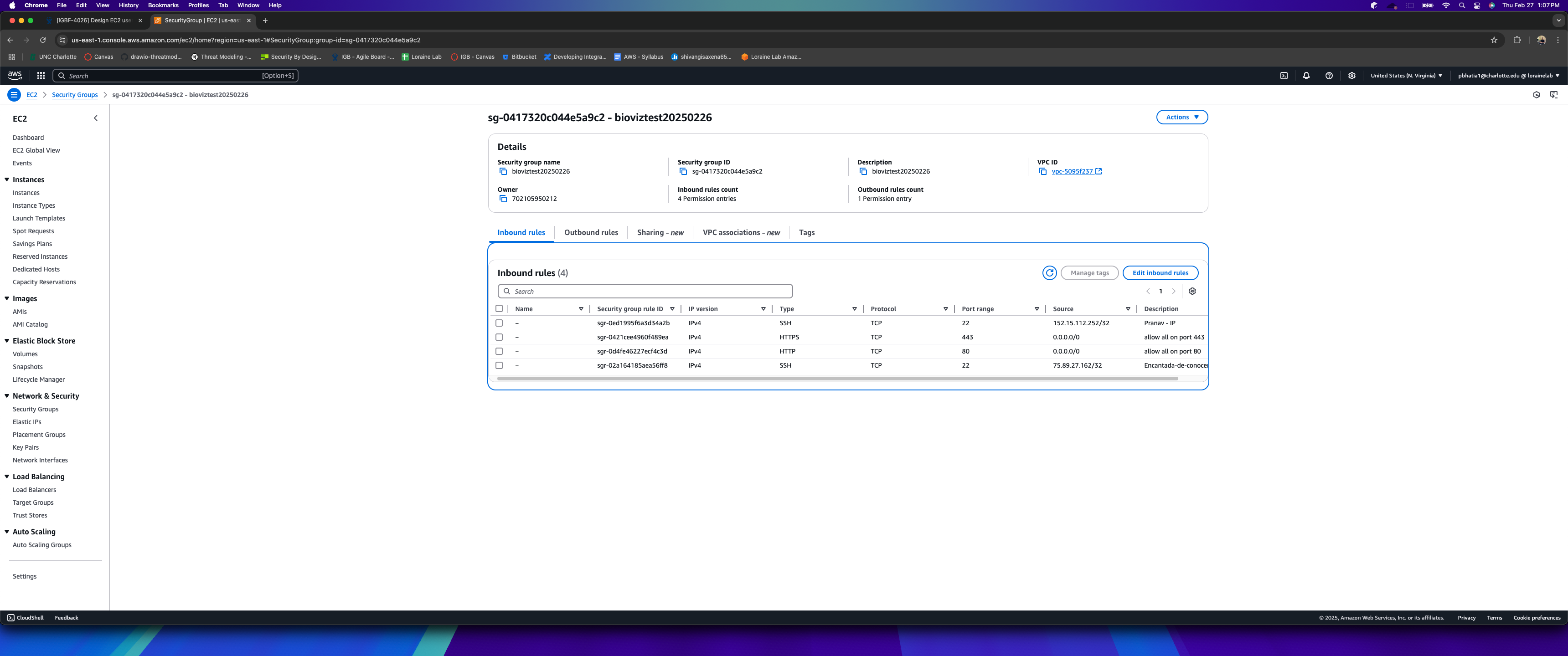
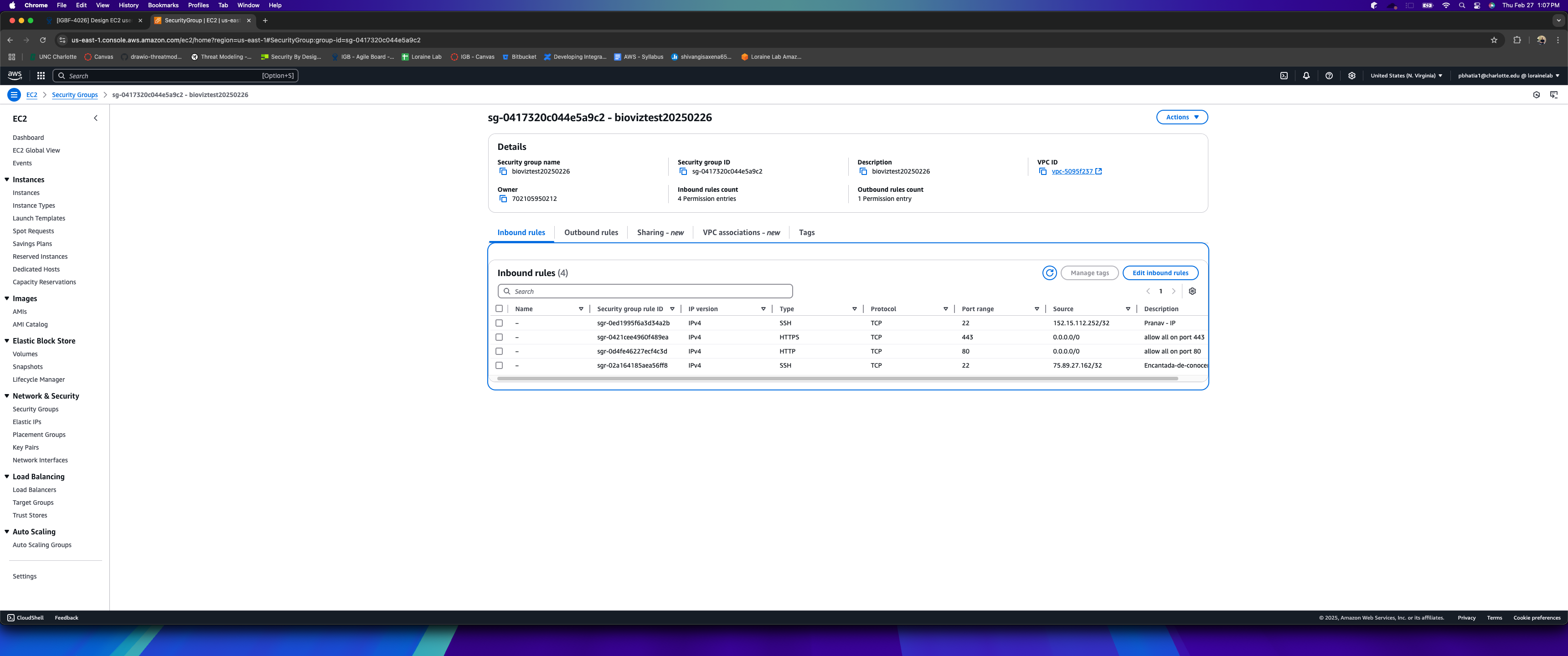
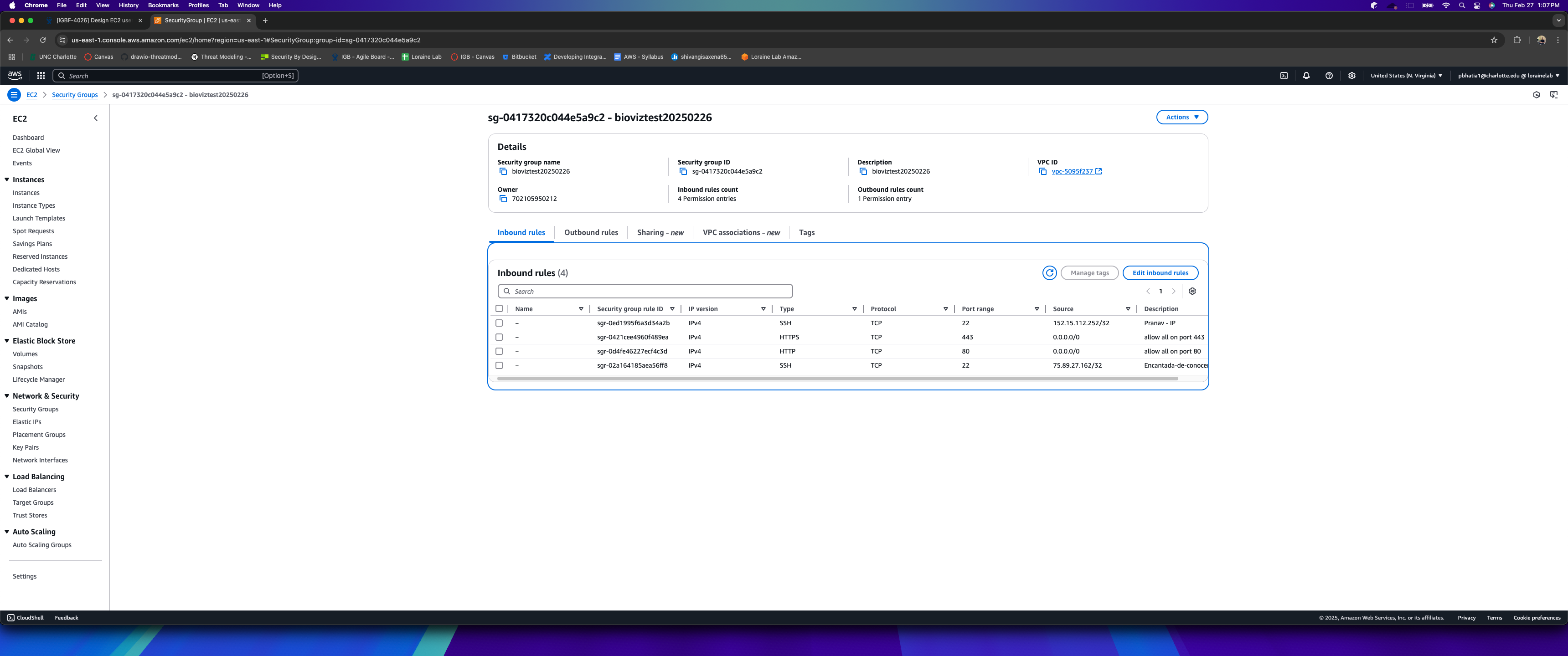
Tested the security group rule modifications for bioviztest20250226. Successfully added an SSH ingress rule with my current IP, and the changes saved without errors, confirming the setup is working as expected.
Attached is the screenshot for reference. !AWS
| Resolution | Done [ 10000 ] | |
| Status | Post-merge Testing In Progress [ 10003 ] | Closed [ 6 ] |
Thanks Pranav Bhatia!
Assuming user group has already been setup in IAM (Identity and Access Management)
Create a policy and attach the policy to a user group.
The attached JSON can be used to set policy where users can only read EC2 instances and start/stop instances that have a specific tag, such as Environment=Dev.
After applying this policy, users will only be able to start/stop/reboot instances that have the tag Environment=Dev.
Note: Please ensure that the EC2 instances have the correct tags added to them.