Details
-
Type:
Bug
-
Status: Closed (View Workflow)
-
Priority:
 Minor
Minor
-
Resolution: Done
-
Affects Version/s: None
-
Fix Version/s: None
-
Labels:
-
Story Points:1
-
Sprint:Winter 2018 Sprint 3, Spring 2019 Sprint 1
Description
User story:
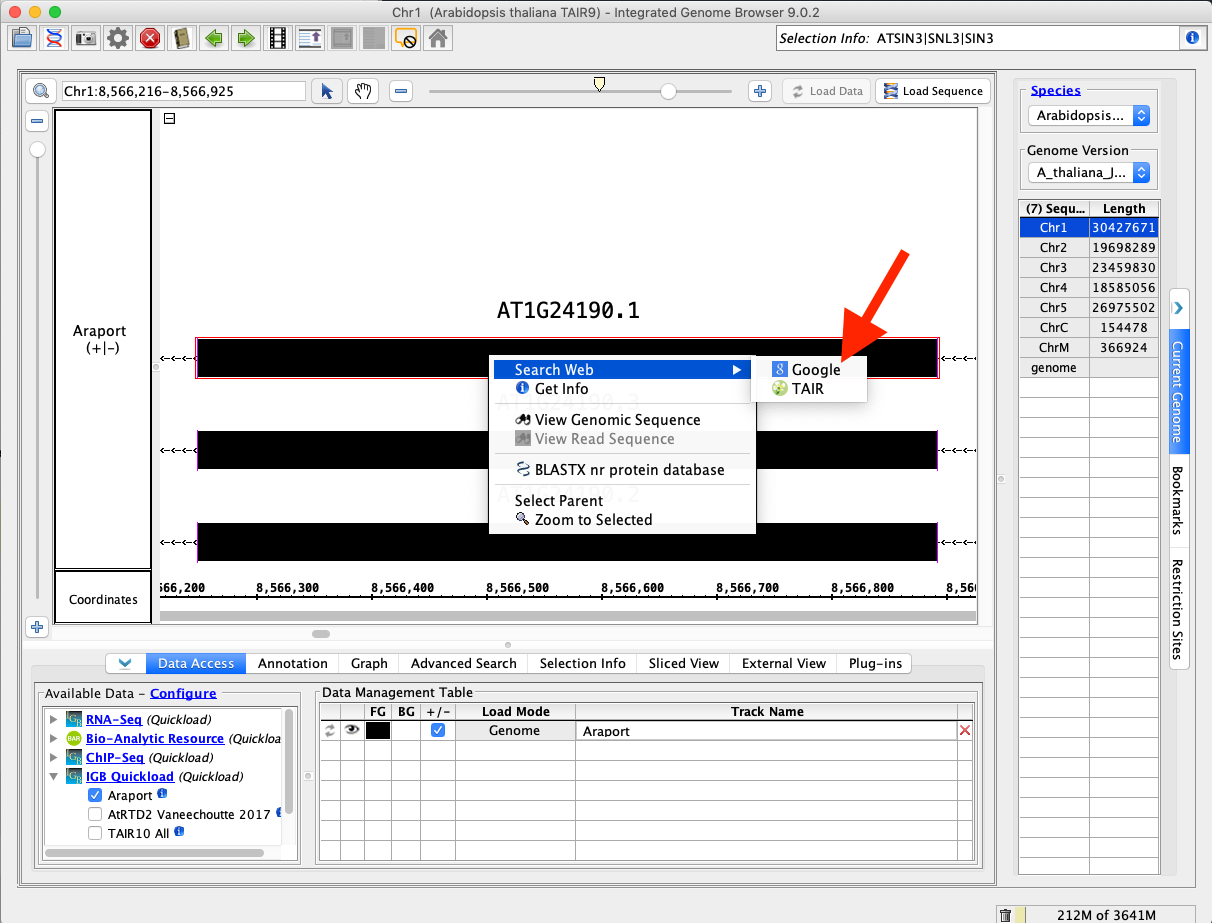
"When I right click an item (Glyph) in a track, a context menu appears.
One of the options is "Search Web"
If I select "Search Web," a new menu appears (a submenu) with links to sites.
The order of the sites shown changes apparently at random as I repeat this action with the same or different items.
This is confusing because it doesn't let me learn where to find a particular option.
This should be fixed to ensure that menu items always appear in the same location in the menu."
To reproduce:
- Load an Annotation track (Araport11 from A_thaliana_Jun_2009 genome version)
- Right-click on item in the track.
- Choose the "web search" option to activate a sub-menu.
- Note there are two options: "TAIR" and "Google"
- Repeat. Note that "TAIR" and "Google" are listed in a different order from before
Task:
- Find out why this random sorting is occurring.
- Propose a fix here (add a Comment).
- Create a new Jira issue (Improvement) for implementing the proposed fix. (Link this issue for instructions on how to do it.)
Attachments

Issue Links
- relates to
-
IGBF-1540 Investigate: Order Get Info and Google right-click menu items
-

- To-Do
-